The Best Python Beginner IDE: A Strategic Choice for New Developers
For the aspiring programmer, the first hurdle isn’t syntax—it’s the environment. A poorly chosen Python beginner IDE becomes a bottleneck, drowning novices in unnecessary complexity while a well-selected one accelerates learning by orders of magnitude. The difference between frustration and fluency often hinges on this single decision: whether the tool adapts to your skill level or forces you to adapt to its quirks. The modern landscape offers no shortage of options, yet most beginners stumble through trial and error, unaware that some IDEs are explicitly designed to scaffold the learning process with visual feedback, built-in tutorials, and error prevention—features that separate the lasting learners from the dropouts.
The irony of Python’s beginner-friendly reputation is that its simplicity in syntax doesn’t always translate to an intuitive development workflow. Without the right Python beginner IDE, even basic tasks like debugging or package management become exercises in patience. The tools you choose will dictate how quickly you transition from writing `print("Hello World")` to architecting modular applications. This isn’t just about typing code—it’s about how the environment shapes your thought process, from variable scoping to algorithmic problem-solving. The best Python beginner IDE doesn’t just execute commands; it teaches by example, anticipates common mistakes, and grows with you as your projects become more complex.
That said, the "best" IDE is a moving target. What worked for a beginner in 2015 may now be outdated, while newer entrants prioritize cloud integration, AI-assisted coding, or gamified learning paths. The challenge lies in distinguishing between features that genuinely enhance the learning experience and those that add superficial polish. This guide cuts through the noise, examining the evolution of Python beginner IDEs, their underlying mechanics, and how to match your learning style with the right tool—without getting lost in the hype.
The Complete Overview of Python Beginner IDEs
The term "Python beginner IDE" refers not just to any editor that supports Python syntax, but to environments specifically engineered to lower the barrier to entry. These tools go beyond basic text editing by embedding educational resources, interactive consoles, and real-time feedback loops that help novices grasp fundamental concepts without drowning in configuration files or terminal commands. The distinction matters: a Python beginner IDE should feel like a mentor, not just a notepad with syntax highlighting.At their core, these IDEs serve as controlled sandboxes where beginners can experiment without fear of breaking their system. Many integrate directly with Python’s official documentation, offer step-by-step project templates, and even include visualizers for data structures like lists or dictionaries—concepts that are abstract in raw code but intuitive when rendered graphically. The best Python beginner IDEs also bridge the gap between theory and practice by providing instant feedback on code quality, from PEP 8 compliance to potential performance bottlenecks. This isn’t just about writing code; it’s about building confidence through immediate, actionable insights.
Historical Background and Evolution
The concept of a Python beginner IDE emerged alongside the language itself, though early adopters often relied on generic text editors like Notepad or vi. The turning point came in the late 1990s and early 2000s, when tools like IDLE (Integrated Development and Learning Environment) were bundled with Python distributions. IDLE, though rudimentary by today’s standards, introduced novices to the idea of an interactive shell paired with a code editor—a paradigm that persists in modern Python beginner IDEs. Its simplicity was both its strength and limitation: it lacked advanced features but required zero setup, making it the default choice for absolute beginners.The real evolution began in the 2010s, as Python’s popularity surged in academia and industry. IDEs like PyCharm (with its "Educational" edition) and Visual Studio Code (via extensions) added layers of sophistication while retaining beginner-friendly onboarding. Meanwhile, web-based Python beginner IDEs—such as Replit and Trinket—eliminated installation friction entirely, allowing users to write and run code directly in a browser. These platforms also introduced collaborative features, enabling mentors to pair-program with students in real time. The shift toward cloud-based Python beginner IDEs reflects a broader trend: modern learners expect tools that align with their digital habits, whether that means mobile accessibility or seamless integration with cloud services like GitHub or AWS.
Core Mechanisms: How It Works
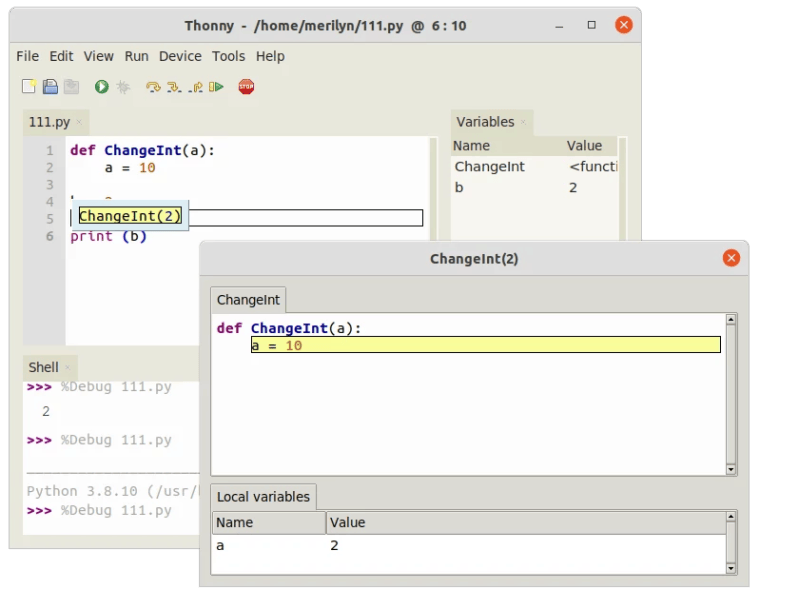
Under the hood, a Python beginner IDE functions as a multi-layered system designed to minimize cognitive load. At the lowest level, it provides a text editor with Python-specific syntax highlighting, autocompletion, and linting—features that reduce manual errors by suggesting correct syntax as you type. Above this, intermediate layers handle project management, such as organizing files into virtual environments or managing dependencies via `pip`. The most advanced Python beginner IDEs incorporate interactive debugging tools, allowing novices to step through code execution line by line while inspecting variables in real time.Table of Contents
- The Complete Overview of Python Beginner IDEs
- Historical Background and Evolution
- Core Mechanisms: How It Works
- Key Benefits and Crucial Impact
- Major Advantages
- Comparative Analysis
- Future Trends and Innovations
- Conclusion
- Comprehensive FAQs
- Q: Is IDLE still a viable Python beginner IDE in 2024?
- Q: Can I use a Python beginner IDE for professional projects later?
- Q: How do I choose between VS Code and PyCharm for beginners?
- Q: Are cloud-based Python beginner IDEs (e.g., Replit) safe for sensitive code?
- Q: What’s the best Python beginner IDE for mobile learning?
- Q: How can I make my Python beginner IDE more educational?
What sets these tools apart is their pedagogical layer. Many include built-in tutorials that guide users through common tasks, from writing functions to using libraries like `pandas` or `requests`. Some even simulate classroom environments, with quizzes or coding challenges that reinforce learning. Behind the scenes, these IDEs often leverage Python’s `ast` (Abstract Syntax Tree) module to analyze code structure, flagging potential issues before they become bugs. For example, a Python beginner IDE might warn you about unused variables or suggest refactoring opportunities—feedback that’s invaluable for someone still internalizing best practices.
Key Benefits and Crucial Impact
The right Python beginner IDE doesn’t just help you write code faster; it reshapes how you think about programming. By abstracting away low-level details—such as memory management or compiler intricacies—these tools let beginners focus on logic and problem-solving. This reduction of friction is critical: studies show that the first few months of coding are where most novices either gain momentum or lose interest entirely. A Python beginner IDE that feels responsive and intuitive can be the difference between quitting after a single frustrating session and sticking with the language long enough to build something meaningful.The impact extends beyond individual learning. In educational settings, Python beginner IDEs enable instructors to standardize environments across classrooms, ensuring every student starts from the same baseline. For self-taught learners, these tools provide a safety net, allowing experimentation without the fear of irreversible system damage. Even in professional contexts, the principles of a beginner-friendly IDE—such as clear error messages and modular project structures—carry over into advanced workflows. The skills you learn in a Python beginner IDE, like reading stack traces or organizing imports, are foundational to becoming a proficient developer.
"An IDE is like a bicycle for the mind: the better the tool, the farther and faster you can go with less effort." — Guido van Rossum (Python’s creator, paraphrased)
Major Advantages
- Zero Setup Overhead: Tools like Replit or Google Colab allow instant coding without local installations, ideal for learners in restricted environments (e.g., school labs or shared computers).
- Built-in Learning Resources: Many Python beginner IDEs include integrated documentation, video tutorials, or even gamified challenges (e.g., CodeCombat’s Python mode).
- Real-Time Feedback: Features like instant error highlighting or variable inspection help beginners debug issues before they compound into larger problems.
- Version Control Integration: Seamless Git/GitHub connections let novices practice collaborative workflows early, a critical skill for modern development.
- Scalability: The best Python beginner IDEs grow with you—what starts as a simple editor can later support complex projects with debugging, profiling, and testing tools.
Comparative Analysis
| Feature | Python Beginner IDE Comparison |
|---|---|
| Ease of Installation |
|
| Learning Curve |
|
| Debugging Tools |
|
| Collaboration Features |
|
Future Trends and Innovations
The next generation of Python beginner IDEs will likely blur the line between coding and natural language interaction. Tools like GitHub Copilot are already demonstrating how AI can suggest entire code blocks based on comments, but future Python beginner IDEs may go further, offering real-time explanations of why certain patterns are used—or even generating test cases automatically. Another trend is the rise of "low-code" Python environments, where drag-and-drop interfaces handle boilerplate tasks, allowing beginners to focus on high-level logic without worrying about syntax.Hardware advancements will also play a role. As AI accelerators and edge computing become more accessible, Python beginner IDEs may integrate with these technologies to provide instant performance feedback—for example, simulating how a function would run on a microcontroller. Additionally, the metaverse could redefine learning environments, with virtual labs where students "walk through" code execution in 3D spaces. While these innovations are speculative, they underscore a key principle: the best Python beginner IDEs will continue to evolve around the learner’s needs, not just the language’s capabilities.

Conclusion
Choosing a Python beginner IDE is more than a technical decision—it’s a commitment to your learning journey. The right tool will demystify concepts, reduce frustration, and keep you engaged during the inevitable plateaus. That said, there’s no one-size-fits-all answer. A data scientist might thrive in Jupyter Notebooks, while a game developer could prefer PyCharm’s project templates. The key is to start with a Python beginner IDE that aligns with your goals, then iterate as you grow. Remember: the best IDE is the one you’ll use consistently, not the one with the most features.As you progress, don’t hesitate to explore alternatives. What feels clunky today might become a limitation tomorrow, and the Python ecosystem’s strength lies in its flexibility. The tools you use now will shape your habits as a developer, so choose wisely—but also be prepared to adapt. After all, the most powerful Python beginner IDE is the one that helps you write your first line of code and your first production-ready application.
Comprehensive FAQs
Q: Is IDLE still a viable Python beginner IDE in 2024?
A: IDLE remains a solid choice for absolute beginners due to its simplicity and zero-configuration setup, but it lacks modern features like Git integration or advanced debugging. For most learners, pairing IDLE with a more feature-rich Python beginner IDE (e.g., VS Code) as they progress is a pragmatic approach.
Q: Can I use a Python beginner IDE for professional projects later?
A: Yes, many Python beginner IDEs—like PyCharm Community or VS Code—scale to professional use. Tools like Replit or Jupyter Notebooks are also widely adopted in industry for specific workflows (e.g., data analysis). The transition is smoother if you start with an IDE that supports plugins or extensions.
Q: How do I choose between VS Code and PyCharm for beginners?
A: VS Code is lighter and more customizable, ideal for learners who want to tinker with extensions. PyCharm (Community Edition) offers more built-in Python-specific tools, such as project wizards and database integration. If you’re unsure, start with VS Code and add the Python extension—it’s a middle-ground solution.
Q: Are cloud-based Python beginner IDEs (e.g., Replit) safe for sensitive code?
A: While cloud-based Python beginner IDEs are convenient, they’re not designed for handling sensitive data. Replit, for example, executes code in isolated sandboxes, but no platform can guarantee 100% privacy. For confidential projects, use local Python beginner IDEs like PyCharm with proper security configurations.
Q: What’s the best Python beginner IDE for mobile learning?
A: For on-the-go learning, consider PythonTutor (visualizer) or Replit’s mobile web app. Both offer limited but functional Python beginner IDE capabilities via browsers or dedicated apps, though full-featured IDEs (like PyCharm) require desktop access.
Q: How can I make my Python beginner IDE more educational?
A: Enhance your IDE with these additions:
- Extensions: Install Python for VS Code or Python Support in PyCharm.
- Tutorials: Use Python’s official docs or interactive guides.
- Visualizers: Add PythonTutor for step-by-step code execution.
Leave a Comment
Comments are moderated before appearing. The data you submit is processed according to the Privacy Policy of Viralcontentbee.