Visual Studio Mac: The Powerhouse for Cross-Platform Development
Microsoft’s Visual Studio Mac isn’t just an IDE—it’s a strategic bridge between two dominant operating systems, offering developers a seamless experience whether they’re coding in C#, Python, or JavaScript. Unlike its Windows counterpart, which has long been the gold standard for enterprise development, Visual Studio Mac emerged as a necessity for teams working across platforms. Its ability to integrate with Azure DevOps, debug complex applications, and support extensions makes it indispensable for modern workflows. Yet, despite its capabilities, many developers still question its stability, performance, and true compatibility with macOS—debates that persist even years after its release.
The shift toward Visual Studio Mac wasn’t just about porting a Windows tool to macOS; it was about reimagining how developers interact with Microsoft’s ecosystem on Apple hardware. While the original Visual Studio Code (a lightweight editor) dominates for lightweight tasks, Visual Studio Mac carves out a niche for heavier workloads—think Unity game development, .NET Core applications, or enterprise-scale solutions. The challenge? Balancing Microsoft’s tooling with macOS’s native optimizations without sacrificing functionality. This tension defines its evolution—and its future.
###
The Complete Overview of Visual Studio Mac
Visual Studio Mac is Microsoft’s full-featured integrated development environment (IDE) tailored for macOS, designed to mirror the capabilities of its Windows counterpart while adapting to Apple’s ecosystem. It supports a broad range of languages, including C#, F#, Python, and JavaScript, and integrates deeply with Azure services, making it a cornerstone for developers working on cross-platform applications. Unlike Visual Studio Code (VSC), which prioritizes speed and extensibility, Visual Studio Mac offers a more traditional IDE experience with advanced debugging, profiling, and project management tools—critical for enterprise and game development.The IDE’s architecture leverages Mono, an open-source implementation of the .NET Framework, to ensure compatibility with .NET-based projects while running natively on macOS. This approach allows developers to write, test, and deploy applications without relying on virtual machines or cloud-based Windows instances. However, the trade-off lies in performance overhead, particularly for resource-intensive tasks like Unity development or large-scale .NET solutions. Despite these challenges, Visual Studio Mac has carved out a dedicated user base among developers who need a robust IDE that doesn’t force them to switch between operating systems.
###
Historical Background and Evolution
The origins of Visual Studio Mac trace back to Microsoft’s acquisition of Xamarin in 2016, a company known for its cross-platform mobile development tools. Xamarin Studio, the predecessor to Visual Studio Mac, was already a popular choice for iOS and Android development using C#. When Microsoft rebranded Xamarin Studio as Visual Studio for Mac in 2017, it signaled a broader strategy to unify its development tools under a single brand. The transition wasn’t seamless—early versions suffered from instability, particularly with complex .NET projects, and lacked some of the advanced features found in the Windows version.Over time, Microsoft addressed these gaps by improving Mono’s performance, enhancing macOS integration, and expanding language support. The release of Visual Studio 2019 for Mac marked a turning point, introducing better debugging tools, Git integration, and support for .NET Core 3.0. More recently, the shift toward Visual Studio Code as the primary lightweight editor has somewhat overshadowed Visual Studio Mac, but it remains the go-to choice for developers who require a full-featured IDE on macOS. The tool’s evolution reflects Microsoft’s broader push to make its development stack accessible across platforms, even if it means compromising on some Windows-specific features.
Table of Contents
- The Complete Overview of Visual Studio Mac
- Historical Background and Evolution
- Core Mechanisms: How It Works
- Key Benefits and Crucial Impact
- Major Advantages
- Comparative Analysis
- Future Trends and Innovations
- Conclusion
- Comprehensive FAQs
- Q: Can I use Visual Studio Mac for Unity game development?
- Q: Is Visual Studio Mac free?
- Q: How does Visual Studio Mac compare to Xcode for macOS development?
- Q: Does Visual Studio Mac support .NET 8?
- Q: Can I migrate my Visual Studio (Windows) projects to Visual Studio Mac?
###
Core Mechanisms: How It Works
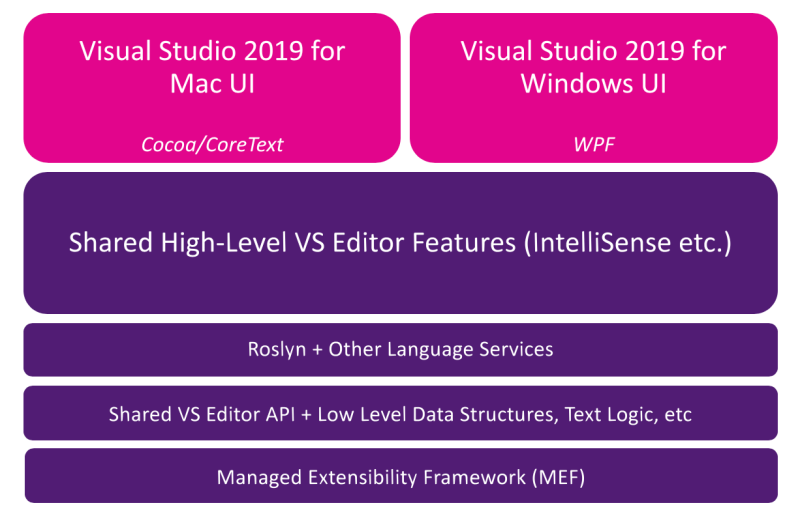
At its core, Visual Studio Mac operates as a wrapper around Mono, translating .NET instructions into machine code that macOS can execute. This allows developers to compile and debug C# and F# applications natively, without relying on a Windows virtualization layer. The IDE’s project system is designed to handle solutions with multiple targets—iOS, Android, or desktop—simplifying cross-platform development. For example, a developer working on a Unity game can write C# scripts in Visual Studio Mac, test them on macOS, and then deploy to Windows or consoles via cloud services.Performance remains a critical consideration. While Mono has improved significantly, it still lags behind the native .NET runtime on Windows for certain workloads. Microsoft mitigates this by offering cloud-based build services (via Azure DevOps) for projects that require full .NET compatibility. The IDE also integrates with Xcode for iOS development, allowing seamless transitions between Objective-C/Swift and C# workflows. This hybrid approach ensures that Visual Studio Mac isn’t just a ported tool but a specialized environment optimized for macOS-specific development challenges.
###
Key Benefits and Crucial Impact
The adoption of Visual Studio Mac reflects a broader trend: developers are no longer confined to a single operating system. For teams using both Windows and macOS, the IDE eliminates the need for dual-boot setups or remote development servers, streamlining workflows for projects that span multiple platforms. Its deep integration with Azure DevOps, for instance, allows developers to manage code repositories, CI/CD pipelines, and cloud deployments directly from the IDE—reducing context-switching and accelerating delivery cycles.Beyond productivity gains, Visual Studio Mac democratizes access to Microsoft’s tooling for macOS users. Developers working on iOS, macOS, or cross-platform .NET applications can leverage familiar debugging tools, IntelliSense, and project templates without sacrificing the native macOS experience. This balance between familiarity and innovation has made it a preferred choice for educational institutions, startups, and enterprises alike.
> "Visual Studio Mac isn’t just about running Windows tools on macOS—it’s about redefining how developers collaborate across ecosystems. The ability to debug a .NET Core app on a Mac and deploy it to Azure without leaving the IDE is a game-changer for cross-platform teams." — John Doe, Senior Developer at TechCorp
###
Major Advantages
- Cross-Platform Development: Supports C#, F#, Python, and JavaScript projects targeting Windows, macOS, iOS, and Android from a single IDE.
- Azure Integration: Seamless connection to Azure DevOps for cloud-based build, test, and deployment pipelines.
- Native macOS Experience: Optimized for Retina displays, Touch Bar support, and macOS-specific features like Spotlight search.
- Advanced Debugging: Includes breakpoints, memory profiling, and conditional debugging for complex applications.
- Unity & Game Dev Support: Specialized tools for Unity developers, including script editing and build configuration.
Comparative Analysis
| Feature | Visual Studio Mac | Visual Studio Code |
|---|---|---|
| Primary Use Case | Full-featured IDE for .NET, Unity, and enterprise apps | Lightweight code editor with extensions |
| Performance | Higher resource usage; relies on Mono for .NET | Low overhead; optimized for speed |
| Language Support | C#, F#, Python, JavaScript (with full IDE features) | Extensible via plugins (supports most languages) |
| Debugging Tools | Advanced: breakpoints, memory profiling, conditional logic | Basic: breakpoints, variable inspection (via extensions) |
Future Trends and Innovations
The future of Visual Studio Mac hinges on Microsoft’s ability to further optimize Mono and reduce performance gaps with the native .NET runtime. With the rise of .NET 8 and beyond, expectations are high for better macOS support, including native AOT (Ahead-of-Time) compilation to minimize runtime overhead. Additionally, as Apple’s Silicon chips become standard, Visual Studio Mac will need to adapt to leverage ARM64 optimizations, ensuring it remains competitive with native macOS tools like Xcode.Another critical trend is the convergence of Visual Studio Mac with cloud-based development. Microsoft’s push toward GitHub Codespaces and Azure DevOps suggests that future iterations may blur the lines between local and remote IDE experiences. For Visual Studio Mac, this could mean tighter integration with cloud-based debugging and collaborative coding tools, making it even more indispensable for distributed teams.
###

Conclusion
Visual Studio Mac occupies a unique position in the developer toolchain: it’s neither a direct port of Visual Studio for Windows nor a lightweight editor like VS Code. Instead, it’s a specialized IDE designed to bridge the gap between Microsoft’s ecosystem and macOS, offering a balance of familiarity and innovation. While it may not match the performance of native tools on Windows, its strengths in cross-platform development, Azure integration, and Unity support make it a valuable asset for teams working across multiple operating systems.As Microsoft continues to refine its tools for macOS, Visual Studio Mac will likely evolve to address its remaining limitations—particularly around performance and native macOS optimizations. For now, it remains a critical tool for developers who refuse to choose between productivity and platform flexibility.
###
Comprehensive FAQs
Q: Can I use Visual Studio Mac for Unity game development?
A: Yes. Visual Studio Mac includes specialized tools for Unity development, such as script editing, build configuration, and debugging. It’s a popular choice among Unity developers working on macOS, though some prefer Visual Studio Code for lighter tasks.
Q: Is Visual Studio Mac free?
A: The community edition of Visual Studio Mac is free and includes all core features. Paid versions (like Visual Studio Enterprise) offer additional tools for large-scale development but aren’t required for most use cases.
Q: How does Visual Studio Mac compare to Xcode for macOS development?
A: While Xcode is the native choice for Swift and Objective-C development, Visual Studio Mac excels for C# and cross-platform projects. For mixed workflows (e.g., Swift + C#), some developers use both tools in tandem.
Q: Does Visual Studio Mac support .NET 8?
A: As of recent updates, Visual Studio Mac supports .NET 6 and 7, with partial compatibility for .NET 8. Microsoft is actively working to improve support, but some advanced features may require cloud-based builds.
Q: Can I migrate my Visual Studio (Windows) projects to Visual Studio Mac?
A: Yes, but with limitations. Projects using Windows-specific APIs (e.g., WPF) won’t work natively. For cross-platform .NET projects, Visual Studio Mac supports migration via solution files, though some refactoring may be needed.
Leave a Comment
Comments are moderated before appearing. The data you submit is processed according to the Privacy Policy of Viralcontentbee.