How to Build Databases: The Definitive Guide to Create Table SQL
The first time you encounter a blank database schema, the weight of responsibility settles in. You’re not just writing code—you’re defining the skeleton of an application’s logic, its data integrity, and its scalability. A single misplaced constraint or omitted column can cascade into months of debugging. Yet, despite its critical role, the create table SQL command remains one of the most underappreciated tools in a developer’s arsenal. It’s not just about syntax; it’s about architecture. Every `CREATE TABLE` statement is a contract between your application and the data it will house, and breaking that contract early can be costly.
Database design isn’t static. What starts as a simple `CREATE TABLE users (id INT, name VARCHAR(50))` can evolve into a complex web of relationships, triggers, and partitions—all while maintaining performance under load. The challenge lies in balancing flexibility with rigidity. Too much freedom risks inconsistency; too many constraints stifle agility. The solution? Mastering the create table SQL command isn’t about memorizing keywords—it’s about understanding trade-offs. Whether you’re normalizing for efficiency or denormalizing for speed, every decision has consequences that ripple through the entire system.
The irony is that most developers treat `CREATE TABLE` as a checkbox task. They run the command, migrate data, and move on—without considering how that table will behave under real-world stress. But the best engineers think ahead: What if this table grows to millions of rows? How will indexing affect write performance? Will foreign keys introduce latency? These aren’t hypotheticals; they’re the difference between a database that scales and one that collapses under its own weight.
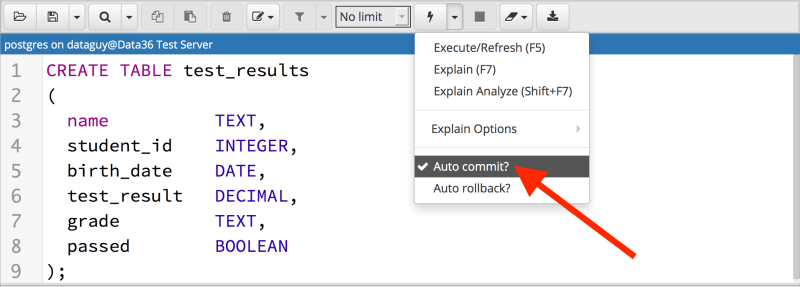
The Complete Overview of Create Table SQL
At its core, the create table SQL command is the foundation of relational database management. It defines how data is stored, structured, and related, serving as the blueprint for every query, join, and transaction that follows. Unlike procedural languages where logic dictates structure, SQL forces you to declare your data model upfront. This declarative approach isn’t just a technicality—it’s a philosophy. You’re not writing code to manipulate data; you’re defining the rules by which data can exist. A poorly designed table can lead to inefficient queries, redundant storage, or even logical errors that propagate through an entire application.The power of `CREATE TABLE` lies in its precision. Every data type, constraint, and index is a deliberate choice. Should `user_id` be an `INT` or a `UUID`? Will `last_login` use a `TIMESTAMP` or a `DATETIME`? These decisions aren’t arbitrary—they reflect the access patterns, concurrency needs, and storage requirements of your application. Even the most seasoned developers revisit their table designs as requirements evolve, proving that create table SQL isn’t a one-time task but an iterative process of refinement.
Historical Background and Evolution
The concept of structured data storage predates SQL itself, but the create table SQL syntax emerged as a direct response to the limitations of earlier systems. In the 1970s, IBM’s System R project introduced the relational model, which treated data as tables with rows and columns—a radical departure from hierarchical or network databases. The `CREATE TABLE` command was a cornerstone of this model, allowing developers to define schemas independently of the data itself. This separation was revolutionary: it enabled data to persist even as applications changed, a principle that underpins modern database design.The evolution of SQL standards—from SQL-86 to SQL:2016—has continuously expanded the capabilities of `CREATE TABLE`. Early versions supported basic data types and primary keys, but modern SQL includes features like generated columns, identity columns, and JSON support. These advancements reflect the growing complexity of applications, where tables must now handle everything from geospatial data to nested documents. Even the syntax has evolved: where older systems required explicit `PRIMARY KEY` clauses, modern databases often infer constraints automatically, reducing boilerplate while maintaining rigor.
Core Mechanisms: How It Works
Under the hood, a `CREATE TABLE` statement is a series of instructions to the database engine. When executed, it allocates storage, initializes metadata, and registers the table in the system catalog. The engine then enforces constraints—such as `NOT NULL` or `UNIQUE`—by validating every subsequent `INSERT` or `UPDATE`. This isn’t just about syntax; it’s about performance optimization. For example, a table with a `CLUSTERED INDEX` on `id` will physically store rows in order, speeding up range queries but potentially slowing down writes. The choice of storage engine (InnoDB, PostgreSQL’s MVCC, etc.) further complicates these trade-offs, as each has its own quirks for handling `CREATE TABLE` operations.Table of Contents
- The Complete Overview of Create Table SQL
- Historical Background and Evolution
- Core Mechanisms: How It Works
- Key Benefits and Crucial Impact
- Major Advantages
- Comparative Analysis
- Future Trends and Innovations
- Conclusion
- Comprehensive FAQs
- Q: Can I add a column to an existing table without downtime?
- Q: What’s the difference between `INT` and `BIGINT` in SQL?
- Q: How do I create a table with a composite primary key?
- Q: What happens if I omit constraints like `NOT NULL` or `UNIQUE`?
- Q: Can I use `CREATE TABLE` to clone an existing table?
The real magic happens in how databases interpret your schema. A `FOREIGN KEY` constraint doesn’t just add a column—it creates a trigger-like mechanism to maintain referential integrity. Similarly, a `CHECK` constraint isn’t just a validation rule; it’s a filter applied at the storage layer. These mechanisms ensure that your data remains consistent, even when multiple transactions are running concurrently. Understanding these internals is crucial: a poorly optimized `CREATE TABLE` can lead to lock contention, deadlocks, or even silent data corruption.
Key Benefits and Crucial Impact
The value of a well-constructed `CREATE TABLE` statement extends beyond mere functionality. It’s the difference between a database that scales effortlessly and one that becomes a bottleneck as traffic grows. Consider an e-commerce platform: a table with a composite index on `user_id` and `order_date` might handle 1,000 queries per second today, but the same schema could choke under Black Friday traffic without proper partitioning. The create table SQL command isn’t just about defining columns—it’s about anticipating future needs.Moreover, a robust schema acts as documentation. When a new developer joins the team, they don’t need to reverse-engineer the database; they can read the `CREATE TABLE` statements to understand the data model. Constraints like `UNIQUE` or `DEFAULT` values serve as self-documenting rules, reducing ambiguity. This clarity is especially critical in collaborative environments, where misaligned assumptions can lead to costly mistakes.
"A database schema is like a city’s infrastructure: if you build it poorly, you’ll spend decades fixing potholes instead of innovating." — Martin Fowler, Refactoring Databases
Major Advantages
- Data Integrity: Constraints like `NOT NULL`, `CHECK`, and `FOREIGN KEY` enforce rules at the database level, reducing application-layer validation errors.
- Performance Optimization: Proper indexing and partitioning (via `CREATE TABLE` clauses) can reduce query times from seconds to milliseconds.
- Scalability: Well-designed tables support horizontal scaling (e.g., sharding) and vertical scaling (e.g., adding columns without downtime).
- Collaboration Clarity: Explicit schemas eliminate ambiguity, making it easier for teams to maintain and extend the database.
- Future-Proofing: Features like generated columns and computed fields allow tables to adapt to new requirements without major refactoring.

Comparative Analysis
| Feature | Traditional SQL (e.g., MySQL) | Modern SQL (e.g., PostgreSQL) |
|---|---|---|
| Data Types | Limited to basic types (INT, VARCHAR, etc.). | Supports JSON, ARRAY, and custom types like `UUID` or `GEOMETRY`. |
| Constraints | Requires explicit `PRIMARY KEY`, `FOREIGN KEY` clauses. | Auto-inferred constraints (e.g., `SERIAL` for auto-increment). |
| Partitioning | Manual partitioning (e.g., `PARTITION BY RANGE`). | Built-in partitioning with declarative syntax. |
| Concurrency | Row-level locking (e.g., InnoDB). | MVCC (Multi-Version Concurrency Control) for read-write isolation. |
Future Trends and Innovations
The next generation of `CREATE TABLE` commands will blur the line between relational and NoSQL paradigms. Databases like PostgreSQL are already integrating JSON and document storage into traditional tables, allowing a single `CREATE TABLE` to define both structured and semi-structured data. This hybrid approach enables developers to leverage SQL’s querying power while accommodating unstructured data, such as logs or configuration settings. As applications grow more complex, the need for flexible schemas will only increase, pushing databases to evolve beyond rigid relational models.Another trend is the rise of declarative schema management. Tools like Flyway and Liquibase are automating migrations, but future systems may integrate schema evolution directly into the `CREATE TABLE` syntax. Imagine a command like `ALTER TABLE users ADD COLUMN bio TEXT IF NOT EXISTS`—a simple way to handle backward compatibility without manual checks. Additionally, AI-driven schema optimization could analyze query patterns and suggest indexes or partitions automatically, further reducing the cognitive load on developers.
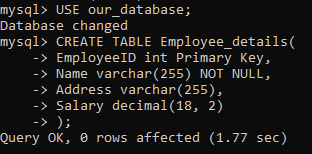
Conclusion
The create table SQL command is more than a syntax construct—it’s the backbone of data-driven applications. Whether you’re building a high-frequency trading system or a content management platform, the choices you make in defining your tables will dictate performance, scalability, and maintainability. The key is to balance pragmatism with foresight: optimize for today’s needs without locking yourself into tomorrow’s limitations.As databases continue to evolve, so too will the tools at your disposal. Staying ahead means understanding not just the syntax of `CREATE TABLE`, but the principles behind it: normalization, indexing, and constraint management. The best engineers don’t just write queries—they design systems that can grow with their applications.
Comprehensive FAQs
Q: Can I add a column to an existing table without downtime?
A: Yes, using `ALTER TABLE table_name ADD COLUMN column_name data_type`. Most modern databases support online schema changes, but performance may degrade during the operation. For zero-downtime changes, consider techniques like blue-green deployments or using tools like pt-online-schema-change (MySQL).
Q: What’s the difference between `INT` and `BIGINT` in SQL?
A: `INT` typically stores 32-bit signed integers (range: -2,147,483,648 to 2,147,483,647), while `BIGINT` stores 64-bit signed integers (range: -9,223,372,036,854,775,808 to 9,223,372,036,854,775,807). Use `BIGINT` for large datasets or when dealing with high-volume IDs (e.g., distributed systems).
Q: How do I create a table with a composite primary key?
A: Use the `PRIMARY KEY` clause with multiple columns, like this:
CREATE TABLE orders (
This ensures uniqueness across both columns.
order_id INT,
user_id INT,
product_id INT,
PRIMARY KEY (order_id, user_id)
);
Q: What happens if I omit constraints like `NOT NULL` or `UNIQUE`?
A: Omitting constraints can lead to data integrity issues. For example, a nullable column might store `NULL` values, which can cause problems in joins or aggregations. Always define constraints explicitly unless you have a specific reason not to.
Q: Can I use `CREATE TABLE` to clone an existing table?
A: Yes, with `CREATE TABLE new_table AS SELECT FROM old_table` (PostgreSQL/MySQL) or `CREATE TABLE new_table LIKE old_table` (MySQL). The latter copies the structure but not the data, while the former duplicates both schema and records.
Leave a Comment
Comments are moderated before appearing. The data you submit is processed according to the Privacy Policy of Viralcontentbee.