solution calculator chemistry essentials for precise chemical

Table of Contents
- Fundamentals of Solution Calculators in Chemistry
- Core Equations in Solution Calculators
- Mathematical Breakdown of Key Equations
- Applications of Solution Calculators in Real-World Scenarios
- Practical Examples of Solution Preparation
- Advanced Considerations in Solution Calculators
- Types of Solution Calculators and Their Functions
- Classification of Solution Calculators by Concentration Unit
- Molarity vs. Molality: Conditions for Preference
- Normality Calculations in Acid-Base Titrations
- Decision Flowchart for Selecting a Solution Calculator Type
- Step-by-Step Procedures for Using Solution Calculators in Chemistry
- Calculating Solute Mass for Target Molarity Solutions
- Troubleshooting Common Calculation Errors
- Validation of Calculator Outputs Using Experimental Data
- Advanced Applications and Specialized Calculators in Solution Chemistry
- Buffer Solutions and pH Adjustment Calculations
- Colligative Properties: Boiling Point Elevation and Freezing Point Depression
- Comparative Analysis: Commercial vs. Custom-Built Solution Calculators
- Integration with Analytical Instruments: Spectrophotometers and pH Meters
- Illustrative Examples and Problem-Solving Workflows in Solution Chemistry
- Multi-Step Workflow: Preparing and Diluting a NaOH Solution for Titration
- Table of Common Chemistry Problems Solved by Solution Calculators
- Designing a Custom Calculator for Enzyme Kinetics (Michaelis-Menten)
- FAQ
- What is an equation calculator for chemistry, and how can it help with balancing chemical reactions?
- How do you perform solution preparation calculations in chemistry, including molarity and dilution?
- What are the most common chemistry calculator formulas used in labs and homework?
Solution calculators serve as indispensable tools in chemistry, bridging theoretical principles with practical laboratory applications. By leveraging stoichiometry, molarity, and dilution laws, these calculators enable precise preparation of solutions critical to pharmaceutical development, analytical chemistry, and industrial processes. Understanding their underlying equations—such as C₁V₁ = C₂V₂ for dilution and n = CV for mole calculations—forms the foundation for accurate experimental design and error mitigation.
Their functionality extends beyond basic calculations, addressing specialized scenarios like temperature-dependent density adjustments in molarity versus molality or step-by-step normality determinations in titrations. Real-world integration with analytical instruments further enhances their role, ensuring reproducibility in high-stakes environments where even minor deviations can compromise results. This guide explores their core principles, practical applications, and advanced workflows to equip chemists with the expertise needed for reliable solution preparation.
Fundamentals of Solution Calculators in Chemistry
Solution calculators in chemistry serve as indispensable tools for precise preparation, analysis, and manipulation of chemical solutions. Their core functionality relies on fundamental principles such as stoichiometry, molarity, and dilution laws, which govern the relationships between solute concentration, volume, and quantity of substance. These calculators automate complex manual calculations, reducing errors in laboratory settings, pharmaceutical manufacturing, and industrial processes. Their application spans from routine lab experiments to large-scale production, where accuracy in concentration and volume directly impacts experimental outcomes and product efficacy.
The mathematical foundation of solution calculators integrates key equations derived from stoichiometric and colligative properties. These equations enable chemists to determine required volumes, concentrations, or masses of solutes for desired experimental conditions. Below are the primary equations used, along with their practical applications in solution preparation.
Core Equations in Solution Calculators
Solution calculators utilize a set of standardized equations to perform calculations efficiently. These equations are derived from fundamental chemical principles and are essential for tasks such as dilution, standardization, and reaction stoichiometry.Dilution Law (C₁V₁ = C₂V₂)
This equation describes the relationship between the initial concentration (C₁) and volume (V₁) of a solution and the final concentration (C₂) and volume (V₂) after dilution. It is universally applied in laboratory settings to prepare solutions of lower concentrations from stock solutions.
Moles in Solution (n = CV)
This equation calculates the number of moles (n) of a solute in a solution given its concentration (C, typically in mol/L) and volume (V, in liters). It is critical for determining reactant quantities in chemical reactions and ensuring stoichiometric balance.
Mathematical Breakdown of Key Equations
Understanding the derivation and application of these equations is essential for accurate solution preparation. Below is a structured breakdown of their components and usage.Dilution Law (C₁V₁ = C₂V₂)
C₁: Initial concentration of the stock solution (mol/L). V₁: Volume of stock solution required (L). C₂: Desired final concentration (mol/L). V₂: Final volume of the diluted solution (L). This equation assumes that the total amount of solute remains constant before and after dilution, adhering to the principle of mass conservation.
Moles in Solution (n = CV)
n: Number of moles of solute. C: Concentration of the solution (mol/L). V: Volume of the solution (L). This equation is derived from the definition of molarity (moles per liter) and is fundamental for stoichiometric calculations in reactions.
Applications of Solution Calculators in Real-World Scenarios
Solution calculators are indispensable in fields where precise concentration control is critical. Their applications range from pharmaceutical formulation to environmental analysis, where even minor deviations can lead to significant consequences.-
Solution calculators ensure accurate dosing of active pharmaceutical ingredients (APIs) in drug formulations, where concentration variations can affect efficacy or toxicity.
-
In clinical laboratories, calculators standardize reagent concentrations for diagnostic tests, ensuring consistent and reliable results across batches.
-
Environmental monitoring relies on solution calculators to prepare samples for analysis, such as determining pollutant concentrations in water or soil.
-
Industrial processes, including semiconductor manufacturing and food production, use calculators to maintain precise chemical compositions for quality control.
Practical Examples of Solution Preparation
Real-world applications often involve preparing solutions from concentrated stock solutions or adjusting concentrations for specific experimental needs. Below are two illustrative examples demonstrating the use of solution calculators.Example 1: Preparing a Diluted HCl Solution
A laboratory requires 500 mL of a 0.1 M HCl solution from a 12 M stock solution.
Using the dilution law:
C₁V₁ = C₂V₂ → (12 M)(V₁) = (0.1 M)(0.5 L)
V₁ = (0.1 M × 0.5 L) / 12 M = 0.00417 L or 4.17 mL.
Thus, 4.17 mL of the 12 M stock solution must be diluted to 500 mL to achieve the desired concentration.
Example 2: Calculating Moles of NaOH in a Standard Solution
A 0.5 L solution of 2 M NaOH is prepared. The number of moles of NaOH is calculated as:
n = CV → n = (2 mol/L)(0.5 L) = 1 mol.
This value is critical for titration experiments where precise molarity is required.
Advanced Considerations in Solution Calculators
Beyond basic dilution and molarity calculations, solution calculators often incorporate additional factors such as temperature effects, solubility limits, and activity coefficients for more accurate results. These considerations are particularly relevant in non-ideal solutions or high-precision applications.-
Temperature variations can alter solute solubility and solution density, necessitating temperature corrections in calculations.
-
Activity coefficients account for deviations from ideal behavior in concentrated or ionic solutions, improving accuracy in real-world scenarios.
-
Solubility product constants (Ksp) are integrated into calculators for saturated solutions to predict precipitation or dissolution equilibria.
Types of Solution Calculators and Their Functions
Solution calculators in chemistry serve as specialized tools to quantify solute-solvent interactions, enabling precise determinations of concentration metrics critical for experimental design, quality control, and theoretical modeling. These calculators are categorized based on the specific concentration unit they address—each tailored to distinct analytical requirements, such as temperature sensitivity, reaction stoichiometry, or environmental compliance. The selection of a calculator type hinges on the physical properties of the system (e.g., solvent density, solute ionization) and the context of the application (e.g., pharmaceutical formulation, environmental testing).The following sections classify solution calculators by their primary function, elucidate the conditions favoring their use, and provide structured methodologies for their application in practical scenarios.
Classification of Solution Calculators by Concentration Unit
Solution calculators are systematically categorized based on the concentration unit they compute, each corresponding to unique thermodynamic or kinetic considerations. The most widely used units include molarity (M), molality (m), normality (N), parts per million (ppm), and mass percent (w/w). Below is a hierarchical overview of their functional domains:-
Molarity (M) Calculators
Quantify solute moles per liter of solution, ideal for reactions where volume changes minimally (e.g., aqueous titrations at constant temperature). Temperature-dependent density variations necessitate corrections, as volume expands or contracts with thermal fluctuations. -
Molality (m) Calculators
Express solute moles per kilogram of solvent, preferred for colligative property analyses (e.g., freezing point depression, osmotic pressure) where mass remains invariant regardless of temperature. Critical in cryoscopic and ebullioscopic measurements. -
Normality (N) Calculators
Account for equivalent weights in redox or acid-base reactions, scaling molarity by the number of protons/electrons transferred. Essential for titration endpoint calculations and stoichiometric balancing. -
Parts per Million (ppm) and Mass Percent (w/w) Calculators
Used in environmental and industrial contexts to quantify trace analytes (ppm) or solid mixtures (w/w). ppm calculations often require density conversions for gaseous or liquid samples, while w/w is invariant to temperature.
Molarity vs. Molality: Conditions for Preference
The choice between molarity and molality calculators is dictated by the sensitivity of the system to temperature-induced volume changes and the need for invariant mass-based measurements.-
Molarity Preference
Applicable when:
Example: Preparing a 1.0 M NaOH solution for pH standardization assumes negligible density variation between 20°C and 25°C.- Solvent density remains approximately constant (e.g., dilute aqueous solutions at near-room temperature).
- Reaction volumes are measured directly (e.g., volumetric titrations).
- Temperature control is feasible (e.g., laboratory settings with ±0.1°C precision).
-
Molality Preference
Applicable when:
Example: Calculating molality for a 3.0 m glucose solution in water ensures accurate freezing point depression data, as mass remains unchanged despite temperature fluctuations.- Colligative properties are studied (e.g., determining molecular weight via freezing point depression).
- Solvent density is temperature-dependent (e.g., organic solvents like ethanol or high-concentration aqueous solutions).
- Mass-based precision is critical (e.g., cryoscopic or ebullioscopic experiments).
-
Conversion Between Units
Molarity and molality are interconvertible via solvent density (ρ) and molar mass (M):Formula:
Note: For dilute solutions (<0.1 m), the approximationmolarity (M) = (molality (m) × ρ) / (1 + (molality (m) × M_solute / 1000))where ρ is solvent density (g/mL) and M_solute is solute molar mass (g/mol).M ≈ m × ρholds.
Normality Calculations in Acid-Base Titrations
Normality accounts for the equivalence factor (n) in reactions, where n equals the number of protons donated (acids) or accepted (bases) or electrons transferred (redox). The step-by-step procedure for normality determination is as follows:-
Determine the Equivalence Factor (n)
For monoprotic acids/bases (e.g., HCl, NaOH),n = 1. For diprotic acids (e.g., H₂SO₄),n = 2per mole of H⁺ ions.Example: H₂SO₄ dissociates as
H₂SO₄ → 2H⁺ + SO₄²⁻, thusn = 2. -
Calculate Molarity (M) of the Solution
Use the standard formula:
Example: 0.5 moles of H₂SO₄ in 250 mL solution yieldsMolarity (M) = moles of solute / volume of solution (L)M = 0.5 / 0.25 = 2.0 M. -
Compute Normality (N)
Multiply molarity by the equivalence factor:
For the H₂SO₄ example:Normality (N) = Molarity (M) × nN = 2.0 M × 2 = 4.0 N. -
Application in Titrations
Normality simplifies stoichiometric calculations. For instance, titrating 25.0 mL of 0.10 N NaOH with 0.20 N HCl requires:Volume HCl = (N_NaOH × V_NaOH) / N_HCl = (0.10 × 25.0) / 0.20 = 12.5 mL
Decision Flowchart for Selecting a Solution Calculator Type
The selection of a solution calculator depends on input parameters such as solute mass, solvent volume, temperature sensitivity, and reaction type. Below is a structured flowchart to guide decision-making:| Step | Decision Criteria | Recommended Calculator |
|---|---|---|
| 1. Is the application volume-based (e.g., titrations, dilutions)? | Yes | Molarity (M) or Normality (N) |
| No | Proceed to Step 2 | |
| 2. Is temperature control critical (e.g., colligative properties)? | Yes | Molality (m) |
| No | Mass percent (w/w) or ppm (for trace analysis) | |
| 3. Is the reaction stoichiometry dependent on equivalents (e.g., acid-base, redox)? | Yes | Normality (N) |
| No | Molarity (M) or Molality (m), based on Step 1 | |
Note: For environmental or industrial samples, ppm or w/w calculators are prioritized when solute concentration is <1% or requires regulatory compliance. |
||
Step-by-Step Procedures for Using Solution Calculators in Chemistry
Solution calculators streamline the preparation of solutions by automating complex stoichiometric and volumetric calculations, reducing human error in laboratory settings. These tools integrate fundamental principles—such as molarity, molality, and density corrections—to generate precise solute quantities for target concentrations. However, their accuracy depends on correct input parameters, awareness of physical constraints (e.g., solvent non-ideality), and validation against experimental benchmarks. Below, a structured methodology is provided for calculating the mass of solute required to prepare a solution of specified molarity, including pitfalls, troubleshooting, and validation techniques.Calculating Solute Mass for Target Molarity Solutions
The preparation of a solution with a defined molarity (c = n/V, where n is moles of solute and V is solvent volume in liters) requires determining the mass of solute (m) from its molar mass (M). This process involves three critical inputs: the target concentration, the solvent volume, and the solute’s molar mass. The core formula for solute mass is derived as follows:Formula:Required Inputs and Their Significance
m = (c × V × M)
Where:
m = mass of solute (g) c = target molarity (mol/L) V = solvent volume (L) M = molar mass of solute (g/mol)
Accurate calculations hinge on precise values for the following parameters:
-
Target Molarity (c)
Specifies the desired concentration of solute particles per liter of solution. For example, a 1.0 M NaCl solution requires 1.0 mol of NaCl per liter of solution. Molarity is temperature-dependent due to solvent density variations; thus, standard conditions (e.g., 25°C) should be assumed unless otherwise specified. -
Solvent Volume (V)
Represents the final volume of the solution after solute dissolution. This must account for the volume of the solute itself if it contributes significantly (e.g., solid solutes are typically negligible, but concentrated liquids like acids may alter total volume). Volume measurements should use calibrated glassware (e.g., volumetric flasks) to minimize errors. -
Solute Molar Mass (M)
Derived from the molecular formula, this value must account for hydration states (e.g., CuSO₄·5H₂O) or isotopic variations if precision is critical. Molar masses can be sourced from reliable databases (e.g., NIST or PubChem) or calculated using atomic weights from the IUPAC periodic table.
Common errors arise from oversimplifications or neglecting physical properties. Key challenges include:
-
Ignoring Solvent Density Variations
Water’s density deviates from 1.00 g/mL at non-standard temperatures, affecting volume-to-mass conversions. For instance, preparing a 1.0 M solution at 0°C (density ≈ 0.9998 g/mL) would require recalculating mass based on actual solvent mass rather than volume. -
Assuming Ideal Solution Behavior
Non-ideal solutions (e.g., mixtures with strong solute-solvent interactions or ionic dissociation) may exhibit activity coefficients (γ) that differ from unity. For such cases, the effective concentration (cₑₓₜ = c × γ) must be used, though this requires experimental data (e.g., colligative property measurements). -
Volume Contraction or Expansion
Dissolving solutes can alter the total solution volume due to molecular interactions. For example, mixing ethanol and water results in a volume contraction of ~3% due to hydrogen bonding. Calculators should incorporate density corrections or empirical volume adjustment factors when preparing non-ideal mixtures. -
Incorrect Molar Mass or Hydration States
Using the anhydrous form of a hydrated salt (e.g., Na₂CO₃ instead of Na₂CO₃·10H₂O) will yield a solution with half the expected molarity. Always verify the solute’s exact formula, including water molecules or counterions.
Troubleshooting Common Calculation Errors
Errors in solution preparation often stem from systematic missteps, such as misaligned volume measurements or overlooked physical effects. Below is a structured guide to diagnosing and resolving frequent issues:Error: Incorrect molarity after dilution.
Cause: Volume measurements not accounted for solvent contraction or expansion.
Fix:
Use corrected volumes based on density data or empirical volume adjustment tables. For aqueous solutions, refer to standard density tables (e.g., CRC Handbook of Chemistry and Physics) to adjust volumes. Alternatively, prepare the solution gravimetrically by weighing the solvent mass instead of measuring volume.
Error: Precipitates or phase separation observed post-dissolution.
Cause: Exceeding solute solubility limits or temperature-dependent solubility.
Fix:
Consult solubility curves for the solute-solvent system at the preparation temperature. Reduce the solute mass or adjust the solvent type (e.g., use a polar aprotic solvent for ionic compounds). For temperature-sensitive solubility, prepare the solution at elevated temperatures if necessary.
Error: Calculated solute mass does not match experimental conductivity or refractive index data.
Cause: Ionic dissociation or non-ideal behavior not accounted for in calculations.
Fix:
Measure the solution’s conductivity (κ) and compare to theoretical values using Debye-Hückel theory or empirical correlations. Adjust the effective concentration by incorporating activity coefficients (γ) derived from experimental κ data. For non-electrolytes, use refractive index or UV-Vis spectroscopy to validate solute concentration.
Error: Solution pH deviates significantly from theoretical predictions.
Cause: Hydrolysis of the solute or solvent impurities (e.g., CO₂ in water).
Fix:
For weak acids/bases, use a buffer calculator to account for hydrolysis equilibria. For pH-sensitive solutes, degas the solvent (e.g., boil distilled water to remove CO₂) or add a pH-stabilizing agent (e.g., phosphate buffer). Validate pH with a calibrated electrode and compare to theoretical values using Ka/Kb constants.
Validation of Calculator Outputs Using Experimental Data
Theoretical calculations must align with experimental observations to ensure practical applicability. Validation techniques vary by solution type and intended use, with conductivity, spectroscopy, and colligative properties being the most common methods.Conductivity Measurements for Ionic Solutions
For electrolytes, solution conductivity (κ) is directly proportional to ion concentration and mobility. The relationship is expressed as:
Formula:Procedure:
κ = Σ (λᵢ × cᵢ × zᵢ²)
Where:
κ = conductivity (S/cm) λᵢ = ionic mobility (S·cm²/mol) cᵢ = concentration of ion i (mol/L) zᵢ = charge of ion i
1. Prepare the solution using the calculator’s output mass.
2. Measure conductivity at 25°C using a calibrated conductivity meter.
3. Compare the experimental κ to the theoretical value calculated from literature ionic mobilities (λᵢ).
4. Discrepancies (>5%) may indicate incomplete dissociation, ion pairing, or impurities. Adjust solute mass or use a more accurate activity coefficient model.
Example:
For a 0.1 M KCl solution at 25°C, the theoretical conductivity is ~12.88 S/cm (using λ₊ₖ = 7.35 × 10⁻³ and λ₋ₖₗ = 7.63 × 10⁻³ S·cm²/mol). If experimental κ = 12.2 S/cm, the 5.2% deviation suggests minor ion interactions or electrode polarization, which can be mitigated by recalibrating the meter.
Spectroscopic Validation for Non-Electrolytes
For colored or UV-absorbing solutes (e.g., dyes, organic compounds), Beer-Lambert’s law (A = εcl) can validate concentration:
Formula:Procedure:
A = ε × c × l Where:
A = absorbance (unitless) ε = molar absorptivity (L·mol⁻¹·cm⁻¹) c = concentration (mol/L) l = path length (cm)
1. Dissolve the solute in a solvent with minimal absorbance at the chosen wavelength (e.g., 500 nm for green dyes).
2. Measure absorbance (A) using a UV-Vis spectrophotometer.
3. Compare c = A/(εl) to the calculator’s predicted concentration
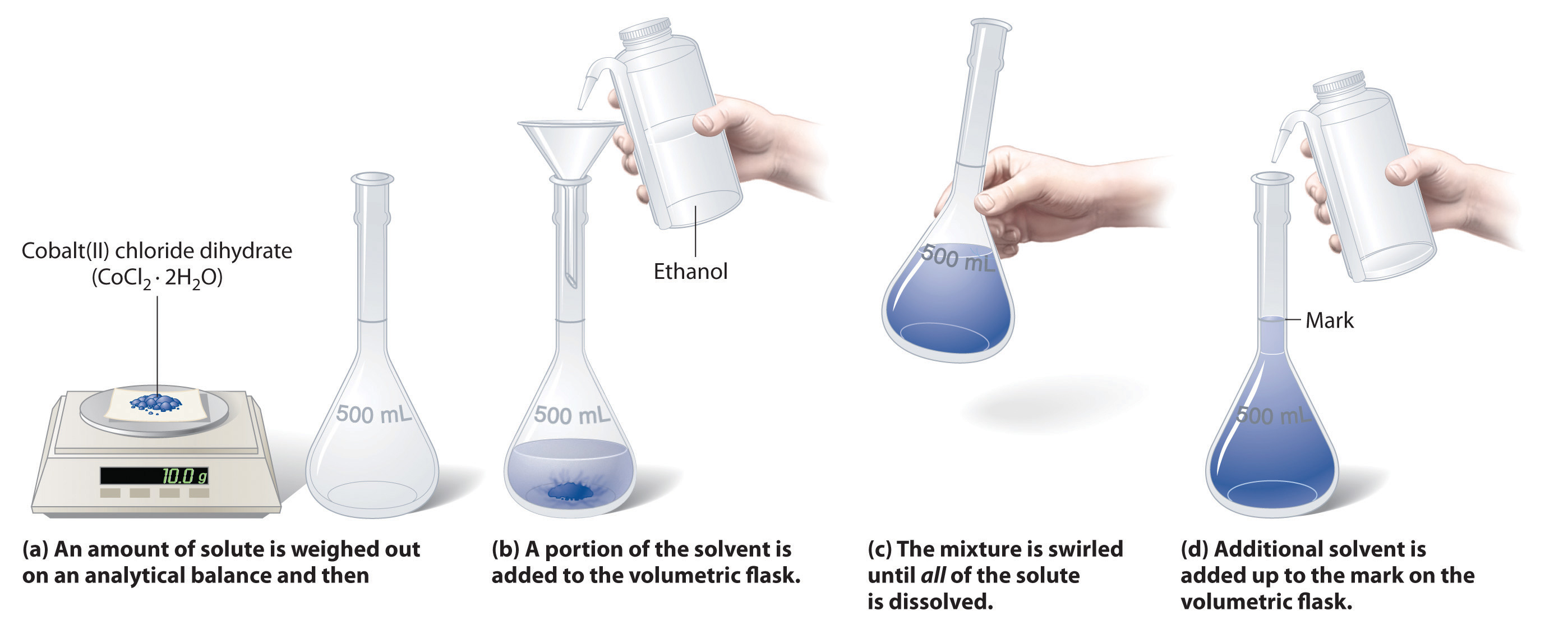
Advanced Applications and Specialized Calculators in Solution Chemistry
Solution calculators extend beyond basic concentration and dilution computations to address complex scenarios in analytical chemistry, biochemical research, and industrial process optimization. Advanced calculators leverage thermodynamic principles, empirical models, and real-time data integration to solve problems where precision and contextual accuracy are critical. These tools are particularly indispensable in fields requiring fine-tuned control over solution properties, such as pharmaceutical formulation, environmental monitoring, and materials science. Below, specialized applications—including buffer systems, colligative property predictions, and integrative analytical workflows—are examined, alongside a comparative analysis of commercial versus custom-built solutions.Buffer Solutions and pH Adjustment Calculations
Buffer systems maintain pH stability in biochemical reactions, drug delivery systems, and environmental samples. Solution calculators automate the application of the Henderson-Hasselbalch equation to determine the required ratios of conjugate acid-base pairs for target pH values. For instance, in pharmaceutical development, calculators predict the buffering capacity of citrate-phosphate buffers at physiological pH (7.4), accounting for ionic strength and temperature variations. The van Slyke equation extension further refines calculations for polyprotic buffers like phosphate, where multiple pKa values must be considered.Key functionalities include:
Henderson-Hasselbalch Equation (simplified for monoprotic buffers):Commercial calculators (e.g., Sigma-Aldrich’s Buffer Calculator, LabX’s pH Calculator) often include preloaded pKa databases for common buffers, while custom-built tools allow integration with pH meters for closed-loop feedback systems in automated labs.
Where [A⁻] = conjugate base concentration, [HA] = weak acid concentration.
Colligative Properties: Boiling Point Elevation and Freezing Point Depression
Colligative properties depend solely on solute particle concentration, not identity, making them critical for processes like cryopreservation, desalination, and solvent purification. Solution calculators predict deviations from ideal behavior using models such as:Advanced calculators incorporate activity coefficient corrections (e.g., Pitzer equations for ionic solutions) to account for non-ideal interactions in concentrated electrolytes. For example:
Example Calculation for Freezing Point Depression (Aqueous NaCl):Specialized tools like NIST’s REFPROP or Aspen Plus integrate colligative property models with phase equilibrium data for mixed-solvent systems (e.g., ethanol-water azeotropes).
For 0.5 m NaCl (i = 1.85 due to dissociation): ΔTf = 1.85 × 1.86 °C·kg/mol × 0.5 mol/kg = 1.71°C depression.
Comparative Analysis: Commercial vs. Custom-Built Solution Calculators
The choice between commercial and custom-built calculators hinges on accuracy requirements, workflow integration, and scalability. Below is a structured comparison:| Feature | Commercial Calculators | Custom-Built Calculators |
|---|---|---|
| Accuracy | High for standard applications (e.g., pH, dilution); limited by proprietary algorithms. | Tailored to niche models (e.g., non-ideal gas laws in supercritical fluids). |
| Usability | User-friendly interfaces (e.g., drag-and-drop inputs); cloud-based access. | Steeper learning curve; requires programming knowledge (Python, LabVIEW). |
| Integration | Limited to vendor ecosystems (e.g., Thermo Fisher’s DeltaV for lab software). | Seamless with open-source tools (e.g., R for statistical thermodynamics). |
| Cost | Recurring licensing fees; hidden costs for premium modules. | One-time development cost; free if in-house. |
| Data Export | Standard formats (CSV, Excel); restricted APIs. | Full control over output (e.g., JSON for IoT devices). |
| Regulatory Compliance | Pre-validated for GMP/GLP (e.g., Sartorius’s Stedim Biotech tools). | Requires independent validation for pharmaceutical use. |
Integration with Analytical Instruments: Spectrophotometers and pH Meters
Modern solution calculators bridge the gap between theoretical predictions and experimental validation by interfacing with analytical instruments. Key integration pathways include:- Spectrophotometric Calibration:
Calculators adjust Beer-Lambert law corrections for non-ideal absorbance (e.g., stray light, solvent interference) by cross-referencing with instrument-specific calibration curves. For example:
- pH Meter Feedback Loops:
Closed-loop systems combine calculators with pH electrodes (e.g., Mettler Toledo InPro 3253) to dynamically adjust titrant volumes. For instance:
- Mass Spectrometry Coupling:
In electrospray ionization (ESI-MS), calculators predict adduct formation (e.g., Na⁺, K⁺) based on solvent composition, enabling optimization of ionization conditions. For example:
Example Workflow: pH Meter + Calculator Integration
1. Input: Target pH = 4.5, buffer = acetic acid/sodium acetate.
2. Calculator: Solves Henderson-Hasselbalch for [Ac⁻]/[HAc] ratio.
3. Instrument: pH meter detects drift (e.g., due to CO₂ absorption) and triggers calculator to recalculate titrant volume.
4. Output: Adjusted buffer composition displayed on LIMS (Laboratory Information Management System).
Illustrative Examples and Problem-Solving Workflows in Solution Chemistry
Solution calculators streamline complex chemical preparations and analyses by automating repetitive calculations, reducing human error, and ensuring precision in multi-step experiments. This section demonstrates practical workflows for common scenarios—such as serial dilutions for titrations—while integrating visual and tabular references to clarify procedural steps. Additionally, it provides structured templates for designing custom calculators tailored to niche applications, such as enzyme kinetics or redox equilibria, ensuring adaptability to specialized research needs.Multi-Step Workflow: Preparing and Diluting a NaOH Solution for Titration
The preparation of a 0.5 M NaOH solution from a 10 M stock followed by further dilution to 0.1 M for a titration against a weak acid (e.g., acetic acid) exemplifies a typical workflow requiring sequential dilution calculations. Below is a step-by-step breakdown with visual cues for accuracy.Key Calculations:
1. Primary Dilution (10 M → 0.5 M):
C₁V₁ = C₂V₂
2. Secondary Dilution (0.5 M → 0.1 M):
Procedural Steps with Visual Descriptions:
- Step 2: Dilute to Primary Concentration
Add distilled water to the flask until the meniscus aligns with the 50 mL mark (not the top of the flask). Invert the flask 10 times to mix thoroughly. The resulting solution is 0.5 M NaOH.
- Step 3: Prepare Titration Solution
Transfer 100.00 mL of the 0.5 M NaOH into a second 500 mL volumetric flask. Add distilled water until the meniscus reaches the 500 mL mark, again inverting to homogenize. This yields 0.1 M NaOH, suitable for titrating ~50 mL of 0.1 M acetic acid (assuming a 1:1 stoichiometry).
- Step 4: Titration Execution
Fill a burette with the 0.1 M NaOH and record the initial volume. Titrate the acetic acid solution dropwise, swirling continuously, until the endpoint (phenolphthalein color change from colorless to pink). Record the final burette volume to calculate moles of NaOH used:
Moles NaOH = \(M \times V_{\text{final}} - V_{\text{initial}}\)Common Pitfalls and Corrections:
Table of Common Chemistry Problems Solved by Solution Calculators
Solution calculators address a broad spectrum of problems in analytical and preparative chemistry. Below is a categorized table outlining typical scenarios, the calculators employed, and critical variables involved.| Problem Type | Calculator Used | Key Variables |
|---|---|---|
| Acid-Base Titration | Normality/Molarity Calculator | Molarity of titrant/analyte, Volume at equivalence point, pH at endpoint |
| Buffer Preparation | Henderson-Hasselbalch Calculator | pH target, Weak acid/conjugate base ratio, Ka of acid |
| Osmotic Pressure Measurements | Colligative Properties Calculator | Solute molarity, Temperature, Observed osmotic pressure (π) |
| Serial Dilutions | Dilution Factor Calculator | Stock concentration, Final volume, Number of dilution steps |
| Redox Titrations (e.g., KMnO₄) | Stoichiometry Calculator | Oxidation states, Moles of electrons transferred, Titrant volume |
| Enzyme Kinetics (Michaelis-Menten) | Rate Law Calculator | Substrate concentration [S], Enzyme concentration [E], Vmax, Km |
| Solubility Product (Ksp) Calculations | Equilibrium Calculator | Ion concentrations, Temperature, Solubility (g/L or mol/L) |
| Density-Based Concentration Adjustments | Density Correction Calculator | Solution density (g/mL), Mass percentage, Molar mass of solute |
Calculators are chosen based on the thermodynamic or stoichiometric principles governing the problem. For example:
Designing a Custom Calculator for Enzyme Kinetics (Michaelis-Menten)
Custom calculators for specialized reactions, such as enzyme-catalyzed reactions, integrate kinetic models with experimental data to predict reaction rates or determine kinetic constants. Below is a structured approach to developing a Michaelis-Menten calculator, including input parameters, core equations, and output interpretations.Step 1: Define Input Parameters
The calculator requires the following user inputs:
Step 2: Core Equation Implementation
The Michaelis-Menten equation forms the basis:
\(v_0 = \frac{V_{max} \times [S]}{K_m + [S]}\)To solve for \(V_{max}\) or \(K_m\) when one is unknown, use the Linewe
Mastering solution calculators in chemistry transforms theoretical knowledge into actionable precision, whether in synthesizing buffer systems, predicting colligative properties, or optimizing titration protocols. From selecting the appropriate calculator type based on input parameters to validating outputs through experimental data, each step demands rigorous attention to detail. As laboratories increasingly rely on both commercial and custom-built tools, the ability to integrate these calculators with broader analytical workflows—such as spectrophotometers or pH meters—becomes a cornerstone of modern chemical research. By adhering to structured procedures and troubleshooting common pitfalls, practitioners can achieve unparalleled accuracy, ensuring consistency in results across diverse applications.
FAQ
What is an equation calculator for chemistry, and how can it help with balancing chemical reactions?
An equation calculator in chemistry is a tool that helps balance chemical equations by adjusting coefficients to ensure the same number of atoms for each element on both sides. It’s useful for students and professionals to verify accuracy and save time, especially for complex reactions. Many online calculators also provide step-by-step solutions to explain the process.
How do you perform solution preparation calculations in chemistry, including molarity and dilution?
Solution preparation calculations involve determining the mass or volume of solute needed to achieve a specific concentration (e.g., molarity) or adjusting stock solutions via dilution. For molarity, use the formula M = moles of solute / liters of solution; for dilution, apply M₁V₁ = M₂V₂. Always account for solvent volume changes (e.g., adding water) and unit conversions (e.g., grams to moles using molar mass).
What are the most common chemistry calculator formulas used in labs and homework?
Common chemistry calculator formulas include:
Leave a Comment
Comments are moderated before appearing. The data you submit is processed according to the Privacy Policy of viralcontentbee.com.