How to Open Files in Python: A Deep Technical Breakdown
Python’s ability to seamlessly interact with files—whether reading configuration settings, parsing logs, or processing datasets—makes it indispensable for developers, data scientists, and automation engineers. The language’s built-in modules for opening files in Python (or reading/writing them) abstract low-level complexities while offering granular control over file operations. From simple text files to complex binary formats, Python’s file-handling capabilities are both powerful and flexible, yet their misuse can lead to inefficiencies, security vulnerabilities, or data corruption.
The distinction between text and binary modes, context managers, and encoding considerations often confuses beginners, but these nuances are critical for robust applications. For instance, misinterpreting a binary file as text—or vice versa—can render data unusable. Similarly, failing to close files manually risks system resource leaks, a problem elegantly solved by Python’s `with` statement. These subtleties underscore why understanding how to open files in Python goes beyond basic syntax; it requires awareness of performance trade-offs, error handling, and cross-platform compatibility.

The Complete Overview of Opening Files in Python
Python’s file handling is rooted in its standard library, where the `open()` function serves as the gateway to file operations. This function accepts parameters like `file_path`, `mode` (e.g., `'r'` for read, `'w'` for write), and `encoding` (e.g., `'utf-8'`), but its true power lies in its integration with context managers (`with` statements) and support for both text and binary modes. For example, opening a CSV file in text mode (`'r'`) allows line-by-line iteration, while binary mode (`'rb'`) is essential for handling images or serialized data without corruption.Beyond the basics, Python’s `open()` function interacts with file descriptors, buffering mechanisms, and OS-level permissions, making it a bridge between high-level abstraction and system-level operations. Libraries like `os` and `pathlib` further extend functionality, enabling dynamic path resolution, file metadata inspection, and atomic writes—critical for applications requiring reliability. Whether processing logs, generating reports, or interfacing with hardware, Python’s file-handling ecosystem is designed to scale from scripts to enterprise systems.
Historical Background and Evolution
File operations in Python trace back to its early days, when the language prioritized simplicity and readability. The `open()` function, introduced in Python 1.0 (1991), mirrored C’s `fopen()` but with Pythonic syntax, eliminating manual memory management. Early versions lacked built-in encoding support, forcing developers to handle byte-to-character conversions manually—a pain point addressed in Python 2.0 (2000) with Unicode integration. The transition to Python 3.x (2008) standardized text mode as UTF-8 by default, phasing out ASCII-only defaults and enforcing explicit encoding declarations.Modern Python (3.10+) has refined file handling with features like type hints for file objects (`typing.TextIO`), async file I/O (`async with open()`), and improved error handling (e.g., `FileNotFoundError` over `IOError`). These evolution milestones reflect Python’s commitment to balancing backward compatibility with forward-looking design, ensuring that opening files in Python remains both intuitive and capable of handling contemporary use cases like high-frequency data pipelines.
Core Mechanisms: How It Works
At its core, `open()` returns a file object that implements the iterator protocol for text files, allowing iteration over lines. For binary files, the object provides methods like `read(n)` or `readinto(buffer)`, which bypass text processing entirely. Under the hood, Python leverages OS-specific APIs (e.g., `open()` on Unix, `CreateFile()` on Windows) to manage file descriptors, while buffering (controlled by `buffering` parameter) optimizes I/O by reducing system calls. For instance, `buffering=1` enables line buffering for text files, while `buffering=0` disables buffering for binary operations requiring immediate writes.Context managers (`with` statements) automate resource cleanup by ensuring files are closed even if exceptions occur, thanks to the `__enter__` and `__exit__` protocol. This mechanism is particularly valuable in long-running processes where manual `close()` calls might be forgotten. Additionally, Python’s `pathlib` module (introduced in 3.4) provides an object-oriented interface to file paths, simplifying cross-platform operations and enabling path manipulations like joining or resolving symlinks without string concatenation.
Key Benefits and Crucial Impact
The efficiency of reading files in Python stems from its ability to abstract away platform-specific quirks while providing fine-grained control. For data scientists, this means parsing millions of rows in a CSV with minimal overhead, while developers benefit from atomic file writes that prevent corruption during crashes. The language’s extensive standard library further reduces dependency bloat, as modules like `csv`, `json`, and `pickle` integrate seamlessly with file operations to handle structured data without reinventing the wheel.Table of Contents
- The Complete Overview of Opening Files in Python
- Historical Background and Evolution
- Core Mechanisms: How It Works
- Key Benefits and Crucial Impact
- Major Advantages
- Comparative Analysis
- Future Trends and Innovations
- Conclusion
- Comprehensive FAQs
- Q: What’s the difference between `'r'` and `'rb'` modes when opening files in Python?
- Q: Why does Python recommend using `with` statements for file operations?
- Q: How can I handle large files efficiently in Python without loading them entirely into memory?
- Q: What encoding should I use when opening files in Python?
- Q: Can I open files in Python from a URL or cloud storage?
- Q: How do I check if a file exists before opening it in Python?
Python’s file-handling ecosystem also excels in error resilience. Explicit encoding declarations (e.g., `encoding='latin-1'`) prevent silent data loss from character encoding mismatches, while context managers mitigate resource leaks. These features are critical in production environments where robustness directly impacts system reliability. For example, a web scraper that fails to close files could exhaust file descriptors under high load, leading to service degradation—a scenario avoided by Python’s idiomatic practices.
"Python’s file handling is a testament to the language’s philosophy: simple in design, powerful in execution. It’s not just about opening files—it’s about doing so reliably, securely, and efficiently across diverse use cases." —Guido van Rossum (Python Creator, in a 2019 interview)
Major Advantages
- Cross-Platform Compatibility: Python’s `open()` function and `pathlib` handle path separators (`/` vs. `\`) and permissions automatically, ensuring scripts run on Windows, Linux, and macOS without modification.
- Memory Efficiency: Iterating over large files line-by-line (e.g., `for line in file:`) avoids loading entire contents into memory, critical for datasets exceeding RAM capacity.
- Security: Context managers (`with` statements) prevent file descriptor leaks, while explicit encoding declarations block injection attacks (e.g., malformed UTF-8 in user uploads).
- Performance Optimization: Binary mode (`'rb'`) and buffering parameters (`buffering=8192`) reduce I/O latency for high-throughput applications like video processing or database backups.
- Extensibility: Custom file-like objects (implementing `__iter__` and `read()`) enable integration with third-party libraries or domain-specific formats without modifying core Python.
Comparative Analysis
| Feature | Python’s `open()` | Alternative Approaches |
|---|---|---|
| Syntax Simplicity | `with open('file.txt') as f:` | Java: `try (FileReader fr = new FileReader("file.txt"))` |
| Error Handling | Raises `FileNotFoundError` or `UnicodeDecodeError` | JavaScript: `fs.readFileSync()` throws generic errors |
| Binary vs. Text Mode | Explicit modes (`'r'` vs. `'rb'`) prevent data corruption | C: Requires manual `fopen()` mode selection (e.g., `"rb"`) |
| Performance for Large Files | Line iteration or chunked reads (`f.read(4096)`) | Go: Uses buffered I/O with `bufio` for similar efficiency |
Future Trends and Innovations
As data volumes grow and applications demand lower latency, Python’s file-handling mechanisms are evolving to support asynchronous operations and memory-mapped files. The `asyncio` library’s integration with `aiofiles` enables non-blocking I/O, crucial for high-concurrency services like real-time analytics. Meanwhile, memory-mapped files (`mmap`) allow zero-copy access to large datasets, bridging the gap between file systems and in-memory processing—a technique gaining traction in machine learning pipelines.Emerging trends also include tighter integration with cloud storage APIs (e.g., `boto3` for S3) and enhanced security features like file integrity checks via cryptographic hashes. Python’s role in edge computing may further drive optimizations for embedded systems, where file operations must balance speed with resource constraints. These advancements ensure that working with files in Python remains at the forefront of both simplicity and cutting-edge performance.
Conclusion
Python’s file-handling capabilities are a cornerstone of its versatility, offering a balance of simplicity and sophistication that few languages match. Whether you’re parsing a log file, generating a report, or interfacing with hardware, the tools at your disposal—from `open()` to `pathlib`—are designed to handle the task efficiently and securely. The key to mastery lies in understanding the nuances: when to use text vs. binary mode, how context managers prevent leaks, and why explicit encoding declarations are non-negotiable.As Python continues to evolve, its file-handling ecosystem will likely incorporate more async support, cloud-native optimizations, and security enhancements. For now, developers who leverage these tools effectively gain a competitive edge in automation, data processing, and system integration—proving that opening files in Python is not just a technical necessity but a strategic advantage.
Comprehensive FAQs
Q: What’s the difference between `'r'` and `'rb'` modes when opening files in Python?
A: The `'r'` mode opens a file in text mode, automatically decoding bytes to strings using the specified encoding (default: UTF-8). `'rb'` opens it in binary mode, returning raw bytes without decoding. Use `'rb'` for non-text files (e.g., images, PDFs) or when you need precise control over byte sequences.
Q: Why does Python recommend using `with` statements for file operations?
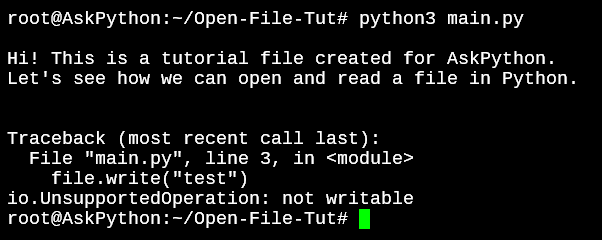
A: The `with` statement ensures files are properly closed after use, even if an exception occurs. Without it, you must manually call `file.close()`, which can be forgotten in complex scripts. This context manager handles cleanup via the `__exit__` method, preventing resource leaks and improving code reliability.
Q: How can I handle large files efficiently in Python without loading them entirely into memory?
A: For text files, iterate line-by-line (`for line in file:`) or read chunks (`file.read(4096)`). For binary files, use memory-mapped files (`mmap`) or libraries like `pandas` with `chunksize`. These methods process data in manageable segments, avoiding memory overload.
Q: What encoding should I use when opening files in Python?
A: Always specify an encoding explicitly (e.g., `encoding='utf-8'`). Default to UTF-8 for modern text files, but use `'latin-1'` for legacy systems or `'utf-16'` for specific formats. Omitting encoding risks `UnicodeDecodeError` or silent data corruption.
Q: Can I open files in Python from a URL or cloud storage?
A: Yes, using libraries like `urllib.request` for URLs or `boto3` for AWS S3. These tools abstract the underlying protocol, allowing you to treat remote files like local ones. For example, `urllib.request.urlopen(url)` returns a file-like object for streaming data.
Q: How do I check if a file exists before opening it in Python?
A: Use `os.path.exists()` or `pathlib.Path(file).is_file()`. However, prefer `try-except` blocks with `FileNotFoundError` for atomic operations, as file existence can change between checks and opens. Example:
try:

    with open('file.txt') as f:

        pass

except FileNotFoundError:

    print("File does not exist.")
Leave a Comment
Comments are moderated before appearing. The data you submit is processed according to the Privacy Policy of Viralcontentbee.