How Python Assert Statements Shape Debugging and Code Reliability
Python’s `assert` statement is a quiet but formidable tool in the developer’s arsenal, silently enforcing invariants that keep code stable. Unlike explicit error handling, it operates at the level of assumptions—validating conditions that should hold true if the program logic is correct. Yet, its subtlety often leads to misuse or underutilization. Whether you’re debugging a critical financial system or optimizing a machine learning pipeline, understanding how `python assert` functions can mean the difference between a fragile script and production-grade software.
The elegance of `assert` lies in its simplicity: a single line can expose a flaw before it cascades into a full-blown failure. But this simplicity masks complexity—how it interacts with exceptions, its role in testing frameworks, and the ethical dilemmas of disabling assertions in release builds. Developers who wield `assert` effectively treat it as a first line of defense, not just an afterthought.
What follows is a rigorous examination of `python assert`—its mechanics, strategic advantages, and the trade-offs that define its proper use. For those who rely on assertions as a debugging crutch or those who dismiss them as redundant, this analysis will clarify their indispensable role in modern Python development.
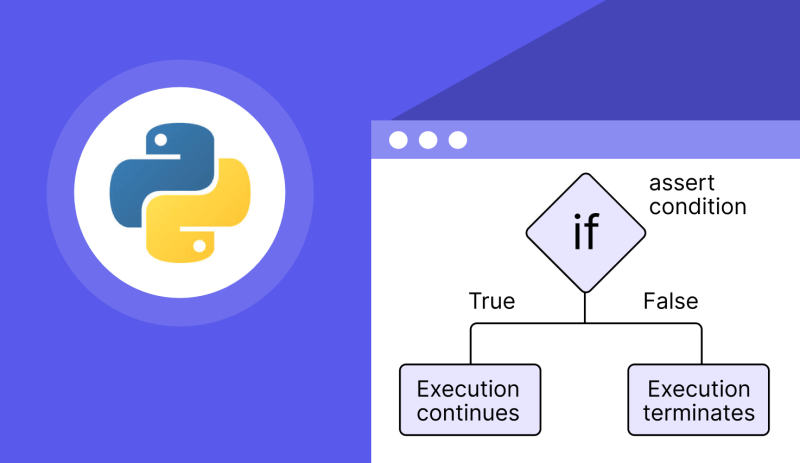
The Complete Overview of Python Assert Statements
Python’s `assert` statement is a conditional debugging aid designed to verify assumptions during development. At its core, it evaluates a boolean expression and raises an `AssertionError` if the condition fails. While often overlooked in favor of explicit exception handling, `assert` excels in scenarios where invariants—properties that must always hold—are critical. For instance, ensuring a function’s input meets expected constraints or validating intermediate states in a complex algorithm. The syntax is straightforward:```python
assert condition, optional_error_message
```
The optional message provides context when the assertion fails, making debugging more efficient.
Beyond its role in debugging, `assert` serves as a lightweight documentation tool. By embedding assertions in code, developers communicate intent without cluttering comments. This dual purpose—validation and clarity—makes `assert` a cornerstone of defensive programming. However, its effectiveness hinges on proper placement: assertions should guard against logical errors, not handle expected runtime conditions (where exceptions or input validation are more appropriate).
Historical Background and Evolution
The concept of assertions traces back to early programming languages like ALGOL 68, where they were introduced as a way to enforce programming invariants. Python adopted a similar mechanism in its design philosophy, emphasizing readability and simplicity. Guido van Rossum, Python’s creator, included `assert` in Python 1.0 (1991) as a pragmatic tool for developers to catch bugs early. The language’s emphasis on explicit over implicit constructs meant `assert` would not interfere with normal execution unless explicitly disabled—a design choice that reflected Python’s pragmatic approach to debugging.Over time, `assert` evolved alongside Python’s growth. In Python 3, the language standardized exception handling, and `assert` was refined to integrate seamlessly with the `try-except` framework. While some languages (like Java) use assertions primarily for testing frameworks, Python’s `assert` remains a general-purpose tool, though its use in production code remains controversial. The debate over whether to enable or disable assertions in release builds (`-O` flag) underscores its dual role: a debugging aid during development and a potential performance overhead in production.
Core Mechanisms: How It Works
Under the hood, `assert` operates by evaluating a condition and raising an `AssertionError` if the result is `False` or `None`. The optional error message, if provided, becomes the argument to the exception. For example:```python
assert len(users) > 0, "User list cannot be empty"
```
If `len(users)` is zero, Python raises:
```
AssertionError: User list cannot be empty
```
This mechanism is efficient because it short-circuits evaluation: if the condition is `False`, Python skips the rest of the expression, avoiding unnecessary computations.
Table of Contents
- The Complete Overview of Python Assert Statements
- Historical Background and Evolution
- Core Mechanisms: How It Works
- Key Benefits and Crucial Impact
- Major Advantages
- Comparative Analysis
- Future Trends and Innovations
- Conclusion
- Comprehensive FAQs
- Q: Should I use `assert` in production code?
- Q: Can I catch `AssertionError` like other exceptions?
- Q: How do assertions interact with type checkers like `mypy`?
- Q: Are there performance penalties for using `assert`?
- Q: What’s the difference between `assert` and `raise`?
- Q: Can assertions be used in unit tests?
The real power of `assert` lies in its integration with Python’s exception hierarchy. Since `AssertionError` is a built-in exception, it can be caught like any other, though this is rarely done in practice. Instead, assertions are typically used to fail fast—terminating execution immediately when an invariant is violated. This behavior contrasts with exceptions, which are designed to handle recoverable errors. The distinction is critical: `assert` is for logical errors, while exceptions are for runtime errors.
Key Benefits and Crucial Impact
Assertions are often dismissed as "just debugging," but their strategic use can transform code quality. By embedding assertions in critical paths, developers create a safety net that catches edge cases before they propagate. This is particularly valuable in large codebases where manual testing cannot cover every scenario. For instance, in a data processing pipeline, an assertion like `assert all(isinstance(x, int) for x in data)` ensures type consistency before further operations, preventing subtle bugs downstream.The psychological impact is equally significant. Assertions act as a form of self-documentation, signaling to other developers (and future you) the conditions that must hold. This is especially useful in collaborative environments where code reviews rely on implicit understanding of invariants. When used judiciously, `assert` statements reduce cognitive load by making assumptions explicit.
> "Assertions are the canary in the coal mine of programming—they don’t prevent all errors, but they give you an early warning when something is wrong." — David Beazley, Python Core Developer
Major Advantages
- Early Bug Detection: Assertions catch logical errors during development, often before they manifest as runtime failures. This reduces the cost of fixing bugs later in the development cycle.
- Improved Code Readability: By embedding conditions directly in the code, assertions serve as executable documentation, making the intended behavior clearer.
- Performance Efficiency: Unlike full-blown exception handling, assertions are optimized for speed. They are typically compiled out in release builds (when using `-O`), adding minimal overhead.
- Integration with Testing: Many testing frameworks (e.g., `pytest`) leverage assertions to validate test cases, blurring the line between debugging and verification.
- Defensive Programming: Assertions enforce invariants, making code more robust against invalid inputs or edge cases that might otherwise go unnoticed.

Comparative Analysis
| Feature | `assert` Statement | Explicit Exception Handling (`try-except`) ||------------------------|--------------------------------------------|--------------------------------------------|
| Primary Use Case | Debugging logical errors | Handling runtime errors |
| Performance | Optimized (often removed in release builds)| Always active, slight overhead |
| Error Context | Customizable via error message | Requires `raise` with custom exceptions |
| Best For | Invariants, internal checks | User-facing errors, recoverable failures |
| Example | `assert x > 0, "x must be positive"` | `try: ... except ValueError: ...` |
While `assert` excels in debugging, explicit exceptions are better suited for graceful error recovery. The choice depends on context: use `assert` for conditions that should never fail in correct code, and exceptions for conditions that might fail due to external factors (e.g., network issues, invalid user input).
Future Trends and Innovations
The role of `assert` in Python is likely to evolve alongside the language’s broader trends. As Python continues to integrate with static type checkers (e.g., `mypy`), assertions may become more closely tied to formal verification tools. For example, combining `assert` with type hints could enable stronger preconditions and postconditions, bridging the gap between dynamic and static analysis.Another potential innovation is the integration of assertions with logging frameworks. Instead of raising exceptions, assertions could log violations and continue execution, making them suitable for production environments where failures are non-fatal. This hybrid approach would preserve the benefits of `assert` while mitigating its traditional limitations.

Conclusion
Python’s `assert` statement is more than a debugging convenience—it’s a disciplined approach to writing reliable code. By validating assumptions early, developers can catch errors before they escalate, reducing the time spent in reactive debugging. However, its effectiveness depends on context: assertions are not a replacement for robust input validation or exception handling but a complementary tool for enforcing logical correctness.The key takeaway is balance. Use `assert` to guard against impossible states in your code, but avoid over-reliance on it for runtime error handling. When wielded correctly, `assert` statements elevate code quality, making programs more maintainable and less prone to subtle bugs.
Comprehensive FAQs
Q: Should I use `assert` in production code?
Generally, no. Assertions are disabled by default in optimized builds (`python -O`), and relying on them for critical error handling can lead to silent failures. Use assertions for development-time checks and combine them with proper exception handling for production.
Q: Can I catch `AssertionError` like other exceptions?
Yes, but it’s rarely recommended. `AssertionError` is meant to terminate execution when an invariant is violated. Catching it would defeat the purpose of failing fast. If you need to handle assertion failures gracefully, reconsider whether the condition should be an assertion or an exception.
Q: How do assertions interact with type checkers like `mypy`?
Assertions can complement static type checking by validating runtime conditions that type checkers cannot verify. For example, `assert isinstance(x, str)` ensures a variable meets a type constraint at runtime, even if `mypy` cannot infer it statically.
Q: Are there performance penalties for using `assert`?
Minimal in development builds. Python compiles assertions out when the `-O` flag is used, so they add no runtime overhead in optimized builds. This makes them ideal for debugging without sacrificing performance.
Q: What’s the difference between `assert` and `raise`?
`assert` is for logical errors (conditions that should never fail), while `raise` is for runtime errors (conditions that might fail due to external factors). For example, use `assert` to validate internal data structures, and `raise` to handle invalid user input.
Q: Can assertions be used in unit tests?
Yes, and they often are. Frameworks like `pytest` rely on assertions to validate test outcomes. For instance, `assert result == expected` is a common pattern for verifying function behavior.
Leave a Comment
Comments are moderated before appearing. The data you submit is processed according to the Privacy Policy of Viralcontentbee.