No-Code Development Explained: The Definitive Guide to Building Without Code
The idea of building functional software without writing a single line of code was once dismissed as fantasy. Today, it’s a reality reshaping industries—from startups to enterprises. No-code development isn’t just about democratizing technology; it’s about redefining efficiency, creativity, and accessibility in digital product creation. Whether you’re a non-technical founder, a developer seeking faster prototyping, or a business leader optimizing workflows, understanding this paradigm shift is no longer optional.
The rise of comprehensive no-code development platforms has turned abstract concepts like automation, databases, and user interfaces into drag-and-drop experiences. These tools eliminate the traditional barriers of coding—syntax errors, debugging, and deployment hurdles—while still delivering scalable solutions. The catch? Mastering them requires more than just clicking buttons; it demands strategic thinking about logic, user experience, and system architecture. The best builders in this space treat no-code as a language, not just a shortcut.
Yet, for all its promise, no-code isn’t a silver bullet. Misconceptions abound: that it’s only for simple apps, that it lacks customization, or that it’s a temporary trend. The truth is far more nuanced. This guide to no-code development cuts through the noise, exploring its mechanics, real-world advantages, and the limitations that demand workarounds. It’s a toolkit for those ready to leverage its full potential—without falling into its pitfalls.

The Complete Overview of No-Code Development
No-code development refers to the creation of software applications, websites, or workflows using graphical user interfaces (GUIs) and configuration-based tools, rather than traditional programming languages. At its core, it’s about abstracting complexity: replacing `if-else` statements with visual logic flows, SQL queries with point-and-click database builders, and deployment scripts with automated hosting. Platforms like Bubble, Webflow, and Zapier exemplify this shift, offering templates, pre-built components, and integrations that accelerate development cycles from months to days.The appeal lies in its dual nature—serving as both a crutch for non-developers and a force multiplier for technical teams. For entrepreneurs, it means validating ideas faster; for enterprises, it means rapid internal tooling without heavy IT overhead. But the real innovation isn’t just in speed; it’s in the collaboration it enables. Designers, marketers, and product managers can now participate in the development process without relying on backend engineers, blurring the lines between roles. This isn’t just about building apps—it’s about redefining how teams think about building them.
Historical Background and Evolution
The seeds of no-code were sown in the 1980s with tools like HyperCard, which allowed users to create interactive applications using a visual programming environment. However, it wasn’t until the 2010s—with the rise of cloud computing, mobile apps, and SaaS—that no-code gained traction. Platforms like Airtable (2012) and Zapier (2011) demonstrated that complex workflows could be automated without code, paving the way for more sophisticated builders.The turning point came with the realization that no-code wasn’t just for hobbyists. Companies like Bubble (2012) and Softr (2017) proved that even MVPs for SaaS products could be built entirely without coding. Today, the ecosystem includes niche players like Glide (for mobile apps), Retool (for internal tools), and even AI-assisted builders like Durable. The evolution reflects a broader trend: the commoditization of infrastructure (AWS, Vercel) and the rise of citizen development, where non-technical users become builders.
Core Mechanisms: How It Works
Under the hood, no-code platforms rely on three foundational principles: abstraction, modularity, and integration. Abstraction hides the complexity of underlying systems—whether it’s rendering a UI or handling authentication—behind intuitive interfaces. Modularity breaks problems into reusable components (e.g., a "user profile" module in Bubble), while integration bridges gaps between tools via APIs or Zapier-like connectors. For example, a no-code CRM might pull data from a Google Sheet, display it in a Webflow site, and sync updates back via Airtable—all without custom backend logic.Table of Contents
- The Complete Overview of No-Code Development
- Historical Background and Evolution
- Core Mechanisms: How It Works
- Key Benefits and Crucial Impact
- Major Advantages
- Comparative Analysis
- Future Trends and Innovations
- Conclusion
- Comprehensive FAQs
- Q: Is no-code development truly scalable for large applications?
- Q: Can I migrate a no-code app to traditional code later?
- Q: What are the biggest security risks of no-code platforms?
- Q: How do I choose between no-code and low-code?
- Q: Are there no-code tools for enterprise-grade applications?
- Q: What skills should I learn to maximize no-code potential?
The trade-off? Flexibility. No-code excels at structured problems—CRMs, landing pages, automation—but struggles with highly customized or computationally intensive tasks (e.g., real-time physics simulations). The best practitioners treat no-code as a hybrid approach: using it for 80% of the solution and coding the remaining 20% when necessary. This is where the term "comprehensive no-code development" becomes critical—it’s not about avoiding code entirely, but about optimizing the development process.
Key Benefits and Crucial Impact
The most compelling argument for adopting no-code isn’t just speed—it’s the strategic advantage it offers. Businesses that leverage it reduce dependency on scarce technical talent, iterate faster on ideas, and allocate resources where they matter most: product-market fit. For individuals, it’s a gateway to tech careers without a computer science degree. The impact is measurable: according to Gartner, by 2025, 70% of new applications developed by enterprises will use low-code or no-code technologies.Yet, the benefits extend beyond metrics. No-code fosters a culture of experimentation. A startup can test a subscription model in a week instead of three months. A marketing team can build a lead-gen tool without waiting for IT. The democratization of tooling shifts power from centralized dev teams to decentralized contributors—though this requires governance to avoid "shadow IT" chaos.
> "No-code isn’t about replacing developers; it’s about amplifying what they can do. The real question isn’t whether you’ll use it, but how you’ll integrate it into your workflow without losing control." — James Cowling, CTO at Retool
Major Advantages
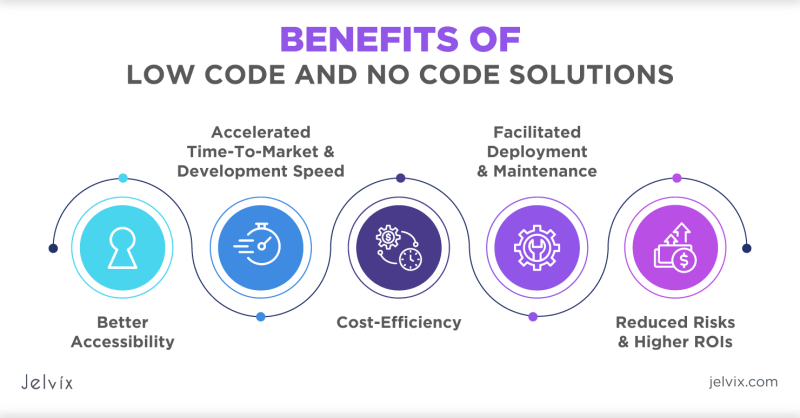
- Speed to Market: Prototypes that would take weeks in traditional development can be launched in days. Example: A Bubble app with Stripe integration for payments can be deployed in under 24 hours.
- Cost Efficiency: Eliminates the need for full-stack developers, reducing hiring costs and licensing fees for proprietary software. Open-source no-code tools (e.g., Directus) further cut expenses.
- Accessibility: Enables non-technical stakeholders to contribute to digital products, reducing bottlenecks. A sales team can update a Webflow site without developer approval.
- Scalability for MVPs: Many no-code platforms (e.g., Supabase for databases) support scaling to thousands of users, making them viable for early-stage startups.
- Integration Ecosystems: Tools like Zapier and Make (formerly Integromat) connect no-code apps to 2,000+ third-party services, reducing the need for custom APIs.
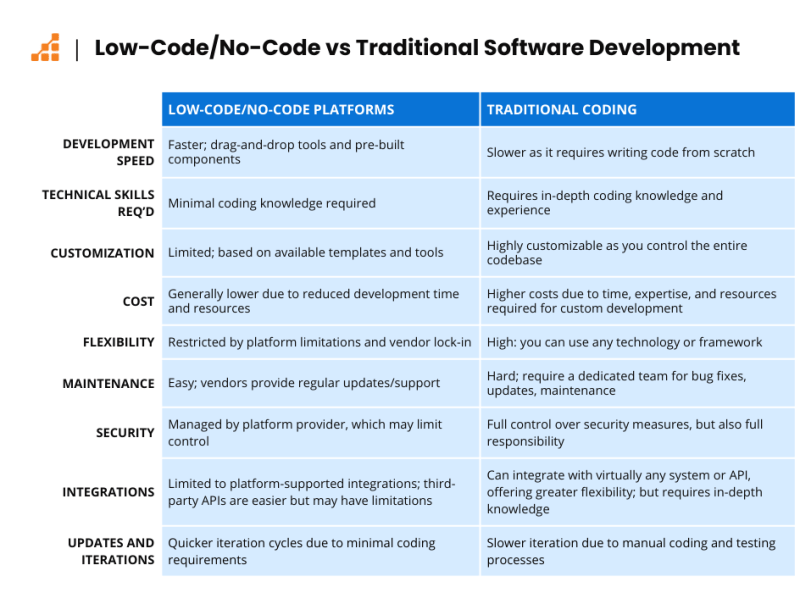
Comparative Analysis
| Traditional Development | No-Code Development |
|---|---|
|
|
| Best for: Highly complex, long-term products (e.g., enterprise SaaS) | Best for: MVPs, internal tools, rapid prototyping |
| Learning Curve: Steep (years of practice) | Learning Curve: Moderate (weeks to master basics) |
| Future-Proofing: Easier to maintain custom code | Future-Proofing: Risk of vendor lock-in or platform changes |
Future Trends and Innovations
The next frontier for no-code lies in AI augmentation and expanded use cases. Tools like Durable and Softr are embedding AI to auto-generate UI components or suggest workflow improvements. Meanwhile, platforms like Glide are pushing into mobile-first development, while Retool is targeting enterprise internal tools with advanced data visualization. The trend toward "citizen development"—where business users build their own solutions—will accelerate, but so will the need for governance frameworks to manage sprawl.Another critical shift is the blurring of lines between no-code and pro-code. Hybrid approaches, where no-code handles the frontend and low-code (e.g., FlutterFlow) manages the backend, are becoming standard. Expect to see more no-code platforms offering "escape hatches"—ways to inject custom code when needed—while traditional dev tools (e.g., GitHub Codespaces) add no-code-like features. The future isn’t either/or; it’s about comprehensive no-code development as a spectrum.
Conclusion
No-code development isn’t a replacement for traditional coding—it’s a redefinition of what’s possible. For the right problems, it delivers unmatched speed, cost savings, and accessibility. For others, it’s a stepping stone to more complex solutions. The key to success lies in understanding its boundaries: where it excels (automation, CRMs, simple SaaS) and where it falls short (highly customized logic, real-time systems). As the ecosystem matures, the tools will become more powerful, but the principles remain: strategic adoption, hybrid workflows, and continuous learning.The most forward-thinking organizations aren’t asking if they should use no-code—they’re asking how. Whether you’re a solo founder, a product manager, or a CTO, the comprehensive guide to no-code development isn’t just about building without code. It’s about building smarter.
Comprehensive FAQs
Q: Is no-code development truly scalable for large applications?
A: While no-code excels at MVPs and medium-scale apps (e.g., up to 10,000 users), large-scale applications often require custom backend logic, database optimizations, or real-time features that no-code platforms struggle to support. Hybrid approaches—using no-code for frontend/UI and custom code for critical backend functions—are common in scalable projects.
Q: Can I migrate a no-code app to traditional code later?
A: Yes, but it’s challenging. No-code platforms often use proprietary architectures, making it difficult to extract logic or data. Some tools (e.g., Bubble) offer export options, but complex apps may require a full rebuild. Always design with migration in mind if scalability is a priority.
Q: What are the biggest security risks of no-code platforms?
A: Risks include data exposure (if integrations aren’t secure), third-party vendor vulnerabilities, and misconfigured permissions. Platforms like Retool mitigate this with built-in security features, but users must follow best practices: limiting API access, encrypting sensitive data, and auditing workflows regularly.
Q: How do I choose between no-code and low-code?
A: Use no-code for fully visual, non-technical projects (e.g., landing pages, simple databases). Low-code (e.g., OutSystems, Mendix) is better for hybrid needs—where some custom code is required but you want to retain drag-and-drop flexibility. Assess your team’s technical skills and project complexity.
Q: Are there no-code tools for enterprise-grade applications?
A: Yes, platforms like OutSystems, Appian, and Microsoft Power Apps are designed for enterprise use cases, offering governance, compliance features, and scalability. However, they often require IT oversight to manage complexity and ensure alignment with corporate standards.
Q: What skills should I learn to maximize no-code potential?
A: Focus on systems thinking (understanding how components interact), UI/UX principles (to design intuitive interfaces), and basic logic (e.g., conditional workflows). Familiarity with APIs, databases (SQL basics), and security fundamentals will also help you avoid common pitfalls.
Leave a Comment
Comments are moderated before appearing. The data you submit is processed according to the Privacy Policy of Viralcontentbee.