How to Setup Local Area Network: The Definitive Technical Blueprint
A properly configured local area network (LAN) is the backbone of modern connectivity—whether you're managing a home office, a small business, or a high-traffic smart home. Without it, devices struggle to communicate efficiently, leading to latency, security vulnerabilities, and fragmented workflows. The process of setting up a local area network isn’t just about connecting cables; it’s about designing a system that balances speed, reliability, and scalability. Even minor misconfigurations can create bottlenecks or expose your network to exploits, making this a task that demands precision.
Most users overlook critical steps, such as VLAN segmentation or QoS (Quality of Service) prioritization, assuming a basic router setup suffices. Yet, these nuances separate a functional network from an optimized one. For instance, a poorly structured LAN setup can lead to broadcast storms, where unnecessary traffic floods the network, degrading performance. Conversely, a well-planned local area network configuration ensures that critical applications—like video conferencing or cloud backups—receive the bandwidth they need without contention.
The evolution of networking technologies has made setting up a local area network more accessible, but it hasn’t simplified the underlying complexity. Modern networks now integrate IoT devices, virtual private networks (VPNs), and cloud services, each introducing new variables. Whether you're deploying a wired Gigabit Ethernet backbone or a mesh Wi-Fi 6 system, understanding the trade-offs—such as latency vs. coverage—is essential. This guide cuts through the ambiguity, providing a structured approach to building a local area network that aligns with both technical requirements and real-world usage.
The Complete Overview of Setting Up a Local Area Network
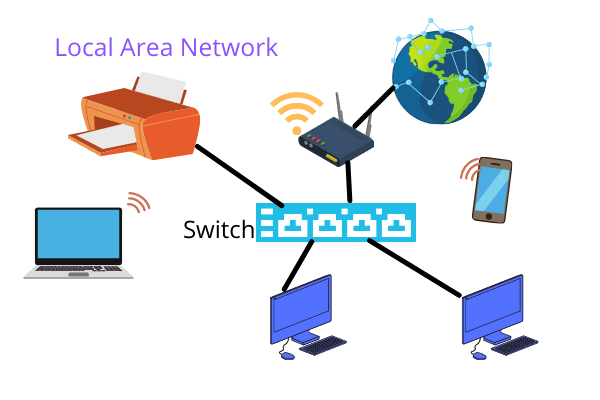
The foundation of any local area network (LAN) lies in its physical and logical infrastructure. At its core, a LAN connects devices within a limited area—typically a home, office, or campus—using shared media like Ethernet cables, Wi-Fi signals, or fiber optics. The process of setting up a local area network begins with hardware selection: routers, switches, access points, and possibly a network-attached storage (NAS) device. Each component plays a distinct role; for example, a managed switch enables VLANs for traffic isolation, while a dual-band router ensures compatibility with legacy and modern devices.
Beyond hardware, the LAN setup hinges on configuration: assigning IP addresses via DHCP, configuring firewalls, and optimizing routing tables. A static IP might be preferable for servers, while dynamic addressing simplifies device management. Security is non-negotiable—misconfigured firewalls or weak encryption can leave the network exposed to man-in-the-middle attacks. Even in a small-scale local area network configuration, overlooking encryption protocols like WPA3 or failing to update firmware can turn a secure setup into a liability. The goal isn’t just connectivity but a resilient, future-proof network that adapts to evolving threats and demands.
Historical Background and Evolution
The concept of a local area network emerged in the 1970s with Ethernet, developed by Xerox PARC, which standardized wired connections using coaxial cables. Early LANs were proprietary, limiting interoperability until the IEEE 802.3 standard (Ethernet) and 802.11 (Wi-Fi) democratized access. The shift from shared media (like 10BASE5) to switched networks in the 1990s revolutionized LAN setup by enabling full-duplex communication, drastically reducing collisions. Meanwhile, the rise of TCP/IP in the 1980s provided the protocol backbone for modern networks, allowing devices to communicate across disparate systems.
Table of Contents
- The Complete Overview of Setting Up a Local Area Network
- Historical Background and Evolution
- Core Mechanisms: How It Works
- Key Benefits and Crucial Impact
- Major Advantages
- Comparative Analysis
- Future Trends and Innovations
- Conclusion
- Comprehensive FAQs
- Q: What’s the minimum hardware needed to setup local area network?
- Q: Can I mix wired and wireless devices in a local area network setup?
- Q: How do I secure my local area network configuration?
- Q: What’s the difference between a switch and a router in a LAN setup?
- Q: How do I troubleshoot connectivity issues in my local area network?
- Q: Is a mesh network better for a local area network setup than traditional Wi-Fi?
- Q: Can I setup local area network without a router?
- Q: How do I expand my local area network for more devices?
- Q: What’s the best practice for naming devices in a local area network configuration?
- Q: How often should I update firmware in my local area network setup?
Today, setting up a local area network involves far more than physical wiring. The advent of Power over Ethernet (PoE), mesh networking, and software-defined networking (SDN) has blurred the lines between traditional LANs and wider area networks (WANs). For instance, a modern LAN configuration might integrate cloud-managed switches, AI-driven traffic analysis, or zero-trust security models. While the core principles remain—connectivity, scalability, and security—the tools and methodologies have evolved to handle the demands of smart cities, remote workforces, and the Internet of Things (IoT). Understanding this evolution is key to avoiding outdated practices in your local area network setup.
Core Mechanisms: How It Works
The mechanics of a local area network revolve around three pillars: physical topology, logical addressing, and data transmission. Physically, networks can be bus (linear), star (centralized), or mesh (decentralized). A star topology, common in home LAN setups, uses a central switch or router to manage traffic, reducing collisions. Logically, devices communicate via IP addresses (IPv4 or IPv6) and MAC addresses, with routers directing traffic between subnets using routing tables. The OSI model governs how data is encapsulated, from the physical layer (cables) to the application layer (services like HTTP).
Data transmission in a LAN setup relies on protocols like TCP for reliability and UDP for speed. Ethernet frames carry data between devices, while Wi-Fi uses CSMA/CA (Carrier Sense Multiple Access with Collision Avoidance) to manage wireless traffic. Switches operate at Layer 2 (data link), forwarding frames based on MAC addresses, while routers at Layer 3 (network) route packets between networks. Misconfigurations here—such as incorrect subnet masks or default gateway settings—can sever connectivity. For example, assigning overlapping IP ranges in a local area network configuration creates address conflicts, rendering devices unreachable. Mastering these mechanics ensures a LAN setup that’s both functional and efficient.
Key Benefits and Crucial Impact
A well-executed local area network setup transforms how organizations and households operate. It eliminates the bottlenecks of ad-hoc connections, such as relying on a single Wi-Fi router for 20 devices, which often leads to congestion and dropped signals. Instead, a structured LAN configuration distributes traffic intelligently, prioritizing critical applications and isolating sensitive data. For businesses, this means uninterrupted video conferencing, while home users enjoy seamless streaming and gaming. The impact extends to security: centralized management of firewalls and access controls reduces the attack surface compared to individual device protections.
Beyond performance, a local area network enables resource sharing—file servers, printers, and even internet connections can be distributed efficiently. This is particularly valuable in multi-tenant environments, where tenants might share a single internet line but require isolated networks. The scalability of a LAN setup also future-proofs investments; adding more switches or upgrading to fiber optics can accommodate growth without a complete overhaul. However, the benefits are only realized with meticulous planning. A poorly designed local area network configuration can become a liability, creating single points of failure or security gaps that compromise integrity.
"A network’s strength lies not in its components, but in how they’re orchestrated. The difference between a chaotic LAN setup and a high-performance network is often just a few well-placed configurations."
— Network Engineer, Cisco Systems
Major Advantages
- Enhanced Speed and Latency: Wired connections (Ethernet) provide consistent speeds up to 10 Gbps, far surpassing Wi-Fi’s variable performance. A LAN setup with dedicated cabling ensures low-latency communication, critical for real-time applications like VoIP or industrial automation.
- Improved Security: Centralized management of firewalls, VPNs, and intrusion detection systems (IDS) in a local area network configuration reduces exposure to external threats. Segmenting networks via VLANs limits lateral movement for attackers.
- Resource Sharing: File servers, databases, and printers can be accessed across the network, eliminating redundancy. For example, a LAN setup in an office allows multiple departments to pull from a shared NAS without local storage constraints.
- Scalability: Adding more devices or expanding coverage (e.g., adding access points) is straightforward in a structured local area network. Unlike consumer-grade routers, enterprise-grade switches support stacking and link aggregation for high availability.
- Cost Efficiency: While initial LAN setup costs may be higher than plug-and-play routers, long-term savings come from reduced downtime, lower bandwidth costs (via QoS), and extended hardware lifecycles through upgrades rather than replacements.

Comparative Analysis
| Factor | Traditional LAN (Wired) | Modern LAN (Wi-Fi 6/6E + Mesh) |
|---|---|---|
| Speed | Up to 10 Gbps (Ethernet), consistent | Up to 9.6 Gbps (Wi-Fi 6E), but affected by interference and distance |
| Latency | Near-zero (hardwired connection) | Higher (5–50ms, depending on load and distance) |
| Security | Harder to intercept (physical access required); VLANs and port security | Vulnerable to eavesdropping unless using WPA3-Enterprise; rogue AP risks |
| Scalability | Limited by cable runs; requires additional switches | Highly scalable with mesh nodes; coverage expands with more APs |
Future Trends and Innovations
The next decade of local area network setups will be shaped by advancements in edge computing, AI-driven network management, and deterministic networking. Edge computing reduces latency by processing data locally, which is critical for autonomous systems like drones or smart factories. AI will automate LAN configurations, predicting traffic patterns and dynamically adjusting QoS policies—eliminating the need for manual tuning. Meanwhile, technologies like Time-Sensitive Networking (TSN) ensure ultra-low latency for industrial applications, where a millisecond delay can cause machinery failures.
Security will also evolve with zero-trust architectures, where every device—even within a local area network—must authenticate before access is granted. Quantum-resistant encryption is on the horizon, preparing for the post-quantum era where current algorithms like AES-256 could be compromised. For home users, expect seamless integration with 5G and Wi-Fi 7, enabling multi-gigabit speeds across devices. The challenge for LAN setup architects will be balancing these innovations with backward compatibility, ensuring legacy devices don’t become obstacles in a high-speed future.

Conclusion
Setting up a local area network is more than a technical exercise; it’s a strategic investment in connectivity, security, and efficiency. The key to success lies in understanding the interplay between hardware, protocols, and user requirements. A LAN configuration that ignores VLANs or skips firewall rules may work in the short term but will fail under stress. Conversely, over-engineering a local area network setup for a small office can lead to unnecessary complexity and costs. The optimal approach balances current needs with future scalability, whether that means deploying a simple Gigabit switch for a home office or a multi-layered SDN for an enterprise.
As networks become more sophisticated, the line between LAN setup and wider network architectures blurs. The principles remain constant: design for performance, secure by default, and plan for growth. By adhering to these guidelines, you’ll avoid the pitfalls of a haphazard local area network and build an infrastructure that supports both today’s demands and tomorrow’s innovations.
Comprehensive FAQs
Q: What’s the minimum hardware needed to setup local area network?
A: The basics include a router (for internet access and DHCP), a switch (to expand wired connections), and Ethernet cables (Cat 5e or higher). For wireless, add an access point or a dual-band router. Optional but recommended components are a firewall (if not built into the router), a NAS for storage, and a managed switch for advanced features like VLANs.
Q: Can I mix wired and wireless devices in a local area network setup?
A: Yes, but ensure your router or switch supports both. Wired devices (like desktops) will have priority for speed and stability, while wireless devices (laptops, phones) will share bandwidth. Use QoS settings to prioritize critical wired traffic if needed. Also, consider separating wireless networks (e.g., a guest network) to avoid congestion.
Q: How do I secure my local area network configuration?
A: Start with strong encryption (WPA3 for Wi-Fi), disable WPS, and change default credentials. Enable MAC filtering for wireless networks and configure a firewall to block unnecessary ports. Segment your network with VLANs to isolate IoT devices or guest traffic. Regularly update firmware on all devices, and consider implementing a network monitoring tool to detect anomalies.
Q: What’s the difference between a switch and a router in a LAN setup?
A: A switch operates at Layer 2 (data link), connecting devices within the same network and forwarding frames based on MAC addresses. A router operates at Layer 3 (network), connecting multiple networks (e.g., your LAN to the internet) and using IP addresses to route traffic. In a local area network setup, a router typically includes built-in switching, but standalone switches offer more ports and advanced features like PoE or VLAN support.
Q: How do I troubleshoot connectivity issues in my local area network?
A: Begin with basic checks: verify cables, restart devices, and ensure IP addresses are correctly assigned (static or via DHCP). Use ping tests to check connectivity between devices (e.g., `ping 192.168.1.1`). Check router logs for errors, and inspect firewall settings for blocked ports. For wireless issues, move the access point away from interference sources (microwaves, cordless phones) and ensure the channel is not congested. Advanced tools like Wireshark can analyze packet-level issues.
Q: Is a mesh network better for a local area network setup than traditional Wi-Fi?
A: Mesh networks excel in large or complex environments (e.g., multi-story homes, offices with dead zones) by dynamically routing traffic between nodes. Traditional Wi-Fi (single router) works well for small, centralized spaces. Mesh is ideal if you need seamless roaming and redundancy, but it’s more expensive and may introduce slight latency. For most LAN setups, a high-quality dual-band router suffices unless coverage is a critical issue.
Q: Can I setup local area network without a router?
A: Technically, yes, but it’s impractical for most use cases. A router provides NAT (for internet sharing), DHCP (IP assignment), and firewall functions. Without it, you’d need to manually configure each device with static IPs and forward ports for internet access. For a pure LAN (no internet), a switch alone can connect devices, but you’d lose features like guest networks or QoS. Routers are essential for modern local area network configurations.
Q: How do I expand my local area network for more devices?
A: Add a switch to extend wired connections, or deploy additional access points for wireless coverage. If your router lacks ports, use a switch in between. For large-scale LAN setups, consider a network extender or a second router in bridge mode. Always ensure your ISP’s bandwidth can handle the increased load, and upgrade to a gigabit plan if needed. VLANs can also help manage traffic growth by segmenting devices.
Q: What’s the best practice for naming devices in a local area network configuration?
A: Use descriptive, consistent naming conventions (e.g., `Office-PC-01`, `IoT-Thermostat`). Avoid generic names like `Device` or `Laptop`, which make troubleshooting difficult. For wireless networks, use SSIDs that indicate purpose (e.g., `Corp-LAN` vs. `Guest-WiFi`). Document your naming scheme to avoid conflicts, especially in enterprise LAN setups where hundreds of devices may exist.
Q: How often should I update firmware in my local area network setup?
A: Check for updates monthly, as manufacturers release patches for security vulnerabilities and performance improvements. Critical updates (e.g., those fixing exploits) should be applied immediately. Some devices (like routers) may require manual checks, while others (like managed switches) can be updated remotely. Always back up configurations before updating to avoid disruptions.
Leave a Comment
Comments are moderated before appearing. The data you submit is processed according to the Privacy Policy of Viralcontentbee.