The Hidden Power of Markdown Code Blocks: Syntax, Mastery, and Beyond
Markdown’s simplicity masks its precision. A well-placed triple-backtick fence (` ``` `) or indented block transforms raw text into executable code snippets, syntax-highlighted output, or even embedded scripts—without requiring external plugins. This isn’t just a formatting trick; it’s a workflow multiplier for developers, technical writers, and content creators who demand clarity without sacrificing functionality. The markdown code block isn’t merely a container for text; it’s a bridge between human-readable prose and machine-executable logic, often determining whether a project’s documentation remains maintainable or devolves into chaos.
Yet despite its ubiquity—embedded in GitHub’s issue trackers, Stack Overflow’s answers, and even corporate wikis—the markdown code block remains underappreciated. Most users treat it as a checkbox: wrap code in backticks, hit Enter, and move on. But beneath the surface lies a system of rules governing language specification, escape sequences, and platform-specific behaviors. Misconfigure a single parameter, and your Python script might render as plain text, or worse, trigger unintended parsing. The stakes are higher than aesthetics; they affect collaboration, debugging, and even security in shared environments.
The markdown code block’s power stems from its duality. It serves as both a visual cue (via syntax highlighting) and a functional component (when parsed by tools like Pandoc or VS Code). This duality explains why it’s the default choice for platforms like GitLab, VS Code’s built-in previewer, and even Jupyter notebooks. But to wield it effectively, you must understand its origins, its internal mechanics, and the subtle variations across implementations.

The Complete Overview of Markdown Code Blocks
The markdown code block is the unsung hero of technical communication—a silent facilitator that ensures code remains legible while preserving its structural integrity. Unlike raw text, which risks being misinterpreted by compilers or IDEs, a properly formatted markdown code block guarantees that indentation, line breaks, and special characters (like `<` or `>`) are preserved exactly as written. This precision is critical for developers reviewing pull requests or troubleshooting errors in shared documentation. The block’s ability to embed multiple languages—from JavaScript to YAML—without requiring manual language tags makes it a universal solution, though not all implementations handle this uniformly.What distinguishes the markdown code block from other formatting tools is its adaptability. It can be used for:
This versatility explains why it’s the default choice for platforms like GitHub, where code blocks are rendered with GitHub Flavored Markdown (GFM) extensions, including tables, task lists, and even embedded images within blocks.
Historical Background and Evolution
The markdown code block traces its lineage to the original Markdown specification by John Gruber and Aaron Swartz in 2004, where it was introduced as a way to preserve code formatting in plaintext documents. The initial design was minimalist: four spaces of indentation or a pair of backticks (` `) for inline code. This approach mirrored the simplicity of Markdown’s core philosophy—“invisible markup”—but it lacked features like syntax highlighting or language specification. The need for richer functionality emerged as Markdown adoption grew, particularly in developer communities where code readability was paramount.Table of Contents
- The Complete Overview of Markdown Code Blocks
- Historical Background and Evolution
- Core Mechanisms: How It Works
- Key Benefits and Crucial Impact
- Major Advantages
- Comparative Analysis
- Future Trends and Innovations
- Conclusion
- Comprehensive FAQs
- Q: Can I nest markdown lists or tables inside a code block?
- Example with a list
- Q: How do I escape backticks inside a markdown code block?
- Q: Why does my code block’s syntax highlighting not work in VS Code?
- Q: Are there security risks with markdown code blocks?
- Q: How can I add line numbers to a markdown code block?
- Q: What’s the difference between `` `code` `` and `` ```code``` ``?
The turning point came with GitHub Flavored Markdown (GFM), introduced in 2009. GFM expanded the markdown code block’s capabilities by:
1. Adding triple-backtick fences (` ``` `) to delimit blocks, enabling multi-line code with optional language specification (e.g., ```python).
2. Supporting syntax highlighting via integration with libraries like Pygments or Highlight.js.
3. Introducing block-level metadata, such as line numbers or captions, which later influenced tools like VS Code’s Markdown previewer.
This evolution didn’t happen in isolation. Platforms like Reddit and Discourse adopted similar conventions, while tools like Pandoc extended markdown code block support to LaTeX and HTML outputs. Today, the markdown code block is a patchwork of standards, with minor deviations across platforms—some support `~` for code blocks, others allow HTML `
` tags to nest within them.

Core Mechanisms: How It Works
At its core, the markdown code block operates on two primary syntaxes:

1. Indented blocks: Four spaces or a tab at the start of each line, a holdover from early Markdown’s reliance on whitespace.

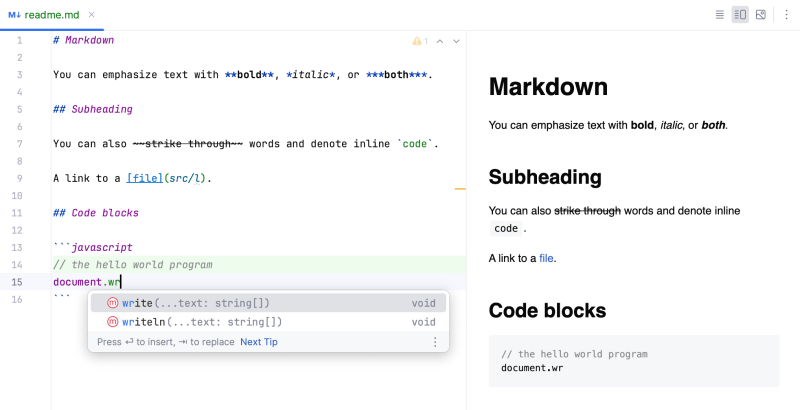
2. Fenced blocks: Triple backticks (` ``` `) or tildes (` ~~~ `) with an optional language specifier (e.g., ```javascript).The fenced block syntax is more flexible and widely adopted because it:
Under the hood, parsers like CommonMark or GFM process these blocks by:
1. Escaping special characters: Backticks inside a code block are rendered literally unless escaped with a second backtick (`` `` ` ``).
2. Language detection: The parser checks the specifier (e.g., `python`) and applies corresponding syntax rules from a lexer like Pygments.
3. Platform-specific rendering: GitHub adds line numbers by default, while VS Code may include a copy button unless disabled.
The trade-off? Some implementations (e.g., Reddit’s Markdown) strip out fenced blocks entirely, defaulting to indented blocks for compatibility. This inconsistency is why understanding the target platform’s markdown code block rules is critical.
Key Benefits and Crucial Impact
The markdown code block’s influence extends beyond aesthetics. It’s a cornerstone of modern technical workflows, reducing friction in:The block’s impact isn’t just functional—it’s cultural. It’s why Stack Overflow’s answers are legible, why The Pragmatic Programmer’s code examples remain clear decades later, and why companies like Stripe use it to document internal APIs. Without it, technical writing would revert to cumbersome HTML or PDFs, slowing down iteration.
“The markdown code block is the closest thing we have to a universal syntax for code in plaintext. It’s not perfect, but it’s the least worst option we’ve got.” — — John MacFarlane, creator of Pandoc
Major Advantages
- Language Agnosticism: Supports over 200+ languages via syntax highlighting (e.g., ```rust, ```sql), making it platform-agnostic.
- Seamless Integration: Works in static site generators (Jekyll, Hugo), wiki engines (Confluence, Notion), and even email clients (via HTML conversion).
- Version Control Friendly: Git diffs show changes line-by-line, unlike attached files where context is lost.
- Extensible Metadata: GFM’s `linenos`, `title`, and `highlight` parameters enable advanced use cases (e.g., embedding code with annotations).
- Reduced Cognitive Load: Developers don’t need to switch between editors to format code; the markdown code block handles it in-place.
Comparative Analysis
Not all markdown code block implementations are equal. Below is a side-by-side comparison of key platforms:| Feature | GitHub Flavored Markdown (GFM) | CommonMark | Reddit/Old-School Markdown |
|---|---|---|---|
| Syntax for Blocks | Triple backticks (` ``` `) or ~~~ | Triple backticks only | Indented (4 spaces) or single backticks (inline) |
| Language Specifier | Yes (e.g., ```python) | Yes (but no platform-specific extensions) | No |
| Line Numbers | Auto-enabled (configurable) | No (requires custom CSS) | No |
| Nested Markdown | Yes (lists, tables inside blocks) | No (strict parsing) | No |
Future Trends and Innovations
The markdown code block’s future lies in interactivity and AI integration. Platforms are already experimenting with:Another trend is standardization. The CommonMark specification is pushing for stricter markdown code block rules, but adoption remains fragmented. Meanwhile, GitHub’s new `.mdx` format (a Markdown extension) allows JSX inside code blocks, hinting at broader use cases beyond traditional syntax highlighting.

Conclusion
The markdown code block is more than a formatting tool—it’s a language unto itself, with its own syntax, quirks, and ecosystem. Mastering it means understanding not just the triple-backtick syntax but the broader implications: how it interacts with version control, how it’s parsed by different platforms, and how it can be extended for specialized use cases. For developers, it’s a productivity multiplier; for writers, it’s a bridge between technical and non-technical audiences.Yet its power isn’t static. As AI and interactive web technologies evolve, the markdown code block will likely become even more dynamic—a hybrid of static text and executable logic. The challenge for users is to stay ahead of these changes while leveraging the block’s current strengths: simplicity, portability, and precision.
Comprehensive FAQs
Q: Can I nest markdown lists or tables inside a code block?
A: Yes, but only in platforms that support GFM (e.g., GitHub). CommonMark and older implementations will treat nested Markdown as literal text. Example:
```markdown
```python
Example with a list
```
Q: How do I escape backticks inside a markdown code block?
A: Use two consecutive backticks (`` `` ` ``) to render a single backtick literally. For example:
```markdown
`` `This is a literal backtick` ``
```
will display as: `This is a literal backtick`.
Q: Why does my code block’s syntax highlighting not work in VS Code?
A: This usually happens if:
1. The language specifier is incorrect (e.g., ````plaintext` instead of ````javascript`).
2. The extension (e.g., Markdown All in One) isn’t configured to use the correct lexer.
3. The file isn’t saved with a `.md` extension.
Check VS Code’s settings for `markdown.extensions` to ensure GFM is enabled.
Q: Are there security risks with markdown code blocks?
A: Yes, if the platform parses the block as executable code. For example:

