How to Create a Linux User: A Step-by-Step Technical Mastery
The act of creating a Linux user is foundational to system administration, yet its nuances often separate novices from seasoned professionals. Unlike proprietary systems where user management is abstracted behind graphical interfaces, Linux demands direct engagement with command-line tools—each with specific behaviors, security implications, and historical quirks. Whether you’re provisioning a new developer account, enforcing least-privilege access, or auditing system roles, understanding how to set up a Linux user with granular control is non-negotiable.
Modern Linux distributions have streamlined the process, but beneath the surface lies a layered architecture where user creation intersects with group membership, shell configuration, and systemd services. A misconfigured user account can expose vulnerabilities, while optimized settings can enhance performance. This guide dissects the mechanics, best practices, and evolving standards for adding a user to Linux, ensuring you wield these tools with authority.
From the early days of Unix, where user management was a manual affair tied to `/etc/passwd` and `/etc/shadow`, to today’s containerized environments where ephemeral users are spun up dynamically, the principles remain rooted in the same core commands. Yet, the context has shifted: cloud-native deployments, immutable infrastructure, and zero-trust policies now dictate how—and whether—persistent user accounts should exist. The ability to create a Linux user is no longer just a technical skill; it’s a strategic decision with security and operational implications.

The Complete Overview of Creating a Linux User
The process of creating a Linux user is governed by a combination of low-level system calls, configuration files, and high-level utilities. At its core, it involves writing entries to `/etc/passwd` (for basic identification) and `/etc/shadow` (for password storage), while simultaneously initializing a home directory and assigning default shell access. Modern distributions abstract much of this complexity through commands like `useradd` and `adduser`, but understanding the underlying mechanics ensures flexibility when customization is required.
Key considerations include:
- Authentication methods: Traditional password-based logins vs. SSH keys, biometrics, or LDAP integration.
- Permission models: UID ranges (system vs. regular users), GID assignments, and supplementary groups.
- Environment setup: Shell profiles (`~/.bashrc`, `~/.profile`), default applications, and systemd service permissions.
Whether you’re working with a minimalist server deployment or a desktop environment, the principles of adding a user in Linux remain consistent, though the tools and workflows may vary by distribution.
Table of Contents
- The Complete Overview of Creating a Linux User
- Historical Background and Evolution
- Core Mechanisms: How It Works
- Key Benefits and Crucial Impact
- Major Advantages
- Comparative Analysis
- Future Trends and Innovations
- Conclusion
- Comprehensive FAQs
- Q: What’s the difference between `useradd` and `adduser`?
- Q: How do I create a user without a login shell?
- Q: Can I automate user creation with a script?
- Q: What’s the `/etc/skel` directory used for?
- Q: How do I delete a user and their files?
- Q: Why does `passwd` fail for a new user?
Historical Background and Evolution
The concept of user accounts traces back to the Multics operating system (1960s), where resource isolation was first formalized. Unix inherited this model, codifying it in `/etc/passwd`—a flat-file database storing usernames, UIDs, GIDs, and shell paths. Early systems used plaintext passwords, a security flaw addressed in the 1970s by moving credentials to `/etc/shadow` (accessible only to root). This separation laid the groundwork for modern Linux user creation practices.
As Linux matured, distributions introduced higher-level tools to simplify administration. Debian’s `adduser` (1998) pioneered interactive prompts and default home directory creation, while Red Hat’s `useradd` (derived from SysVinit) emphasized scriptability. Today, containerization and cloud platforms have introduced ephemeral users (e.g., Kubernetes ServiceAccounts), but the traditional `useradd` workflow persists for persistent systems. Understanding this history contextualizes why certain commands behave as they do—and why deviations from defaults can lead to compatibility issues.
Core Mechanisms: How It Works
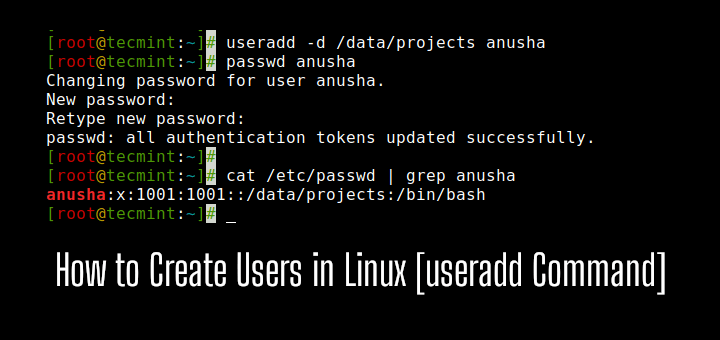
When you create a Linux user, the system performs a series of operations:
- Entry creation: A line is appended to `/etc/passwd` in the format `username:x:UID:GID:description:home:shell`. The `x` in `/etc/shadow` indicates the password is stored there.
- Directory initialization: If `SKEL` (skeleton) directories are configured, files like `.bashrc` and `.ssh/` are copied to the new user’s home (`/home/username`).
- Permission assignment: The user’s primary group (GID) and supplementary groups (from `/etc/group`) dictate file access.
- Shell/spawn: The default shell (e.g., `/bin/bash`) is set, enabling interactive or scripted sessions.
Under the hood, these actions rely on the `libuser` library (used by `useradd`) or PAM (Pluggable Authentication Modules) for policy enforcement. For example, PAM can enforce password complexity rules or multi-factor authentication during Linux user setup.
Key Benefits and Crucial Impact
The ability to create a Linux user with precision directly impacts system security, compliance, and operational efficiency. Poorly configured accounts can serve as attack vectors (e.g., default passwords, excessive permissions), while optimized setups reduce administrative overhead. In enterprise environments, user lifecycle management—from creation to deprovisioning—is tied to audit trails and least-privilege principles.
Beyond security, user management enables resource isolation. For instance, system users (UID < 1000) are typically reserved for services, while regular users (UID ≥ 1000) get home directories. This separation prevents accidental privilege escalation. Additionally, group-based permissions (e.g., `sudo`, `docker`) allow granular control over system access without granting root privileges.
"A user account is not just a login; it’s a boundary between the system and the entity using it. Misconfigure it, and you’ve created a backdoor." — Chet Ramey, Bash Developer
Major Advantages
- Security hardening: Enforcing strong passwords, disabling shell access for service accounts, and restricting `sudo` privileges.
- Auditability: Tracking user creation via `lastlog`, `faillog`, and `auditd` for compliance (e.g., PCI DSS, HIPAA).
- Resource efficiency: Limiting user processes with `ulimit` or cgroups to prevent DoS attacks.
- Integration: Syncing with LDAP/Active Directory for centralized management in heterogeneous environments.
- Customization: Tailoring shell environments, default applications, and desktop configurations via `/etc/skel`.
Comparative Analysis
| Aspect | Traditional `useradd` | Debian `adduser` |
|---|---|---|
| Interactivity | Non-interactive (script-friendly) | Interactive prompts (user-friendly) |
| Default Home Dir | /home/username (configurable) | /home/username (auto-created) |
| Password Handling | Requires separate `passwd` command | Integrated password prompt |
| Distribution Support | RHEL, CentOS, Arch | Debian, Ubuntu, Mint |
Future Trends and Innovations
The traditional model of creating a Linux user is evolving with containerization and serverless architectures. Kubernetes, for example, replaces persistent users with ephemeral identities tied to pods, while immutable systems (e.g., Flatpak, Snap) sandbox applications to reduce user-level vulnerabilities. However, for traditional servers, trends like passwordless SSH, U2F/YubiKey authentication, and automated user provisioning (via Ansible/Puppet) are gaining traction.
Emerging standards like SCIM (System for Cross-domain Identity Management) and OAuth-based logins are blurring the line between local and cloud identities. Meanwhile, projects like systemd-homed aim to replace static home directories with dynamic, encrypted storage. These shifts don’t obviate the need to understand core user management but redefine its scope—from local machines to distributed, identity-aware systems.

Conclusion
Mastering how to create a Linux user is more than memorizing commands; it’s about understanding the interplay between security, permissions, and system design. Whether you’re maintaining a legacy server or deploying cloud-native workloads, the principles remain: define clear boundaries, enforce least privilege, and audit changes. The tools may evolve—from `useradd` to containerized identities—but the fundamentals of user management endure.
For administrators, this knowledge is a cornerstone of system integrity. For developers, it’s a prerequisite for secure deployments. And for security professionals, it’s the first line of defense. As Linux continues to power everything from embedded devices to supercomputers, the ability to set up a Linux user with intent will remain a critical skill.
Comprehensive FAQs
Q: What’s the difference between `useradd` and `adduser`?
A: `useradd` is a low-level SysVinit tool for scripted use, while `adduser` (Debian) is a high-level wrapper that handles defaults (home dir, password prompts) interactively. `adduser` is often preferred for desktops due to its user-friendliness.
Q: How do I create a user without a login shell?
A: Use `useradd -s /sbin/nologin username` or set the shell to `/bin/false` in `/etc/passwd`. This is common for service accounts.
Q: Can I automate user creation with a script?
A: Yes. Use `useradd` with non-interactive flags (e.g., `-m`, `-p`, `-G`) and pipe commands via `expect` or Ansible. Example:
echo "password" | useradd -m -p $(openssl passwd -stdin) -s /bin/bash username
Q: What’s the `/etc/skel` directory used for?
A: It contains default configuration files (e.g., `.bashrc`, `.ssh/`) copied to new users’ home directories during creation. Customize it to enforce consistent environments.
Q: How do I delete a user and their files?
A: Use `userdel -r username`. The `-r` flag removes the home directory and mail spool. Always verify backups first.
Q: Why does `passwd` fail for a new user?
A: Common causes include:
- Missing `/etc/shadow` entry (use `useradd -p` to set a password directly).
- PAM module restrictions (check `/etc/pam.d/passwd`).
- Filesystem permissions (ensure `/home` is writable).
Run `passwd -S username` to debug.
Leave a Comment
Comments are moderated before appearing. The data you submit is processed according to the Privacy Policy of Viralcontentbee.