Why Linux Admins Fear (and Use) chmod 777—The Risks, Fixes, and Alternatives
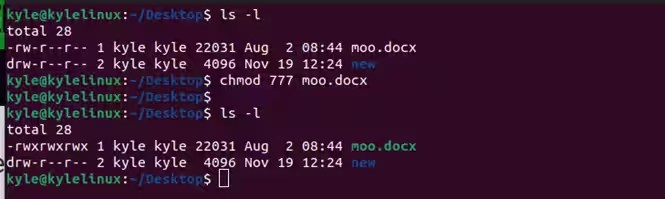
The `chmod 777` command is a double-edged sword in Unix-like systems. On one hand, it grants full read, write, and execute permissions to every user—owner, group, and others—making it a quick fix for misconfigured directories. On the other, it’s a security nightmare, exposing files to unauthorized access and exploitation. Yet, despite its dangers, `chmod 777` remains a go-to solution for developers and sysadmins under pressure, often without understanding the long-term consequences.
Why does this command persist? Partly because it’s simple: three digits, immediate effect. But simplicity masks complexity. A single `chmod 777` can turn a secure server into a playground for attackers, especially in shared environments like web hosting. The irony is that the very tool meant to solve permission issues often creates new ones—sometimes catastrophic ones.
Understanding `chmod 777` isn’t just about memorizing the syntax. It’s about grasping the underlying permission model of Unix, recognizing when to use it (or avoid it), and knowing the alternatives that balance functionality with security. This guide dissects the mechanics, risks, and best practices surrounding this infamous command.

The Complete Overview of File Permissions in Unix
At its core, `chmod 777` is shorthand for setting all permission bits—read (r), write (w), and execute (x)—for the owner, group, and others. The numbers correspond to octal values: 7 (read + write + execute), 7 (same for group), and 7 (same for others). While this may seem like a blanket solution, it ignores the principle of least privilege, a cornerstone of system security.
The Unix permission model is granular, allowing fine-tuned control over who can access what. However, `chmod 777` bypasses this granularity, treating all users equally. This approach is useful in development environments where rapid iteration is prioritized over security, but it’s a liability in production. The command’s persistence stems from its effectiveness in temporary fixes, but its overuse reflects a deeper misunderstanding of how permissions should function in layered security architectures.
Historical Background and Evolution
The concept of file permissions traces back to the early days of Unix, when resource sharing and multi-user access required structured access controls. The `chmod` command itself evolved from the need to manage these permissions dynamically. Initially, permissions were set manually via octal notation, a system that remains in use today due to its efficiency. Over time, symbolic notation (e.g., `u+rwx`) was introduced to make permissions more human-readable, but the octal system persisted because it was faster for scripting and automation.
Table of Contents
- The Complete Overview of File Permissions in Unix
- Historical Background and Evolution
- Core Mechanisms: How It Works
- Key Benefits and Crucial Impact
- Major Advantages
- Comparative Analysis
- Future Trends and Innovations
- Conclusion
- Comprehensive FAQs
- Q: Is `chmod 777` ever safe to use?
- Q: How do I check current file permissions?
- Q: What’s the difference between `chmod 777` and `chmod -R 777`?
- Q: Can I use `chmod 777` for web directories?
- Q: What are some alternatives to `chmod 777`?
- Q: How do I revert from `chmod 777` to safer permissions?
By the 1990s, as the internet expanded, the risks of permissive settings like `chmod 777` became apparent. Web servers, in particular, faced exploitation when directories were left open to all users. This led to the rise of more restrictive defaults and tools like SELinux and AppArmor, which enforce mandatory access controls beyond traditional Unix permissions. Yet, `chmod 777` endures because it’s a quick workaround, often applied without considering the broader security implications.
Core Mechanisms: How It Works
The `chmod` command modifies the permission bits stored in the file’s inode, a data structure that holds metadata about the file. The three digits in `chmod 777` correspond to:
- 7 (Owner): Read, write, and execute for the file owner.
- 7 (Group): Same permissions for the group assigned to the file.
- 7 (Others): Full permissions for all other users on the system.
Execute permissions (`x`) are particularly critical for directories—they determine whether a user can traverse into the directory. Without `x`, even if a user has read permissions, they cannot access files inside. This is why `chmod 777` is often used for directories in shared environments, but it’s a flawed approach because it assumes trust where none should exist.
The octal system works because each digit is a sum of the permission bits:
- 4 = read (r)
- 2 = write (w)
- 1 = execute (x)
Adding these values (4+2+1=7) gives full permissions. However, this system is rigid—it doesn’t account for partial permissions (e.g., read-only for others). The flexibility of symbolic notation (`chmod o+rx`) is often overlooked in favor of the simplicity of `chmod 777`, even though the latter is far less secure.
Key Benefits and Crucial Impact
The allure of `chmod 777` lies in its simplicity and immediate results. In a development environment, where files are frequently modified and accessed by multiple users, setting permissions to 777 can eliminate permission-related errors. It’s a brute-force solution that works—until it doesn’t. The impact of this command extends beyond convenience; it can expose sensitive data, allow unauthorized script execution, and create backdoors for attackers.
For sysadmins, the trade-off is clear: speed versus security. While `chmod 777` resolves permission issues quickly, it does so at the expense of security. The command’s overuse has led to widespread vulnerabilities, particularly in web applications where directories like `/tmp` or `/var/www` are often misconfigured. The long-term cost of this convenience is often higher than the initial time saved.
"Permission settings are the first line of defense in Unix systems. Over-permissive configurations like `chmod 777` are like leaving the front door unlocked—it might work for a while, but it’s only a matter of time before someone walks in."
Major Advantages
- Immediate Fix: Resolves permission errors in seconds, making it ideal for troubleshooting.
- Universal Access: Ensures all users can read, write, and execute files, useful in collaborative environments.
- Scripting-Friendly: Easy to automate in deployment scripts where granular permissions aren’t critical.
- Directory Traversal: Allows users to navigate into directories, which is essential for shared storage.
- Legacy Compatibility: Works across all Unix-like systems, ensuring consistency in older applications.
Comparative Analysis
While `chmod 777` offers broad permissions, it’s rarely the best choice. Below is a comparison with alternative approaches:
| Approach | Use Case |
|---|---|
| chmod 777 | Temporary fixes, development environments, shared directories where trust is assumed. |
| chmod 755 | Executable scripts and binaries where group/others need read/execute but not write. |
| chmod 700 | Sensitive files (e.g., SSH keys) where only the owner should have access. |
| ACLs (Access Control Lists) | Fine-grained permissions for specific users/groups without over-permissive defaults. |
The table highlights that `chmod 777` is a blunt instrument. Alternatives like ACLs or restrictive octal values (e.g., `700`) provide better security without sacrificing functionality. The key is aligning permissions with the principle of least privilege—granting only the access necessary for a task.
Future Trends and Innovations
The future of file permissions lies in more dynamic and context-aware systems. Traditional Unix permissions are static, but emerging technologies like mandatory access controls (MAC) (e.g., SELinux, AppArmor) and attribute-based access control (ABAC) are changing the game. These systems evaluate permissions based on attributes like user identity, time of day, or even file content, rather than fixed octal values.
Additionally, containerization and cloud-native environments are introducing new permission models. Tools like Docker’s user namespace remapping and Kubernetes’ Pod Security Policies are redefining how permissions are managed in modern infrastructures. While `chmod 777` may still appear in legacy scripts, its relevance is waning as systems adopt more sophisticated access control mechanisms. The shift is toward automation and policy-driven security, where manual overrides like `chmod 777` are minimized.

Conclusion
`chmod 777` is a relic of a time when security was an afterthought. Its simplicity is its greatest strength and weakness—it works, but at a cost. The command’s persistence in modern systems reflects a broader issue: a lack of understanding of how permissions function and how they can be exploited. For developers and sysadmins, the lesson is clear: avoid `chmod 777` unless absolutely necessary, and always consider the security implications of permissive settings.
The alternative is to embrace granular permissions, ACLs, and modern access control frameworks. These tools may require more effort upfront, but they pay dividends in security and maintainability. The goal isn’t to eliminate `chmod 777` entirely—it has its place—but to recognize that it’s a tool for specific scenarios, not a universal solution. As systems grow more complex, so too must our approach to permissions.
Comprehensive FAQs
Q: Is `chmod 777` ever safe to use?
A: Only in highly controlled environments like development sandboxes where trust is absolute. Even then, it’s better to use restrictive permissions and adjust as needed. In production, `chmod 777` should be avoided due to security risks.
Q: How do I check current file permissions?
A: Use `ls -l` to list files with their permissions. The first column shows permissions in symbolic form (e.g., `-rwxr-xr-x`), where the first three characters are for the owner, the next three for the group, and the last three for others.
Q: What’s the difference between `chmod 777` and `chmod -R 777`?
A: The `-R` flag applies the permissions recursively to all files and subdirectories within a given directory. This is even more dangerous than `chmod 777` alone, as it can expose an entire directory tree to unauthorized access.
Q: Can I use `chmod 777` for web directories?
A: Generally no. Web directories (e.g., `/var/www`) should have restrictive permissions (e.g., `755` for directories, `644` for files) to prevent unauthorized uploads or script execution. Use tools like `.htaccess` or web server configurations to manage access instead.
Q: What are some alternatives to `chmod 777`?
A: Use `chmod 755` for directories needing group access, `chmod 700` for sensitive files, or ACLs (`setfacl`) for fine-grained control. For shared environments, consider group ownership and restrictive umasks.
Q: How do I revert from `chmod 777` to safer permissions?
A: Use `chmod` with restrictive values (e.g., `chmod 755 directory`, `chmod 644 file`). For directories, ensure the owner has full control, the group has read/execute, and others have read-only access where possible.
Leave a Comment
Comments are moderated before appearing. The data you submit is processed according to the Privacy Policy of Viralcontentbee.