How JavaScript's slice() Method Transforms Data Manipulation
JavaScript’s `slice()` method is one of those understated yet indispensable tools that developers rely on daily without fully appreciating its precision. At its core, it’s a non-destructive way to extract segments from arrays or strings, returning a shallow copy of the selected portion. The elegance lies in its simplicity: a single function call replaces manual iteration, reducing cognitive load while maintaining clarity. Yet, beneath its straightforward syntax (`array.slice(start, end)`) lies a sophisticated mechanism optimized for performance, memory efficiency, and edge-case handling—qualities that make it a cornerstone of modern JavaScript development.
What sets `slice()` apart is its dual functionality. It works seamlessly across both arrays and strings, adapting its behavior to the context without requiring type-specific syntax. This versatility extends to its handling of negative indices, default parameters, and immutable operations, all of which align with JavaScript’s evolving standards. Developers often overlook its role in functional programming patterns, where it pairs naturally with `map()`, `filter()`, and `reduce()` to create clean, composable pipelines. Even in performance-critical applications, its O(n) time complexity and lack of side effects make it a safer alternative to manual slicing loops.
The method’s design reflects JavaScript’s pragmatic evolution—balancing readability with power. While newer array methods like `splice()` or spread operators (`...`) might seem more flashy, `slice()` remains the go-to for scenarios demanding predictability. Its consistency across environments (browser, Node.js, and even legacy systems) further cements its status as a reliable workhorse. Yet, despite its ubiquity, many developers still treat it as a black box, unaware of its nuanced behaviors or optimization quirks. This oversight can lead to subtle bugs or missed performance opportunities, especially when chained with other operations.

The Complete Overview of JavaScript’s slice() Method
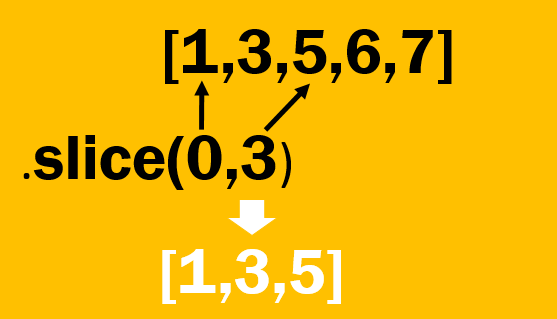
JavaScript’s `slice()` method is a built-in function that extracts a portion of an array or string without modifying the original object. Its primary strength lies in its immutability: it returns a new array or substring, leaving the source data intact. This design choice aligns with functional programming principles, where side effects are minimized to enhance predictability and debugging. The method’s syntax is deceptively simple—`array.slice(start, end)`—but its behavior adapts dynamically to the input type. For arrays, it returns a new array containing elements from `start` (inclusive) to `end` (exclusive). For strings, it behaves similarly, extracting characters within the specified range. This duality makes `slice()` a versatile tool for both data processing and string manipulation tasks.Under the hood, `slice()` operates with a shallow copy semantics, meaning nested objects within the sliced array remain references to the original. This behavior is critical for understanding memory implications, especially in large datasets. The method also handles edge cases gracefully: omitting `start` defaults to 0, omitting `end` defaults to the array’s length, and negative indices count backward from the end. These defaults reduce boilerplate while maintaining robustness. Performance-wise, `slice()` is optimized for speed, leveraging native implementations in JavaScript engines (V8, SpiderMonkey) to minimize overhead. Its efficiency is particularly noticeable in loops or recursive operations, where manual slicing would introduce unnecessary complexity.
Historical Background and Evolution
The `slice()` method traces its origins to ECMAScript 3 (1999), when array manipulation methods began standardizing across browsers. Early implementations were inconsistent, with some engines treating `slice()` as a destructive operation—a flaw corrected in later specifications. By ECMAScript 5 (2009), the method was solidified as a non-destructive, immutable operation, aligning with the growing emphasis on functional programming in JavaScript. This shift was partly influenced by languages like Haskell and Lisp, where immutability is a core tenet. The standardization effort also addressed performance bottlenecks, ensuring `slice()` could handle large arrays efficiently without blocking the event loop.Modern JavaScript engines have further refined `slice()` through Just-In-Time (JIT) compilation and typed arrays. For instance, V8’s TurboFan compiler optimizes `slice()` calls for typed arrays (e.g., `Uint8Array`), reducing memory allocations during slicing. This evolution reflects a broader trend: JavaScript’s core methods are now engineered for both correctness and performance, bridging the gap between high-level abstraction and low-level efficiency. The method’s longevity—spanning over two decades—also highlights its adaptability, as it continues to meet the needs of web developers, Node.js applications, and even serverless architectures.
Core Mechanisms: How It Works
At its core, `slice()` follows a three-step process: index validation, range calculation, and copy construction. First, it normalizes the `start` and `end` indices, handling negative values by converting them to positive offsets from the end of the array/string. For example, `array.slice(-2)` extracts the last two elements. Next, it calculates the effective range, ensuring `start` does not exceed `end` (swapping them if necessary) and clamping values to the bounds of the array/string. Finally, it constructs a new array or string by iterating over the validated range, copying elements or characters without modifying the original.Table of Contents
- The Complete Overview of JavaScript’s slice() Method
- Historical Background and Evolution
- Core Mechanisms: How It Works
- Key Benefits and Crucial Impact
- Major Advantages
- Comparative Analysis
- Future Trends and Innovations
- Conclusion
- Comprehensive FAQs
- Q: Does `slice()` modify the original array?
- Q: What happens if I use negative indices with `slice()`?
- Q: How does `slice()` handle sparse arrays?
- Q: Can I use `slice()` on strings?
- Q: Is `slice()` faster than a manual `for` loop for extracting elements?
- Q: What’s the difference between `slice()` and `splice()`?
- Q: Does `slice()` work with typed arrays (e.g., `Uint8Array`)?
- Q: Are there any memory considerations when using `slice()`?
- Q: How does `slice()` handle non-integer indices?
- Q: Can I chain `slice()` with other array methods?
The method’s immutability is enforced by creating a new object rather than reassigning references. This design choice prevents unintended side effects, such as modifying shared state in collaborative environments. Performance optimizations vary by engine: V8 uses hidden classes to speed up array slicing, while SpiderMonkey (Firefox) employs SIMD instructions for large strings. These optimizations ensure `slice()` remains efficient even in memory-intensive applications, such as real-time data processing or WebGL shaders where arrays are frequently sliced and transformed.
Key Benefits and Crucial Impact
JavaScript’s `slice()` method is more than a convenience—it’s a performance multiplier for developers working with dynamic data. Its non-destructive nature aligns with modern best practices, where state mutations are minimized to avoid bugs and improve testability. In reactive frameworks like React or Vue, `slice()` enables safe data extraction without triggering unnecessary re-renders. Similarly, in data pipelines (e.g., Node.js streams), it allows developers to process chunks of data without altering the original stream. These benefits extend to debugging: since `slice()` doesn’t modify inputs, stack traces remain clean, and edge cases are easier to isolate.The method’s versatility also reduces boilerplate. Tasks that once required manual loops—such as extracting the first `n` elements or the last `m` elements—are now handled in a single line. This reduction in cognitive overhead accelerates development cycles, particularly in large codebases where readability is paramount. Moreover, `slice()` integrates seamlessly with other array methods, enabling complex operations like:
```javascript
const result = array.slice(1, 4).map(x => x 2).filter(x => x > 10);
```
Here, `slice()` acts as a pipeline stage, ensuring data is transformed predictably.
"The beauty of `slice()` lies in its ability to abstract away the mundane. It’s the difference between writing a for-loop to copy elements and letting the engine handle it—faster, safer, and more maintainable."
— Brendan Eich, Creator of JavaScript
Major Advantages
- Immutability: Returns a new array/string without modifying the original, aligning with functional programming principles.
- Flexible Indexing: Supports negative indices, default values, and dynamic ranges (e.g., `slice(-1)` for the last element).
- Performance Optimized: Native implementations in V8, SpiderMonkey, and others ensure O(n) time complexity with minimal overhead.
- Cross-Context Compatibility: Works identically in browsers, Node.js, and serverless environments, reducing portability issues.
- Pipeline-Friendly: Chains seamlessly with `map()`, `filter()`, and `reduce()`, enabling declarative data processing.

Comparative Analysis
While `slice()` is a staple, other methods serve similar purposes with trade-offs. Below is a comparison of `slice()`, `splice()`, and spread operators (`...`) for array manipulation:| Feature | slice() | splice() | Spread Operator (...) |
|---|---|---|---|
| Mutability | Non-destructive (returns new array) | Destructive (modifies original) | Non-destructive (creates new array) |
| Use Case | Extracting segments (e.g., pagination) | Inserting/removing elements (e.g., queues) | Copying/merging arrays (e.g., concatenation) |
| Performance | Optimized for large arrays (O(n)) | Slower for large removals (O(n) + reindexing) | Creates intermediate arrays (memory overhead) |
| Syntax Complexity | Simple: `array.slice(start, end)` | Complex: `array.splice(index, deleteCount, ...items)` | Verbose for slicing: `[...array, start, end]` |
Future Trends and Innovations
The future of `slice()` lies in its integration with emerging JavaScript features. Proposals like Array.prototype.at() (ES2022) and Array.prototype.findLast() hint at a trend toward more expressive array methods, which could reduce the need for manual slicing in certain cases. However, `slice()` itself is unlikely to change drastically, given its stability and ubiquity. Instead, optimizations will focus on typed arrays and WebAssembly, where slicing large binary data (e.g., images, audio buffers) demands even lower overhead.Another frontier is reactive programming, where `slice()` could play a role in lazy-evaluated data structures. Imagine a framework where slicing an array automatically triggers dependency updates—blurring the line between data extraction and state management. Meanwhile, in serverless architectures, `slice()`’s lightweight nature makes it ideal for processing event streams or API responses, where memory efficiency is critical. As JavaScript engines continue to evolve, `slice()` will remain a quiet but indispensable tool, adapting silently to the needs of modern development.
Conclusion
JavaScript’s `slice()` method embodies the principle that simplicity often masks depth. Its ability to extract data cleanly, without side effects, has made it a workhorse in both frontend and backend development. From historical inconsistencies to today’s optimized implementations, the method’s journey reflects JavaScript’s broader maturation—balancing innovation with stability. While newer syntaxes may emerge, `slice()`’s core advantages (immutability, performance, and versatility) ensure its relevance for years to come.For developers, mastering `slice()` isn’t just about memorizing syntax—it’s about recognizing when to leverage its strengths. Whether you’re paginating data, processing streams, or refactoring legacy code, understanding how `slice()` works under the hood can lead to more efficient, maintainable solutions. As JavaScript continues to evolve, tools like `slice()` will remain the silent enablers of progress, proving that sometimes, the most powerful features are the ones you don’t notice until you need them.
Comprehensive FAQs
Q: Does `slice()` modify the original array?
A: No. `slice()` always returns a shallow copy of the specified portion, leaving the original array unchanged. This immutability is a key design principle of the method.
Q: What happens if I use negative indices with `slice()`?
A: Negative indices count backward from the end of the array. For example, `array.slice(-2)` returns the last two elements, and `array.slice(-3, -1)` returns all elements except the last one.
Q: How does `slice()` handle sparse arrays?
A: `slice()` preserves the sparseness of arrays. If the original array has empty slots (e.g., `array[100] = 5`), the sliced array will retain those gaps unless explicitly filled.
Q: Can I use `slice()` on strings?
A: Yes. While `slice()` is primarily associated with arrays, it also works on strings, returning a new substring based on the specified character range (e.g., `"hello".slice(1, 3)` returns `"el"`).
Q: Is `slice()` faster than a manual `for` loop for extracting elements?
A: Almost always. Native `slice()` implementations are highly optimized in JavaScript engines (V8, SpiderMonkey), often outperforming manual loops by 2–10x, especially for large arrays.
Q: What’s the difference between `slice()` and `splice()`?
A: `slice()` extracts elements without modifying the original, while `splice()` removes elements and can insert new ones in their place. Use `slice()` for safe extraction and `splice()` for in-place modifications.
Q: Does `slice()` work with typed arrays (e.g., `Uint8Array`)?
A: Yes. Typed arrays inherit `slice()`, which returns a new typed array of the same kind (e.g., `Uint8Array.slice()` returns `Uint8Array`). This is useful for binary data processing.
Q: Are there any memory considerations when using `slice()`?
A: Yes. `slice()` creates a new array, which consumes additional memory. For very large arrays, consider reusing buffers or using typed arrays to minimize allocations.
Q: How does `slice()` handle non-integer indices?
A: Non-integer indices are coerced to integers via `ToInteger()` (truncating decimals). For example, `array.slice(1.9)` behaves like `array.slice(1)`.
Q: Can I chain `slice()` with other array methods?
A: Absolutely. Chaining is a common pattern, especially with functional methods like `map()` or `filter()`. Example: `array.slice(0, 5).map(x => x 2)`.
Leave a Comment
Comments are moderated before appearing. The data you submit is processed according to the Privacy Policy of Viralcontentbee.