How JavaScript Replace Transforms Text Manipulation in Modern Development
JavaScript’s replace() isn’t just another string method—it’s the backbone of text transformation in dynamic applications. Whether sanitizing user input, reformatting API responses, or implementing real-time search-and-replace, its precision turns raw strings into structured data. The method’s versatility extends beyond basic substitutions; nested regex patterns, global replacements, and callback functions unlock capabilities that rival dedicated parsing libraries.
Yet its power often goes underappreciated. Developers frequently default to simple replace() calls without exploring its full spectrum—from case-insensitive matching to template literal integration. The method’s design reflects JavaScript’s pragmatic evolution: balancing simplicity for beginners with depth for advanced use cases. Even seasoned engineers occasionally rediscover its nuances when debugging edge cases in international text handling or legacy system migrations.
The replace() function’s role in modern JavaScript isn’t static. As frameworks like React and Vue push for declarative data flows, its ability to preprocess strings before rendering components becomes critical. Meanwhile, performance optimizations in V8 and Node.js engines have made it a cornerstone for high-throughput text processing—whether in CLI tools or serverless architectures. Understanding its mechanics isn’t optional; it’s a competitive advantage in writing maintainable, efficient code.
The Complete Overview of JavaScript Replace
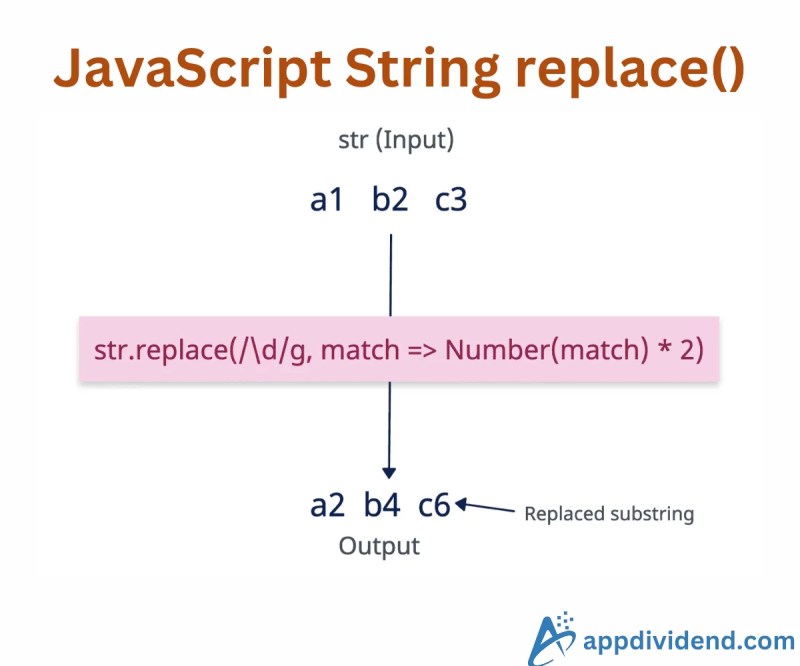
At its core, JavaScript’s replace() method is a string prototype function designed to find and replace substrings within a given string. Its syntax—str.replace(regexp|substr, newSubstr|function)—hides a layer of complexity that belies its simplicity. The method accepts two primary arguments: a pattern to match (either a literal string or regular expression) and a replacement value (which can be a static string or a function). This duality allows it to handle everything from basic text substitutions to dynamic transformations based on context.
What sets replace() apart is its ability to integrate with JavaScript’s broader ecosystem. When paired with regular expressions, it becomes a Swiss Army knife for pattern-based text manipulation. The global flag (g) enables batch replacements across entire strings, while the replaceAll() method (introduced in ES2021) offers a more intuitive syntax for non-regex scenarios. Developers also leverage it in combination with template literals for dynamic string construction, blurring the line between static and runtime-generated content.
Historical Background and Evolution
The origins of replace() trace back to JavaScript’s early days in Netscape Navigator, where string manipulation methods were among the first utilities added to the language. By the time ECMAScript 1.0 standardized these methods in 1997, replace() had already established itself as essential for form validation and client-side templating—a critical feature for the nascent web.
Table of Contents
- The Complete Overview of JavaScript Replace
- Historical Background and Evolution
- Core Mechanisms: How It Works
- Key Benefits and Crucial Impact
- Major Advantages
- Comparative Analysis
- Future Trends and Innovations
- Conclusion
- Comprehensive FAQs
- Q: How does replace() handle Unicode characters like emojis?
- Q: Can I use replace() with template literals for dynamic content?
- Q: What’s the difference between replace() and replaceAll() ?
- Q: How do I replace multiple patterns in a single pass?
- Q: Are there performance pitfalls with replace() ?
- Q: Can I use replace() in Node.js streams for real-time processing?
Significant milestones in its evolution include the introduction of regular expression support in ECMAScript 3 (1999), which transformed replace() from a simple find-and-replace tool into a powerful pattern-matching engine. The addition of the g flag in later iterations allowed developers to replace all occurrences of a pattern rather than just the first match, addressing a common pain point in bulk text processing. More recently, ES2021’s replaceAll() method provided a cleaner alternative for global replacements without regex, reflecting JavaScript’s trend toward reducing boilerplate.
Core Mechanisms: How It Works
The method operates in two distinct modes: literal string replacement and regex-based substitution. In its simplest form, "hello".replace("l", "p") returns "heppo" by replacing the first occurrence of "l" with "p". However, when a regular expression is provided, the behavior becomes more sophisticated. For example, "/\\d+/.exec("123") captures digits, which can then be replaced with a function that formats them dynamically—like converting "123" to "$123.00".
Under the hood, replace() follows a strict evaluation order: it first matches the pattern against the string, then applies the replacement either immediately (for static strings) or through a callback function (for dynamic logic). The callback receives match details—including groups, index, and the entire input string—enabling complex transformations. This design choice explains why replace() is often preferred over split() + join() for intricate text operations, as it avoids intermediate array creation and maintains state within the replacement logic.
Key Benefits and Crucial Impact
JavaScript’s replace() method isn’t just a utility—it’s a productivity multiplier. In applications where text processing is central (e.g., CMS platforms, search engines, or data pipelines), it reduces development time by eliminating the need for custom parsing loops. Its integration with regex also means developers can reuse patterns across projects, maintaining consistency in validation, sanitization, or formatting logic.
The method’s impact extends to performance-critical scenarios. Modern JavaScript engines optimize replace() operations heavily, making them faster than equivalent loops in many cases. This efficiency is particularly valuable in serverless environments, where execution time directly affects cost and scalability. Additionally, its role in internationalization (i18n) is often overlooked: with proper regex flags like u for Unicode support, it handles multilingual text seamlessly.
"The
replace()method is JavaScript’s most underrated tool for text manipulation. Its combination of simplicity and power makes it indispensable for everything from quick fixes to large-scale data transformations."— Brendan Eich, Creator of JavaScript
Major Advantages
- Pattern Flexibility: Supports both literal strings and regex, enabling precise or broad matches as needed.
- Dynamic Replacements: Callback functions allow context-aware transformations (e.g., formatting dates, sanitizing HTML).
- Performance Optimized: Engine-level optimizations make it faster than manual string splitting/joining for most use cases.
- Unicode Support: The
uflag in regex ensures correct handling of emojis, non-Latin scripts, and combining characters. - Framework Integration: Works seamlessly with React’s JSX, Vue’s templates, and Node.js streams for real-time processing.

Comparative Analysis
| Feature | replace() |
replaceAll() |
split() + join() |
|---|---|---|---|
| Global Replacement | Requires g flag in regex |
Native support (ES2021+) | Manual iteration needed |
| Dynamic Logic | Full callback support | Limited to static strings | Requires external function |
| Unicode Handling | Supports u flag |
Supports u flag |
No built-in Unicode awareness |
| Performance | Optimized for single/multiple replaces | Optimized for bulk replaces | Slower for large strings |
Future Trends and Innovations
The evolution of replace() isn’t stagnant. With the rise of WebAssembly and high-performance computing in browsers, future iterations may integrate tighter with typed arrays or memory views, enabling zero-copy text processing. Meanwhile, the growing demand for AI-driven text manipulation suggests that replace() could incorporate machine learning models directly in the replacement logic—imagine a callback that auto-corrects typos or translates phrases on the fly.
Another frontier is real-time collaborative editing, where replace() operations must synchronize across distributed clients with minimal latency. Here, the method’s current design—simple yet powerful—positions it well for optimizations that reduce network overhead. As JavaScript continues to blur the line between client and server, replace() will likely become even more central to data pipelines, especially in edge computing scenarios where lightweight processing is paramount.

Conclusion
JavaScript’s replace() method exemplifies the language’s ability to balance simplicity with sophistication. From its humble beginnings in client-side scripting to its current role in high-performance applications, it remains a testament to JavaScript’s adaptability. The key to leveraging its full potential lies in understanding not just the syntax, but the underlying patterns—whether regex optimizations, callback strategies, or integration with modern frameworks.
As text processing becomes increasingly central to web development, mastering replace() isn’t just about writing cleaner code—it’s about building systems that are faster, more maintainable, and scalable. The method’s versatility ensures it will remain relevant long after newer APIs emerge, serving as a reminder that sometimes, the most powerful tools are the ones that feel familiar.
Comprehensive FAQs
Q: How does replace() handle Unicode characters like emojis?
A: Use the u flag in your regex (e.g., /😊/gu) to ensure proper matching and replacement of Unicode characters, including emojis and combining marks. Without this flag, some characters may be split or mismatched.
Q: Can I use replace() with template literals for dynamic content?
A: Yes. While replace() itself doesn’t directly work with template literals, you can combine it with String.raw or preprocess template strings to inject dynamic values. For example:
const template = `Hello, ${name}!`; const result = template.replace(/\${name}/g, "World");
Q: What’s the difference between replace() and replaceAll()?
A: replace() replaces only the first match (unless the g flag is used), while replaceAll() (ES2021+) replaces all occurrences by default. The latter is simpler for global replacements but lacks callback support.
Q: How do I replace multiple patterns in a single pass?
A: Use a single regex with alternation (e.g., /pattern1|pattern2/g) or chain replace() calls with a global flag. For complex cases, a callback function can handle each match dynamically.
Q: Are there performance pitfalls with replace()?
A: Yes. Overusing regex with greedy quantifiers (e.g., .) can cause catastrophic backtracking. Always anchor patterns (e.g., ^pattern$) and prefer non-greedy quantifiers (.?) when possible. For large strings, replaceAll() may outperform chained replace() calls.
Q: Can I use replace() in Node.js streams for real-time processing?
A: Indirectly. While replace() isn’t a stream method, you can pipe data through a Transform stream that applies replace() in its _transform function. This is ideal for log processing or API response sanitization.
Leave a Comment
Comments are moderated before appearing. The data you submit is processed according to the Privacy Policy of Viralcontentbee.