How JavaScript Includes Reshape Modern Web Development
JavaScript includes are the backbone of modern web applications, enabling developers to stitch together functionality without rewriting core logic. Behind every dynamic SPA (Single-Page Application) lies a delicate ecosystem of JavaScript includes—whether through ES6 modules, npm packages, or dynamic imports—that dictate how code is consumed, shared, and optimized. The shift from monolithic scripts to modular components didn’t just improve maintainability; it redefined collaboration across teams, frameworks, and even entire industries.
What separates today’s JavaScript landscape from its early days isn’t just syntax improvements but the architecture of how code is included and executed. Consider a modern React app: its bundle isn’t a single file but a network of dependencies, each pulled in conditionally via JavaScript includes mechanisms. This granularity reduces load times, isolates bugs, and future-proofs projects against breaking changes. Yet, for all its elegance, the system remains opaque to many developers who treat includes as a black box—clicking "install" without understanding the implications.
The consequences of this opacity are far-reaching. Poorly managed JavaScript includes can bloat applications, introduce security vulnerabilities, or create fragile dependency chains. Conversely, mastering them unlocks performance gains (e.g., lazy-loading critical resources) and architectural flexibility (e.g., micro-frontends). The question isn’t whether to use them—it’s how to wield them strategically in an era where JavaScript’s role extends beyond browsers into servers, IoT, and even desktop applications.

The Complete Overview of JavaScript Includes
At its core, JavaScript includes refer to the methods by which external code—whether modules, libraries, or scripts—is incorporated into a running application. This encompasses traditional `` tags to load external libraries, a practice that persisted into the 2000s despite its limitations—global namespace collisions, race conditions, and no native module system. The turning point came with CommonJS (2009), which introduced `require()` for server-side Node.js applications. While CommonJS standardized dependency management, it lacked browser compatibility, forcing a bifurcation in JavaScript’s ecosystem.The unification arrived with ES6 (2015), which standardized `import`/`export` syntax, enabling JavaScript includes to work seamlessly across browsers and Node.js. This shift wasn’t merely syntactic; it introduced static analysis capabilities, allowing tools like Babel and bundlers to pre-process dependencies before runtime. Dynamic imports (`import()`) later added runtime flexibility, enabling lazy-loading and code-splitting—a critical evolution for SPAs where initial load times could make or break user retention.
Core Mechanisms: How It Works
Under the hood, JavaScript includes rely on two primary mechanisms: static resolution (for `import` statements) and dynamic resolution (for `import()`). Static imports are analyzed during build time, creating a dependency graph that bundlers like Webpack use to optimize asset delivery. Dynamic imports, however, resolve at runtime, triggered by user interactions or conditional logic. This distinction is key: static includes enable tree-shaking (removing unused code), while dynamic includes support on-demand loading.The process begins with a module specifier (e.g., `'react'` or `./components/Button.js`). Resolvers—configured via tools like Webpack’s `resolve` or Node.js’s `module` field—map these specifiers to physical files, handling aliases, extensions, and fallback paths. Once resolved, the module’s code is executed in a new lexical scope, preserving encapsulation. For dynamic imports, the result is a `Promise`, allowing asynchronous handling of dependencies without blocking the main thread.
Key Benefits and Crucial Impact
The adoption of JavaScript includes hasn’t just streamlined development—it has redefined the boundaries of what web applications can achieve. By decoupling functionality into reusable units, developers can iterate faster, reduce duplication, and leverage community-driven packages. The impact extends beyond technical efficiency: modular includes foster collaboration, as teams can work on independent components without merging conflicts. This modularity is particularly vital in large-scale projects, where a single monolithic file would become unmanageable.Table of Contents
- The Complete Overview of JavaScript Includes
- Core Mechanisms: How It Works
- Key Benefits and Crucial Impact
- Major Advantages
- Comparative Analysis
- Future Trends and Innovations
- Conclusion
- Comprehensive FAQs
- Q: What’s the difference between static and dynamic imports in JavaScript?
- Q: How do I avoid "module not found" errors when using JavaScript includes?
- Q: Can I use ES6 modules in older browsers without a bundler?
- Q: What’s the impact of too many JavaScript includes on performance?
- Q: How do JavaScript includes interact with TypeScript?
- Q: Are there security risks with dynamic JavaScript includes?
Performance is another critical dimension. Modern JavaScript includes enable techniques like code-splitting, where only the necessary code is loaded for a given route or feature. Combined with lazy-loading, this reduces initial bundle sizes by up to 70% in some cases. Security benefits from scoped modules, as global variables—historically a prime attack vector—are contained within module boundaries. Even error handling improves, with dynamic imports allowing graceful fallbacks when dependencies fail to load.
"The rise of modular JavaScript isn’t just about cleaner code—it’s about rethinking how we architect entire applications. Every `import` statement is a contract between components, and breaking those contracts has cascading effects." — Addy Osmani, Engineering Director at Google
Major Advantages
- Modularity and Reusability: Components like React hooks or utility libraries can be included once and reused across projects, reducing redundancy.
- Performance Optimization: Tools like Webpack analyze import graphs to eliminate dead code (tree-shaking) and split chunks for faster loading.
- Isolated Scopes: Modules prevent variable collisions, a common source of bugs in legacy JavaScript.
- Dynamic Loading: Features like `import()` enable on-demand resource loading, critical for SPAs and progressive web apps (PWAs).
- Tooling Integration: Package managers (npm, Yarn) and bundlers (Vite, esbuild) automate dependency resolution, versioning, and conflict resolution.
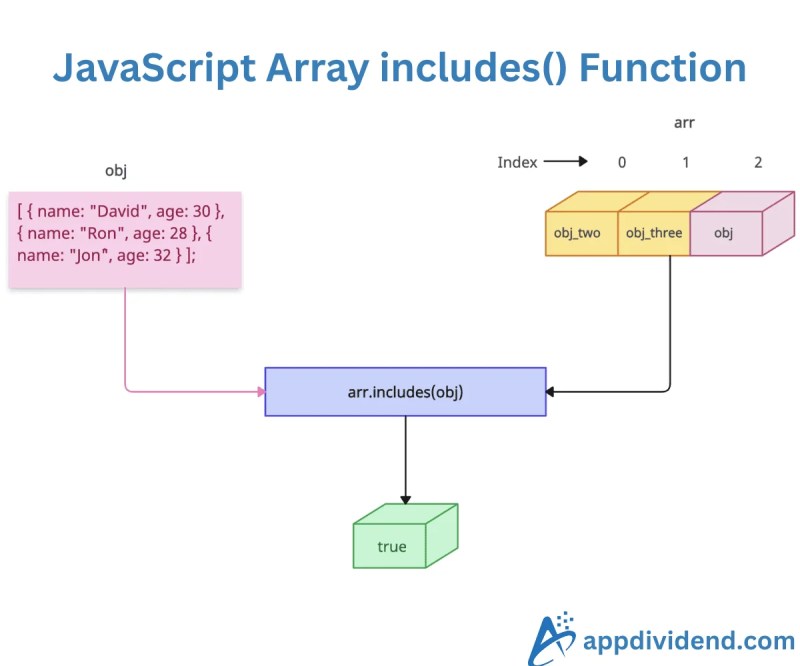
Comparative Analysis
| Mechanism | Use Case |
|---|---|
<script src="..."></script> |
Legacy projects or when dynamic loading isn’t needed. Pollutes global scope. |
ES6 import/export |
Static analysis, tree-shaking, and build-time optimizations (e.g., React apps). |
Dynamic import() |
Lazy-loading, conditional loading (e.g., loading a heavy library only when needed). |
CommonJS (require) |
Node.js environments or projects requiring runtime flexibility (e.g., plugins). |
Future Trends and Innovations
The next frontier for JavaScript includes lies in adaptive loading and AI-driven optimization. Emerging tools like Vite’s native ESM support and esbuild’s near-instant bundling are pushing the boundaries of what’s possible, with some frameworks now achieving sub-100ms cold starts. Meanwhile, research into dependency-aware caching could eliminate redundant network requests for shared modules across pages, further reducing latency.Another trend is the blurring line between frontend and backend includes. With frameworks like Next.js and Deno, the same module syntax now powers server-side rendering, edge functions, and even CLI tools. This convergence suggests that JavaScript includes will become the universal standard for code reuse across the entire stack. Additionally, WebAssembly (WASM) modules may soon join the mix, allowing performance-critical code to be included alongside JavaScript without sacrificing interoperability.

Conclusion
JavaScript includes are more than a syntactic feature—they’re the architectural foundation of modern web development. From the static imports of React to the dynamic loads of Next.js, each mechanism reflects a deliberate choice about performance, maintainability, and scalability. The evolution of these includes mirrors broader industry shifts: toward modularity, automation, and cross-platform consistency.As applications grow in complexity, the role of JavaScript includes will only expand. Developers who treat them as mere boilerplate risk falling behind, while those who understand their mechanics gain a competitive edge. The future belongs to those who don’t just include code—but optimize, secure, and innovate around it.
Comprehensive FAQs
Q: What’s the difference between static and dynamic imports in JavaScript?
A: Static imports (`import React from 'react'`) are resolved at build time, enabling tree-shaking and bundle optimization. Dynamic imports (`import('./module.js')`) resolve at runtime, allowing conditional or lazy loading. Static imports are better for performance-critical paths, while dynamic imports suit on-demand features.
Q: How do I avoid "module not found" errors when using JavaScript includes?
A: Ensure your package manager (npm/yarn) resolves dependencies correctly. Use absolute imports (e.g., `@/components/Button`) with path aliases in tools like Webpack or Vite. For Node.js, check the `node_modules` structure and verify `package.json` exports. Dynamic imports should include error handling (e.g., `.catch(() => import('./fallback.js'))`).
Q: Can I use ES6 modules in older browsers without a bundler?
A: Yes, but with caveats. Browsers like Chrome and Firefox support native ESM, while others (e.g., Safari) require polyfills like es-module-shims. For universal support, use a bundler like Rollup or Vite to transpile modules into compatible formats. Dynamic imports may need additional handling for legacy environments.
Q: What’s the impact of too many JavaScript includes on performance?
A: Excessive includes—especially synchronous ones—can bloat bundle sizes and increase parse/compile times. Mitigate this with:
- Code-splitting (dynamic imports).
- Tree-shaking (removing unused exports).
- Lazy-loading non-critical modules.
- Optimizing third-party packages (e.g., using `unpkg` for CDN-loaded libraries).
Q: How do JavaScript includes interact with TypeScript?
A: TypeScript enhances JavaScript includes by adding type safety. Static imports (`import { foo } from './module'` with types) enable IDE autocompletion and compile-time checks. Dynamic imports require type assertions (e.g., `const mod = await import('./module') as typeof import('./module')`). Tools like `tsconfig.json`’s `moduleResolution` (e.g., "node16") control how imports are resolved.
Q: Are there security risks with dynamic JavaScript includes?
A: Yes. Dynamic imports can expose applications to:
- Code injection if module paths are user-controlled (sanitize inputs).
- Supply-chain attacks via compromised npm packages (use `npm audit` and `yarn why`).
- XSS if dynamically loaded scripts execute untrusted code (use CSP headers).
Leave a Comment
Comments are moderated before appearing. The data you submit is processed according to the Privacy Policy of Viralcontentbee.