How Rendering Graphics Transforms Digital Visuals in Real Time
At its core, what is rendering graphics boils down to the alchemy of turning abstract data—vertices, polygons, textures, and lighting calculations—into the seamless visuals we interact with daily. Whether it’s the hyper-realistic landscapes in a AAA video game, the fluid animations of a cinematic trailer, or the dynamic UI elements of a smartphone app, rendering is the invisible force that bridges raw computational instructions and human perception. Without it, the digital world would remain a static grid of numbers, devoid of the depth and immersion that defines modern storytelling and user experiences.
The process isn’t just about making things look good—it’s about solving a series of complex challenges: simulating physics, managing memory constraints, optimizing for hardware limitations, and ensuring consistency across devices. Rendering graphics is, in essence, a high-stakes negotiation between creativity and computational feasibility. Developers and artists don’t merely "draw" frames; they orchestrate a symphony of mathematical operations, shader programs, and real-time adjustments to fool the eye into believing in virtual worlds.
Yet, despite its ubiquity, the mechanics of rendering graphics remain misunderstood. Many assume it’s a passive process—like a camera snapping a photograph—but in reality, it’s an active, iterative cycle of prediction, correction, and optimization. The difference between a jagged polygon and a buttery-smooth curve, between a flickering shadow and a dynamic glow, lies in the precision of these calculations. To grasp how rendering works is to understand the backbone of digital visual culture.

The Complete Overview of What Is Rendering Graphics
Rendering graphics is the final stage of the 3D pipeline, where a scene description—a collection of objects, materials, and lighting—is converted into a 2D image or animation frame. This stage is where theory meets execution: mathematical models (like ray tracing or rasterization) are applied to simulate how light interacts with surfaces, how textures deform, and how motion appears fluid. The result isn’t just a static image but a dynamic representation that can adapt to user input, environmental changes, or narrative demands.What distinguishes rendering from other stages (modeling, texturing, animation) is its reliance on real-time or offline computation. Real-time rendering—used in games and VR—requires frames to be generated at speeds imperceptible to the human eye (typically 30–120 FPS), while offline rendering (used in film and high-end visualization) prioritizes quality over speed, often taking hours or days per frame. The choice between these approaches defines the limits of what’s achievable, from blockbuster visual effects to interactive simulations.
Historical Background and Evolution
The origins of what is rendering graphics trace back to the 1960s, when early computer graphics researchers like Ivan Sutherland and his team at MIT explored how to display wireframe models on screens. These primitive renderings were little more than skeletal outlines, but they laid the groundwork for rasterization—the process of converting vector graphics into pixels. By the 1970s, the introduction of hidden-surface removal algorithms (like the Painter’s Algorithm) allowed for basic 3D rendering, though the results were clunky by today’s standards.The 1980s and 1990s marked a turning point with the advent of ray tracing, pioneered by researchers like Turner Whitted, which simulated the physical behavior of light to create more realistic reflections and shadows. Concurrently, the rise of polygon-based rendering (popularized by games like Doom and Quake) shifted focus toward performance, trading photorealism for speed. The late 1990s and early 2000s saw the birth of real-time rendering as GPUs evolved from mere graphics accelerators into programmable processors capable of handling complex shaders. Today, the line between offline and real-time rendering has blurred, thanks to advancements like NVIDIA’s RTX and AMD’s FSR, which bring cinematic-quality rendering to interactive media.
Core Mechanisms: How It Works
At its simplest, rendering graphics involves three primary phases: geometry processing, shading, and post-processing. Geometry processing begins with the rasterization of 3D models into 2D pixels, where the GPU determines which polygons are visible (via depth testing) and calculates their screen-space positions. Shading then applies materials, lighting, and textures to these polygons using shader programs—small scripts that run on the GPU to simulate effects like reflections, transparency, or subsurface scattering.Table of Contents
- The Complete Overview of What Is Rendering Graphics
- Historical Background and Evolution
- Core Mechanisms: How It Works
- Key Benefits and Crucial Impact
- Major Advantages
- Comparative Analysis
- Future Trends and Innovations
- Conclusion
- Comprehensive FAQs
- Q: What’s the difference between rasterization and ray tracing in rendering graphics?
- Q: Can rendering graphics be done without a GPU?
- Q: How do real-time rendering engines like Unreal Engine 5 handle complex scenes?
- Q: What role does AI play in modern rendering graphics?
- Q: Are there open-source alternatives for rendering graphics?
- Q: How does rendering graphics impact virtual reality (VR) experiences?
- Q: What’s the most computationally expensive part of rendering graphics?
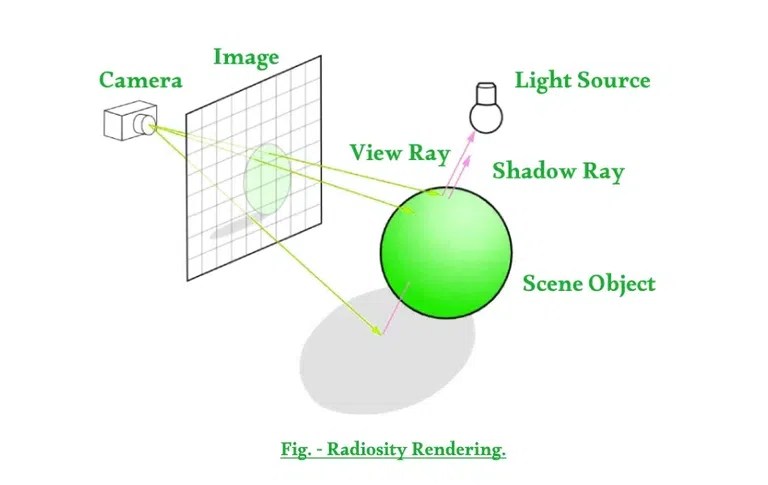
The final phase, post-processing, refines the image with effects like bloom (to simulate light glare), tone mapping (to adjust contrast), or anti-aliasing (to smooth jagged edges). For more advanced techniques like ray tracing, the process becomes recursive: rays are cast from the camera into the scene, bouncing off surfaces and accumulating color data to simulate realistic lighting. Modern APIs like Vulkan and DirectX further abstract these steps, allowing developers to optimize rendering pipelines for specific hardware or artistic goals.
Key Benefits and Crucial Impact
The impact of what is rendering graphics extends far beyond aesthetics. In gaming, rendering determines immersion—whether a player feels present in a virtual world or distracted by visual artifacts. In film and advertising, it enables the creation of environments that would be impossible to shoot in real life, from alien planets to historical reconstructions. Even in fields like architecture and medicine, rendering transforms abstract data into intuitive visualizations, aiding decision-making.The efficiency of rendering also drives innovation. Techniques like path tracing (a high-fidelity variant of ray tracing) push the boundaries of realism, while procedural generation reduces the need for manual asset creation. Meanwhile, real-time rendering in VR and AR creates interactive experiences that were once confined to sci-fi. The ability to render graphics at scale has democratized creativity, allowing indie developers and solo artists to compete with industry giants.
"Rendering isn’t just about making things look good—it’s about making them feel real. The best renderers don’t just simulate light; they tell stories through visuals." — John Carmack, Former CTO of id Software
Major Advantages
- Realism and Immersion: Advanced rendering techniques (e.g., global illumination, motion blur) create environments that respond dynamically to user actions, heightening engagement.
- Performance Optimization: Techniques like level-of-detail (LOD) rendering and occlusion culling reduce computational load, enabling complex scenes on mid-range hardware.
- Artistic Flexibility: Shaders and post-processing effects allow artists to achieve styles ranging from hyper-realistic to stylized (e.g., cel-shading in Celeste).
- Cross-Platform Compatibility: Modern rendering pipelines (e.g., Unity’s URP, Unreal’s Lumen) ensure consistent visuals across consoles, PCs, and mobile devices.
- Collaboration and Iteration: Real-time rendering enables artists and designers to preview changes instantly, speeding up workflows in film, gaming, and product design.
Comparative Analysis
| Aspect | Real-Time Rendering | Offline Rendering |
|---|---|---|
| Primary Use Case | Games, VR, interactive applications | Film, high-end visualization, pre-rendered media |
| Speed | 30–120 FPS (real-time) | Hours/days per frame (batch processing) |
| Quality Trade-offs | Optimized for performance (e.g., screen-space reflections) | Unlimited by time (e.g., path-traced caustics) |
| Hardware Requirements | High-end GPUs (e.g., RTX 4090) | Cluster rendering farms or CPU/GPU hybrids |
Future Trends and Innovations
The next frontier in rendering graphics lies in hybrid approaches that merge real-time and offline techniques. Denoisers like NVIDIA’s DLSS and AMD’s FSR are already bridging the gap by upscaling low-resolution renders in real time, while AI-assisted rendering (e.g., NVIDIA’s Omniverse) uses machine learning to predict and optimize scenes. Emerging technologies like photon mapping and volumetric rendering will further blur the line between virtual and physical, enabling simulations of smoke, fire, and even quantum effects.Another critical shift is toward sustainable rendering. As hardware demands grow, so does energy consumption. Future renderers will likely incorporate ray marching (for efficient ray tracing) and procedural asset generation to reduce memory usage. Additionally, the rise of cloud rendering (e.g., AWS Thinkbox) is making high-end rendering accessible to smaller studios, democratizing the tools once reserved for blockbuster productions.

Conclusion
Understanding what is rendering graphics is to unlock the magic behind modern digital experiences. It’s the intersection of art and engineering, where every frame is a solution to a computational puzzle. As hardware advances and creative demands evolve, rendering will continue to redefine what’s possible—whether in gaming, film, or beyond. The key takeaway? Rendering isn’t just about rendering; it’s about storytelling, innovation, and pushing the boundaries of human perception.For developers and artists, mastering these techniques means staying ahead of the curve. For consumers, it means experiencing visuals that were once unimaginable. The future of rendering isn’t just about better graphics; it’s about deeper immersion, greater accessibility, and new forms of interactive storytelling.
Comprehensive FAQs
Q: What’s the difference between rasterization and ray tracing in rendering graphics?
A: Rasterization is a fast, approximation-based method that projects 3D models onto a 2D screen using polygons and shading. Ray tracing, by contrast, simulates the physical path of light by tracing rays from the camera into the scene, resulting in more accurate reflections, shadows, and global illumination—but at a higher computational cost.
Q: Can rendering graphics be done without a GPU?
A: While possible (using CPU-based renderers like Blender’s Cycles or mental ray), GPU-accelerated rendering is far more efficient due to parallel processing. CPUs excel in offline rendering for complex scenes but struggle with real-time applications like games.
Q: How do real-time rendering engines like Unreal Engine 5 handle complex scenes?
A: Engines like Unreal Engine 5 use a combination of Lumen (a global illumination system), Nanite (virtualized geometry), and Quixel Megascans (high-resolution assets) to optimize scenes. They also employ techniques like virtual shadow maps and reflection capture to maintain performance.
Q: What role does AI play in modern rendering graphics?
A: AI is revolutionizing rendering through denoising (reducing noise in ray-traced images), super-resolution (upscaling low-res renders), and procedural generation (creating assets on the fly). Tools like NVIDIA’s AI-denoised ray tracing cut render times by 90% while improving quality.
Q: Are there open-source alternatives for rendering graphics?
A: Yes. Popular open-source renderers include Blender’s Cycles (for offline rendering), Krita’s G’MIC (for procedural effects), and Godot Engine’s Vulkan renderer (for real-time applications). These tools offer flexibility but may require more manual setup than proprietary solutions.
Q: How does rendering graphics impact virtual reality (VR) experiences?
A: In VR, rendering must account for latency (to avoid motion sickness) and foveated rendering (focusing computational resources on the user’s gaze). Techniques like asynchronous timewarp and variable rate shading optimize performance, while real-time ray tracing enhances immersion by simulating accurate lighting.
Q: What’s the most computationally expensive part of rendering graphics?
A: Global illumination (simulating indirect light) and path tracing (recursive ray casting) are the most demanding. Even with optimizations like light probes or screen-space global illumination, these processes require significant GPU power, often limiting real-time applications to high-end hardware.
Leave a Comment
Comments are moderated before appearing. The data you submit is processed according to the Privacy Policy of Viralcontentbee.