Is Tableau Free? The Full Truth Behind Costs, Trials, and Hidden Value
Tableau’s name dominates conversations about data visualization, but the question “is Tableau free?” rarely gets a straightforward answer. The software giant offers multiple entry points—some costing thousands per year, others seemingly free—leaving users confused about which version aligns with their needs. The confusion stems from Tableau’s layered pricing model, where “free” isn’t a binary yes or no but a spectrum of access points, each with strings attached. Public users can publish dashboards at no cost, while enterprises must navigate paid tiers for advanced features. The ambiguity isn’t accidental; it’s a deliberate strategy to funnel users toward premium subscriptions while keeping a low barrier for experimentation.
What’s often overlooked is that Tableau’s “free” options aren’t interchangeable. Tableau Public, for instance, is free to use but locks users into a web-based environment with restrictions on data sources and collaboration. Meanwhile, the 14-day free trial of Tableau Desktop offers full functionality but expires unless converted to a paid plan. This duality creates a paradox: Tableau can be free to start, but the tools that unlock its full potential come at a price. The challenge for users isn’t just determining whether Tableau is free—it’s understanding the trade-offs between free access and the limitations that come with it.
The stakes are higher than most realize. Organizations that assume Tableau Public’s free tier is sufficient for internal reporting often hit walls when they need to connect to live databases or share secure datasets. Similarly, individuals who rely on the free trial for prototyping may find themselves scrambling to justify a $70/month subscription when their project scales. The answer to “is Tableau free?” isn’t just about upfront costs; it’s about long-term usability, scalability, and whether the free version’s constraints will stifle growth before it begins.

The Complete Overview of Tableau’s Free and Paid Access
Tableau’s approach to free access is a study in controlled generosity. The company provides two primary pathways for users to engage with its software without immediate financial commitment: Tableau Public and the Tableau Desktop free trial. Both serve distinct purposes, catering to different user profiles—public-facing creators versus internal analysts. However, the distinction between these options isn’t just about cost; it’s about functionality, data sources, and the ability to collaborate. Tableau Public, for example, is designed for sharing insights publicly (hence the name) and lacks features like scheduled refreshes or server integration, which are critical for enterprise use. Meanwhile, the free trial of Tableau Desktop mirrors the full product’s capabilities but is time-bound, forcing users to decide whether the tool’s value justifies the investment before they’ve even explored its depth.
The confusion arises because Tableau’s marketing often blurs the lines between these options. A casual search for “is Tableau free to download?” might lead users to Tableau Public, which is indeed free, but it’s not the same as the trial version of Tableau Desktop. The latter requires an email address and credit card for verification, even though the trial itself is free. This friction is intentional—it’s a soft commitment mechanism to filter out users who might abandon the tool after 14 days. The result? A fragmented landscape where “free” Tableau exists in multiple forms, each with its own rules and restrictions. Understanding these nuances is the first step in determining whether Tableau’s free options align with your goals—or if you’re better off exploring alternatives.
Historical Background and Evolution
Tableau’s journey from a niche academic tool to a billion-dollar enterprise software began with a simple idea: making data visualization accessible. Founded in 2003 by Chris Stolte, Christian Chabot, and Pat Hanrahan (a Stanford professor and graphics pioneer), Tableau was initially developed as a research project at Stanford’s Computer Graphics Lab. The team’s goal was to create a drag-and-drop interface that would democratize data analysis, removing the need for complex coding. By 2004, they launched Tableau Software, and by 2005, they released Tableau Desktop to a select group of beta testers. The product’s intuitive design and speed set it apart from competitors like Microsoft’s pivot tables, which required manual calculations and pivoting.
Table of Contents
- The Complete Overview of Tableau’s Free and Paid Access
- Historical Background and Evolution
- Core Mechanisms: How It Works
- Key Benefits and Crucial Impact
- Major Advantages
- Comparative Analysis
- Future Trends and Innovations
- Conclusion
- Comprehensive FAQs
- Q: Can I use Tableau for personal projects without paying?
- Q: Does Tableau offer a permanently free version for students or nonprofits?
The introduction of Tableau Public in 2010 marked a turning point in the company’s strategy. Recognizing that data storytelling was becoming a public good—especially in journalism, education, and advocacy—Tableau offered a free, web-based version of its software. This move wasn’t just philanthropic; it was a calculated risk to build a community of users who would later advocate for the paid versions. Over the years, Tableau Public evolved into a platform where millions of users could publish interactive dashboards, from tracking global pandemics to visualizing local election data. Meanwhile, Tableau’s enterprise offerings expanded with features like server-based collaboration, embedded analytics, and AI-driven insights, all of which required paid subscriptions. The dual-track approach—free for public sharing, paid for professional use—became a cornerstone of Tableau’s business model.
Core Mechanisms: How It Works
Tableau’s free offerings operate on two distinct technical frameworks. Tableau Public runs entirely in a browser, leveraging cloud-based processing to handle data visualization without requiring local installation. Users upload datasets (up to 10MB per file) and build visualizations that are stored on Tableau’s servers. The trade-off? No direct database connections, limited interactivity, and no option to export data in a usable format—only as static images or PDFs. This design choice ensures Tableau Public remains lightweight and accessible but inherently restrictive for users who need to integrate with enterprise systems or automate workflows.
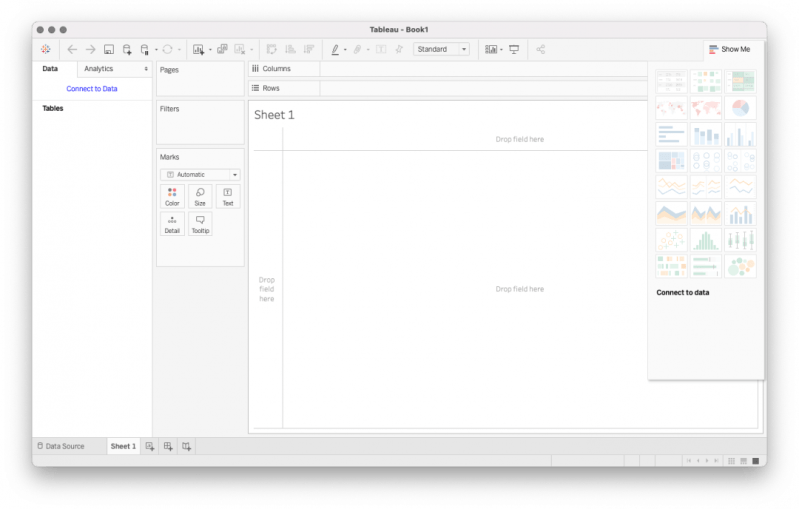
The Tableau Desktop free trial, on the other hand, functions as a full-featured application installed locally. It supports direct connections to databases, Excel files, and cloud services, and includes all the core features of the paid version—drag-and-drop dashboards, calculated fields, and advanced analytics. The only difference is the expiration date. During the trial, users can save work to their local machine, but once the 14 days elapse, any unsaved projects are lost unless the trial is converted to a subscription. This mechanism forces users to make a deliberate choice: either commit to a paid plan or accept the limitations of Tableau Public. The trial’s design reflects Tableau’s understanding that most users won’t go all-in without experiencing the tool’s full capabilities firsthand.
Key Benefits and Crucial Impact
The question “is Tableau free?” often overshadows the real value Tableau provides—even in its free forms. Tableau Public, for instance, has enabled a wave of data-driven storytelling, from journalists mapping crime rates to nonprofits visualizing community health data. Its ease of use allows users without technical backgrounds to create compelling visualizations that would otherwise require a data scientist’s expertise. Similarly, the free trial of Tableau Desktop serves as a low-risk way for individuals and small teams to experiment with professional-grade analytics before making a financial commitment. These benefits extend beyond cost savings; they represent Tableau’s ability to lower the barrier to entry for data literacy in fields where resources are limited.
Yet, the impact of Tableau’s free options isn’t just about accessibility—it’s about ecosystem building. By offering a free tier, Tableau fosters a community of users who can later become customers for its premium products. For example, a freelance analyst might start with Tableau Public to build a portfolio, only to later upgrade to Tableau Desktop when they land a client who needs secure, scalable dashboards. The free tools act as a loss leader, driving adoption that eventually translates into revenue. This strategy has been so effective that Tableau’s public dashboards have become a de facto standard for transparency in sectors like government and healthcare, further cementing its position as the industry leader.
“Tableau Public is like giving away a sample of your product—except the sample is so good that people forget they’re supposed to pay for the full version.” — Data visualization consultant, speaking on Tableau’s dual-tier strategy
Major Advantages
- No Upfront Cost for Public Use: Tableau Public requires zero investment, making it ideal for hobbyists, educators, and journalists who need to share insights without budget constraints.
- Low-Risk Trial for Professionals: The 14-day Tableau Desktop trial allows users to test advanced features like data blending and parameter controls before committing to a subscription.
- Community and Collaboration: Tableau Public’s dashboard gallery serves as a repository of best practices, while the trial version includes collaboration tools for team-based projects.
- Seamless Transition to Paid Plans: Users who start with Tableau Public or the trial can easily upgrade to Tableau Creator, Explorer, or Viewer licenses without losing their work.
- Integration with Enterprise Tools: Even the free trial of Tableau Desktop supports connections to SQL databases, Google Analytics, and other enterprise data sources, bridging the gap between personal and professional use.
Comparative Analysis
| Feature | Tableau Public (Free) | Tableau Desktop Trial (Free for 14 Days) |
|---|---|---|
| Installation Required | No (web-based) | Yes (local installation) |
| Data Source Limits | 10MB per file; no direct database connections | Unlimited file sizes; supports live database connections |
| Collaboration Features | Public sharing only; no private projects | Full team collaboration, scheduled refreshes, and permissions |
| Export Capabilities | Images/PDFs only; no data export | Full data export, including interactive PDFs and images |
Future Trends and Innovations
The future of Tableau’s free offerings will likely revolve around balancing accessibility with monetization. As AI and embedded analytics become more prevalent, Tableau may introduce free tiers that incorporate generative AI for basic visualization tasks, further lowering the barrier to entry. However, these features will probably come with watermarks or limitations to guide users toward paid plans. Additionally, Tableau’s acquisition by Salesforce in 2019 suggests a shift toward deeper integration with the Salesforce ecosystem, potentially offering free Tableau licenses to Salesforce customers as part of bundled services. This could create a new tier of “free” access for users already invested in Salesforce’s platform.
Another trend to watch is the rise of open-source alternatives like Apache Superset and Metabase, which are gaining traction among cost-conscious users. While these tools lack Tableau’s polish, they offer free, self-hosted solutions that could challenge Tableau’s dominance in the free-tier space. Tableau’s response may involve enhancing its public offerings with more advanced features—such as real-time collaboration or AI-assisted insights—to retain its lead. Ultimately, the question “is Tableau free?” will continue to evolve as Tableau navigates the tension between democratizing data visualization and sustaining its enterprise revenue model.

Conclusion
Tableau’s relationship with “free” is a masterclass in strategic ambiguity. The company has successfully created multiple entry points—Tableau Public for public sharing and the 14-day trial for professional exploration—each designed to serve a specific user segment while ultimately funneling them toward paid subscriptions. For individuals or small teams with limited budgets, these free options provide a viable starting point. However, those who outgrow the constraints of Tableau Public or the trial period will inevitably face the reality that Tableau’s full potential comes at a cost. The key takeaway isn’t whether Tableau is free, but whether its free offerings align with your long-term goals. If your needs are simple and public-facing, Tableau Public may suffice. If you require advanced analytics, security, or scalability, the free trial is a necessary step—but the clock is ticking.
The answer to “is Tableau free?” is yes, but with caveats. It’s free to start, but not free to scale. It’s free to experiment, but not free to deploy at enterprise levels. Understanding these nuances is the first step in deciding whether Tableau’s free tools are a gateway to greater insights—or just a teaser for what’s truly possible with a paid subscription.
Comprehensive FAQs
Q: Can I use Tableau for personal projects without paying?
A: Yes, but your options depend on the scope. Tableau Public is free for personal, public-facing projects with data under 10MB. For private, more complex projects, you’ll need to use the 14-day free trial of Tableau Desktop. After the trial, you’ll either need to purchase a subscription or switch to Tableau Public’s limitations.
Q: Does Tableau offer a permanently free version for students or nonprofits?
A: Tableau does not have a permanently free version for students or nonprofits, but it occasionally offers academic pricing or discounts. Nonprofits may qualify for special programs—contact Tableau’s sales team for details. Otherwise, the free trial and Tableau Public remain the only no-cost options.
Q: Can I export data from Tableau Public dashboards?
A: No, Tableau Public does not allow exporting the underlying data. You can only save visualizations as images or PDFs. For data extraction, you’d need to use Tableau Desktop (via the trial or a paid license) or an alternative tool like Power BI.
Q: What happens if I don’t convert my Tableau Desktop trial to a paid plan?
A: If you don’t convert your trial within 14 days, your work will be lost unless you’ve saved it to a file (e.g., .twbx or .twb). Tableau does not offer extensions or rollovers for expired trials.
Q: Are there free alternatives to Tableau that offer similar functionality?
A: Yes, alternatives like Google Data Studio (free), Apache Superset (open-source), and Metabase (free tier) provide basic visualization capabilities. However, these tools lack Tableau’s depth in advanced analytics, collaboration, and enterprise integration.
Q: Can I use Tableau Public for internal team reports?
A: No, Tableau Public is designed for public sharing only. Internal reports require Tableau Desktop (via trial or subscription) or Tableau Server/Online for secure, private collaboration.
Q: Does Tableau’s free trial include all features of the paid version?
A: Yes, the 14-day trial of Tableau Desktop includes all features of the Creator license, including data blending, calculated fields, and advanced visualizations. The only difference is the expiration date.
Leave a Comment
Comments are moderated before appearing. The data you submit is processed according to the Privacy Policy of Viralcontentbee.