| Temporal Resolution |
- Static snapshots (e.g., annual brand perception surveys).
- Retrospective analysis (post-campaign ROI reviews).
|
- Real-time analysis (e.g., adjusting ad
Data Collection Methods in Marketing Research
Effective data collection serves as the foundation of actionable marketing insights, enabling organizations to tailor strategies based on first-party, second-party, and third-party data sources. The selection of collection methods must align with campaign objectives—whether optimizing lead generation, enhancing customer retention, or refining personalized engagement—to ensure relevance and scalability. Below, structured approaches and validation frameworks are outlined to support evidence-based decision-making in marketing research.
First-Party, Second-Party, and Third-Party Data Gathering Techniques
The categorization of data sources—first-party (directly owned), second-party (shared via partnerships), and third-party (purchased or aggregated)—determines the depth, granularity, and ethical considerations of collection methods. Each category requires distinct strategies to maintain compliance with privacy regulations (e.g., GDPR, CCPA) while maximizing utility.First-Party Data Collection
First-party data originates from direct interactions with customers, offering high trust and specificity. Techniques include:
- Owned Databases: Centralized repositories (e.g., CRM systems like Salesforce, transactional databases) capturing customer profiles, purchase histories, and engagement metrics.
- Website and App Analytics: Tools like Google Analytics 4 or Adobe Analytics track user behavior, session duration, and conversion paths.
- Customer Surveys and Feedback Loops: Structured questionnaires (e.g., NPS, CSAT) or unstructured feedback (e.g., reviews, chat transcripts) to gauge sentiment and preferences.
- Loyalty Programs: Incentivized data collection through points-based systems (e.g., Starbucks Rewards) that reveal purchase patterns and brand affinity.
Second-Party Data Collection
Second-party data involves partnerships with non-competitors to access high-quality datasets without direct collection efforts. Examples include:
- Data Sharing Agreements: Collaborations with B2B vendors (e.g., a fintech partner sharing anonymized transaction data with a retail brand) to enrich customer segmentation.
- Affiliate or Co-Branded Programs: Joint initiatives (e.g., Amazon’s partnership with Whole Foods) where data is exchanged under mutual terms.
- Industry Consortia: Membership-based data pools (e.g., healthcare analytics networks) where participants contribute anonymized insights.
Third-Party Data Collection
Third-party data is purchased or licensed from aggregators, offering broad but often less precise datasets. Common sources include:
- Data Brokers: Firms like Acxiom or Experian selling demographic, psychographic, or behavioral profiles.
- Public and Syndicated Data: Government datasets (e.g., U.S. Census), market research reports (e.g., Nielsen), or social media APIs (e.g., Twitter/X Ads).
- IoT and Device Data: Anonymized sensor data from smart devices (e.g., fitness trackers, smart appliances) used for contextual advertising.
Key Consideration: Third-party data must undergo rigorous validation to mitigate biases (e.g., sampling errors) and ensure alignment with campaign goals. First-party data, while costly to collect, provides the highest ROI for personalized marketing.
Structuring a Data Collection Framework Aligned with Campaign Objectives
A systematic framework ensures data collection supports measurable outcomes, such as lead generation or customer retention. The following step-by-step process integrates objective alignment, tool selection, and validation:1. Define Objectives and KPIs
- Map data needs to campaign goals (e.g., "Increase lead conversion by 20%" requires tracking form submissions and email open rates).
- Example KPIs:
- Lead Generation: Cost per lead (CPL), conversion rate.
- Customer Retention: Churn rate, repeat purchase frequency.
2. Select Data Sources by Category
- First-Party: Prioritize CRM data for retention; use website analytics for lead generation.
- Second-Party: Partner with complementary brands (e.g., a travel agency sharing data with a hotel chain).
- Third-Party: Purchase demographic data for audience segmentation if first-party lacks granularity.
3. Design Data Collection Workflows
- Automated Tools: Implement pixel tracking (e.g., Meta Pixel) for real-time behavioral data.
- Manual Processes: Schedule regular surveys (e.g., quarterly NPS) to capture qualitative insights.
- Integration Layer: Use middleware (e.g., Zapier, Segment) to unify disparate data streams into a single view.
4. Validate and Clean Data
- Apply deduplication (e.g., merging duplicate customer records in a CRM).
- Flag inconsistencies (e.g., age fields with values >120) using statistical outliers detection.
- Enrich with contextual metadata (e.g., geotagging IP addresses to city-level precision).
5. Monitor and Iterate
- Set up dashboards (e.g., Tableau, Power BI) to track data completeness and quality metrics (e.g., missing value rates).
- Adjust collection methods based on feedback loops (e.g., if survey response rates drop, optimize timing or incentives).
Flowchart Representation (Descriptive Text): [Start] → Define Objectives → [Select Sources] →
[Design Workflows] → [Validate/Clean] → [Integrate] →
[Monitor] → [Iterate] → [End] Note: Visualize this as a linear or cyclic flowchart in tools like Lucidchart, with decision nodes for "Data Quality Check" and "KPI Alignment."
Common Data Sources, Pros, Cons, and Ideal Use Cases
Below is a comparative table of prevalent data sources, their trade-offs, and optimal applications in marketing research:
| Data Source |
Pros |
Cons |
Ideal Use Case |
|---|
| Social Media Platforms (e.g., Facebook, LinkedIn) |
- High engagement metrics (likes, shares, comments).
- Demographic and psychographic segmentation.
- Real-time sentiment analysis via NLP.
|
- Privacy restrictions (e.g., iOS 14+ tracking limits).
- Surface-level data (lack of purchase intent signals).
- Algorithm biases in targeting.
|
- Brand awareness campaigns.
- Influencer marketing ROI analysis.
- Competitor benchmarking.
|
| IoT Devices (e.g., Smart Speakers, Wearables) |
- Contextual triggers (e.g., voice queries for ads).
- Behavioral patterns (e.g., gym attendance via Fitbit).
- Anonymized but highly granular.
|
- Fragmented data silos (requires unification).
- Ethical concerns (e.g., always-on tracking).
- High infrastructure costs.
|
- Hyper-personalized retargeting (e.g., Amazon Alexa ads).
- Healthcare marketing (e.g., insulin pump data for pharma).
- Smart home product recommendations.
|
| Transaction Histories (e.g., POS Systems, E-Commerce) |
- Direct purchase intent signals.
- High accuracy for revenue attribution.
- Enables basket analysis (e.g., "Frequently Bought Together").
|
- Limited to customers who transact.
- No behavioral context (e.g., why a purchase occurred).
- Integration challenges with offline sales.
|
- Dynamic pricing strategies.
- Loyalty program optimization.
- Supply chain demand forecasting.
|
| Customer Support Interactions (e.g., Chatbots, Help Desks) |
- Unstructured data rich in pain points (e.g., "Why did you churn?").
- Real-time feedback on product issues.
Data Processing and Preparation for Marketing Insights
Data processing transforms raw marketing data into structured, actionable insights by systematically cleaning, structuring, and enriching datasets. This phase is critical for ensuring accuracy, consistency, and relevance in subsequent analyses, such as customer segmentation, predictive modeling, or campaign optimization. Poorly prepared data leads to flawed conclusions, wasted resources, and missed opportunities—highlighting the need for rigorous preprocessing protocols. Below, a structured approach outlines key steps, techniques, and best practices for preparing marketing datasets for analytical applications.
Step-by-Step Guide to Cleaning Raw Marketing Data
Raw marketing data often contains inconsistencies, missing values, or irrelevant entries that distort analysis. A systematic cleaning process addresses these issues while preserving data integrity. The following steps form a standardized workflow:Handling Duplicates
Duplicate records inflate sample sizes and skew statistical results. Identify duplicates using unique identifiers (e.g., customer IDs, email addresses) or fuzzy matching for near-duplicates (e.g., slight variations in names or addresses). Tools like Python’s `pandas` or SQL’s `ROW_NUMBER()` function can automate detection: # Example: Remove exact duplicates based on 'customer_id'
df_clean = df.drop_duplicates(subset=['customer_id'], keep='first') Normalizing Formats
Inconsistent data formats (e.g., dates as "MM/DD/YYYY" vs. "DD-MM-YYYY," currency as "$100" vs. "100.00") hinder aggregation and analysis. Standardize formats using:
- Dates: Convert to ISO format (`YYYY-MM-DD`) via Python’s `pd.to_datetime()` or SQL’s `TO_DATE()`.
- Text: Apply lowercase/title case and remove special characters (e.g., `str.strip()` in Python).
- Numbers: Ensure decimal precision (e.g., `round(value, 2)` for currency).
Removing Outliers
Outliers in numerical data (e.g., purchase amounts, engagement metrics) can distort distributions. Detect outliers using statistical methods (e.g., Z-score, IQR) or domain knowledge (e.g., flagging transactions exceeding 3 standard deviations from the mean). Decide whether to:
- Trim: Remove extreme values.
- Cap: Replace with percentile-based thresholds (e.g., 99th percentile).
- Impute: Use median/mode for missing data (addressed in the next section).
Addressing Missing Data
Missing values arise from data entry errors or system limitations. Strategies include:
- Deletion: Remove rows/columns with high missingness (if <5% of data).
- Imputation: Fill gaps with mean/median (numerical) or mode (categorical).
- Flagging: Add a binary column (e.g., `is_missing = True`) for analysis.
-- SQL example: Impute missing values with median for 'purchase_amount'
UPDATE sales
SET purchase_amount = (
SELECT PERCENTILE_CONT(0.5) WITHIN GROUP (ORDER BY purchase_amount)
FROM sales
WHERE purchase_amount IS NOT NULL
)
WHERE purchase_amount IS NULL;
Transformations convert raw data into formats suitable for modeling or visualization. Categorical and numerical variables require distinct approaches to maximize analytical value.Categorical Variable Transformations
Categorical data (e.g., "gender," "product_category") must be encoded numerically for machine learning algorithms. Common techniques include:
- One-Hot Encoding: Creates binary columns for each category (e.g., `gender_male`, `gender_female`).
pd.get_dummies(df['gender'], prefix='gender') - Label Encoding: Assigns integers to categories (risky for ordinal data).
- Target Encoding: Replaces categories with mean target values (e.g., average purchase frequency per segment).
- Binning: Groups rare categories (e.g., "Other" for low-frequency brands).
Numerical Variable Transformations
Numerical data often requires scaling, normalization, or feature engineering to improve model performance:
- Aggregation: Summarize data by time periods (e.g., monthly sales) or dimensions (e.g., average engagement per user).
-- SQL: Aggregate daily transactions to weekly totals
SELECT
DATE_TRUNC('week', transaction_date) AS week,
SUM(amount) AS weekly_sales
FROM transactions
GROUP BY week; - Binning: Discretize continuous variables (e.g., age groups: "18-24," "25-34").
- Normalization: Scale data to a common range (e.g., Min-Max: `(x - min) / (max - min)`).
- Log/Exponential Transforms: Reduce skew in right-skewed distributions (e.g., `np.log1p(df['revenue'])`).
Feature Engineering for Segmentation
Create derived features to enhance segmentation models:
- Ratio Features: Calculate metrics like "purchase frequency per customer" or "spend per visit."
- Time-Based Features: Extract day-of-week, seasonality, or recency (e.g., "days since last purchase").
- Interaction Terms: Combine variables (e.g., `age income`) to capture combined effects.
Automating Preprocessing with SQL and Python
Efficient preprocessing pipelines leverage SQL for database operations and Python for advanced analytics. Below are template scripts for common tasks:SQL for Data Cleaning and Aggregation -- Clean and aggregate customer transaction data
WITH cleaned_data AS (
SELECT
customer_id,
-- Handle missing values
COALESCE(transaction_date, '1970-01-01') AS transaction_date,
-- Normalize currency
CASE WHEN amount IS NULL THEN 0 ELSE ROUND(amount, 2) END AS amount,
-- Remove outliers (cap at 99th percentile)
LEAST(amount, (SELECT PERCENTILE_CONT(0.99) WITHIN GROUP (ORDER BY amount)
FROM transactions))
FROM raw_transactions
WHERE customer_id IS NOT NULL
),
segmented_data AS (
SELECT
customer_id,
COUNT(*) AS transaction_count,
SUM(amount) AS total_spend,
AVG(amount) AS avg_purchase,
-- Bin customers by spend
CASE
WHEN SUM(amount) < 100 THEN 'Low'
WHEN SUM(amount) BETWEEN 100 AND 500 THEN 'Medium'
ELSE 'High'
END AS spend_segment
FROM cleaned_data
GROUP BY customer_id
)
SELECT FROM segmented_data; Python for Advanced Transformations import pandas as pd
from sklearn.preprocessing import StandardScaler # Load and clean data
df = pd.read_csv('marketing_data.csv')
df['purchase_date'] = pd.to_datetime(df['purchase_date'], errors='coerce')
df = df.dropna(subset=['customer_id', 'amount']) # Encode categorical variables
df_encoded = pd.get_dummies(df, columns=['product_category'], drop_first=True) # Normalize numerical features
scaler = StandardScaler()
df[['age', 'income']] = scaler.fit_transform(df[['age', 'income']]) # Create time-based features
df['purchase_hour'] = df['purchase_date'].dt.hour
df['is_weekend'] = df['purchase_date'].dt.dayofweek >= 5
Impact of Poor Data Preparation on Marketing Campaigns
Poor data preparation directly correlates with suboptimal marketing performance, leading to misallocated budgets, inaccurate targeting, and diminished ROI. A 2021 study by Gartner found that 60% of marketing analytics projects fail due to data quality issues, resulting in campaigns with up to 30% lower conversion rates. For example:
- Target’s 2012 Data Scandal: Flawed customer segmentation based on incomplete data led to a $1.2 billion loss and reputational damage (NYT, 2013).
- Amazon’s Price Optimization: A 2019 internal review revealed that 30% of dynamic pricing errors stemmed from unprocessed product attribute data, costing the company $100M+ annually in missed revenue (Reuters, 2019).
- Retailer X’s Email Campaigns: A 2020 case study by McKinsey showed that 15% of abandoned cart emails were sent to invalid addresses due to unclean CRM data, reducing open rates by 22%.
Key Consequences:
- Bias in Segmentation: Incorrectly binned or encoded variables lead to skewed customer clusters (e.g., lumping high-value and low-value users).
- Model Degradation: Outliers or missing data reduce predictive accuracy (e.g., churn models with 10% missing engagement metrics may misclassify 20% of customers).
- Regulatory Risks: Incomplete data violates GDPR/CCPA requirements (e.g., missing opt-out flags in
Segmentation and Targeting Strategies Using Data
Data-driven segmentation and targeting transform marketing from a broad, one-size-fits-all approach into a precision-driven discipline. By leveraging clustering algorithms, rule-based methodologies, and predictive modeling, organizations can identify high-value customer groups, optimize resource allocation, and deliver hyper-personalized experiences. The distinction between B2B and B2C segmentation further refines strategy, as firmographics and transactional behavior in B2B contrast sharply with individual demographics and real-time engagement in B2C. This section explores algorithmic and rule-based segmentation techniques, their applications across sectors, and the integration of predictive analytics to drive actionable insights—culminating in a framework for automating segmentation within marketing platforms.
Comparative Analysis of Clustering Algorithms and Rule-Based Segmentation
Clustering algorithms and rule-based segmentation serve distinct yet complementary roles in data-driven marketing. Clustering (e.g., K-means, RFM analysis) groups customers based on statistical similarity, uncovering latent patterns without predefined criteria. In contrast, rule-based segmentation applies explicit business logic (e.g., "customers who purchased Product X within 30 days and spent >$500") to segment audiences deterministically. The choice between methods depends on context: clustering excels in exploratory analysis, while rule-based approaches align with tactical execution.Key Algorithms and Their Applications:
- K-means Clustering: Partitions data into k clusters by minimizing within-cluster variance. Ideal for B2C behavioral segmentation (e.g., grouping e-commerce users by purchase frequency and average order value).
- RFM Analysis (Recency, Frequency, Monetary): A rule-based hybrid that segments customers by transactional metrics. Common in B2C retention strategies (e.g., targeting "high-frequency, low-monetary" users with upsell campaigns).
- Hierarchical Clustering: Builds nested clusters for granular B2B segmentation (e.g., categorizing enterprise clients by industry, contract value, and engagement tier).
- DBSCAN (Density-Based): Identifies outliers and dense regions, useful for detecting niche B2B segments (e.g., early adopters of SaaS products).
B2B vs. B2C Segmentation Dynamics: | Dimension | B2B Segmentation Focus | B2C Segmentation Focus |
|---|
| Primary Variables | Firmographics (industry, company size, revenue) | Demographics (age, location, psychographics) |
| Behavioral Data | Contract renewal cycles, procurement patterns | Clickstream, social media interactions, cart abandonment |
| Algorithmic Fit | Hybrid (clustering + rule-based for firmographics) | Pure clustering (e.g., K-means for purchase behavior) |
| Personalization | Account-based marketing (ABM) with tailored CTAs | Dynamic content (e.g., product recommendations) |
A B2B software vendor uses RFM + firmographics to segment enterprise clients:
- Cluster 1: High recency, high frequency, low monetary (targeted with feature upsells).
- Cluster 2: Low recency, low frequency, high monetary (flagged for churn risk).
Rule-based overlays (e.g., "companies with >500 employees and 3+ support tickets/month") refine these clusters for account-based outreach.
Case Study: Data Segmentation for Personalized Email Campaigns
Company: E-commerce retailer specializing in sustainable apparel.
Objective: Increase email open rates by 20% and conversion rates by 15% through segmentation.Segmentation Approach:
1. Data Collection:
- Behavioral: Purchase history, browsing time, cart abandonment.
- Demographic: Age, gender, location (derived from CRM).
- Psychographic: Survey data on sustainability preferences.
2. Clustering Method:
- K-means (k=5) applied to RFM metrics + psychographic scores.
- Segments identified:
- Loyalists: High RFM, sustainability-focused (targeted with exclusive green collections).
- Bargain Hunters: Low monetary, high frequency (offered discounts on bulk purchases).
- At-Risk: Low recency, medium frequency (triggered with win-back campaigns).
3. Execution:
- Email Personalization:
- Subject lines tailored to segment (e.g., "Your 10% Off for Sustainable Swaps, [First Name]").
- Product recommendations based on cluster behavior (e.g., Loyalists received eco-certified items).
- A/B Testing: Varied CTAs by segment (e.g., "Shop the New Collection" vs. "Complete Your Look").
4. Results:
- Open Rate: Increased from 18% to 24% (6% lift).
- Conversion Rate: Rose from 3.2% to 4.7% (15% lift).
- ROI: 3.8x (vs. baseline 2.1x).
- Churn Reduction: At-Risk segment’s repeat purchase rate improved by 22%.
Key Insight:
The combination of K-means for behavioral grouping and rule-based psychographic overlays enabled granular personalization. Automation tools (e.g., Klaviyo) executed dynamic content delivery based on segment triggers.
Predictive Segmentation Using Machine Learning
Predictive segmentation leverages supervised learning to classify customers into actionable categories (e.g., churn risk, high-value prospects) based on historical data. Unlike clustering, predictive models require labeled outcomes (e.g., "churned = 1") and can incorporate unstructured data (e.g., NLP for customer support transcripts).Process Overview:
1. Data Preparation:
- Features: RFM, engagement metrics, firmographics (B2B), or demographics (B2C).
- Target Variable: Binary (e.g., churned/non-churned) or multi-class (e.g., customer lifetime value tiers).
- Example Feature Engineering:
# Python snippet: Creating RFM features
from sklearn.preprocessing import StandardScaler
df['recency_score'] = StandardScaler().fit_transform(df[['days_since_last_purchase']])
df['frequency_score'] = StandardScaler().fit_transform(df[['total_purchases']])
df['monetary_score'] = StandardScaler().fit_transform(df[['avg_order_value']]) 2. Model Selection:
- Classification Algorithms:
- Logistic Regression: Interpretable baseline for churn prediction.
- Random Forest: Handles non-linear relationships (e.g., interaction between recency and support tickets).
- XGBoost: Optimized for tabular data with feature importance insights.
- Example Model Training:
from xgboost import XGBClassifier
model = XGBClassifier(scale_pos_weight=3) # Adjust for imbalanced data
model.fit(X_train, y_train) # X = RFM + firmographics, y = churn (1/0) 3. Validation and Deployment:
- Metrics: Precision, recall, AUC-ROC (critical for imbalanced datasets).
- Deployment: Export model to API (e.g., Flask) or integrate via Marketo’s Predictive Content or HubSpot’s AI-driven segmentation.
Predictive Segment Examples:
- Churn Risk: Customers with:
- Recency > 90 days AND support tickets > 3 in last 30 days AND RFM score < 0.3.
- High-Value Prospects: B2B leads with:
- Firm size > 1,000 employees AND website engagement score > 0.8 AND predicted CLV in top 20%.
Mapping Segmentation Variables to Actionable Marketing Tactics
The following table aligns segmentation variables with tactical applications, ensuring data insights directly inform campaign execution. Variables are categorized by demographic, behavioral, firmographic (B2B), and transactional dimensions.
| Segmentation Variable |
B2C Application |
B2B Application |
Marketing Tactic |
|---|
| DemographicsAge, gender, location |
Targeting Gen Z with influencer partnerships in urban areas. |
N/A (irrelevant for firmographics). |
- Localized ad creative (e.g., weather-based promotions).
- Demographic-based email send times (e.g., millennials open emails at 9 AM).
|
Data-driven marketing research relies on specialized tools and technologies to collect, process, analyze, and visualize data for actionable insights. These tools span analytics platforms, customer relationship management (CRM) systems, automation engines, and integration frameworks, each serving distinct yet interconnected roles in the marketing research pipeline. The selection of tools influences scalability, cost efficiency, and the ability to derive meaningful insights from structured and unstructured data. Below, the categorization, integration workflows, and comparative analysis of open-source versus proprietary solutions are explored, alongside practical templates for tool evaluation and API-driven data aggregation.
Tools in data-driven marketing research are classified based on their primary functions: analytics, CRM, automation, data integration, and specialized analytics. Each category addresses specific needs, from real-time performance tracking to customer segmentation and predictive modeling.Analytics Platforms
These tools transform raw data into visualizations, reports, and interactive dashboards, enabling data-driven decision-making. - Tableau: A leader in data visualization, Tableau supports drag-and-drop interfaces, AI-driven insights (e.g., "Ask Data"), and integration with cloud databases (Snowflake, Google BigQuery). Its strength lies in ad-hoc analysis and storytelling through dashboards, though it requires skilled users for advanced customization.
- Power BI (Microsoft): Tightly integrated with Microsoft’s ecosystem (Excel, Azure, Dynamics 365), Power BI offers AI capabilities (e.g., Quick Insights) and natural language querying (Q&A). It is cost-effective for enterprises already using Microsoft products but may lack depth in statistical modeling compared to Tableau.
- Google Data Studio (Looker Studio): Free and cloud-based, Looker Studio connects to over 700 data sources, including Google Analytics, AdWords, and BigQuery. It excels in collaborative reporting but has limited advanced analytics features.
- Qlik Sense: Emphasizes associative data modeling, allowing users to explore relationships dynamically. Its in-memory processing enables real-time analytics, though licensing costs can be prohibitive for small teams.
- Sisense: Specializes in embedding analytics into applications (e.g., customer portals) and handles large datasets efficiently. It is preferred for embedded BI but requires technical setup for complex queries.
Customer Relationship Management (CRM) Systems
CRMs centralize customer data, track interactions, and automate workflows to personalize marketing campaigns.- Salesforce: The market leader in CRM, Salesforce offers Einstein AI for predictive analytics, Marketing Cloud for multichannel campaigns, and robust API access. Its ecosystem is extensive but comes with high implementation costs and a steep learning curve.
- HubSpot: A user-friendly, all-in-one CRM with free tiers for startups. HubSpot’s strength lies in inbound marketing (e.g., SEO, email automation) and seamless integrations with tools like Shopify and Mailchimp. However, advanced analytics require paid upgrades.
- Marketo (Adobe): Focuses on enterprise-level lead management and B2B marketing automation. It integrates with Adobe Analytics for cross-channel attribution but is complex and expensive for small businesses.
- Zoho CRM: Affordable and scalable, Zoho CRM includes AI-driven insights (Zia) and customizable workflows. It is ideal for SMBs but lacks the depth of Salesforce for large-scale operations.
- Pipedrive: Simplifies sales pipeline management with visual workflows and automation. While strong in sales CRM, its marketing analytics capabilities are limited compared to HubSpot or Salesforce.
Marketing Automation and Personalization Tools
These platforms automate repetitive tasks (e.g., email campaigns, lead nurturing) and deliver personalized experiences using data triggers.- ActiveCampaign: Combines CRM, email marketing, and automation with conditional logic (e.g., "if-this-then-that" rules). Its predictive sending and AI-driven segmentation make it versatile for mid-sized businesses.
- Klaviyo: Specializes in e-commerce personalization, using real-time behavioral data to trigger emails, SMS, and ads. It integrates with Shopify and BigCommerce but is less effective for B2B marketing.
- Mailchimp: Beginner-friendly with drag-and-drop email builders and basic automation. Its free tier is suitable for small businesses, but advanced features (e.g., AI recommendations) require premium plans.
- Marketo Engage (Adobe): Enterprise-grade automation with robust lead scoring and multichannel orchestration. Requires significant training and budget but excels in complex B2B campaigns.
- Pardot (Salesforce): B2B-focused automation with CRM integration, lead nurturing, and ROI tracking. Best for sales-driven teams but lacks consumer marketing features.
Data Integration and ETL Tools
These tools consolidate data from disparate sources (e.g., social media, POS systems, third-party APIs) into a single repository for analysis.- Talend: Open-source and enterprise versions support ETL, data quality, and cloud integration. It is flexible for custom workflows but requires technical expertise.
- Informatica: Enterprise ETL with AI-driven data cataloging and governance. High cost and complexity limit adoption to large organizations.
- Fivetran: Cloud-based ETL that automates data pipelines to warehouses (Snowflake, Redshift). Scalable for startups but lacks advanced transformation capabilities.
- Stitch (now part of Talend): Simplifies SaaS-to-warehouse integration with pre-built connectors. Ideal for non-technical users but limited in customization.
- Apache NiFi (Open-Source): Data flow automation for real-time processing. Requires DevOps skills but is cost-effective for custom pipelines.
Specialized Analytics and AI Tools
Tools designed for niche applications, such as predictive modeling, natural language processing (NLP), or social listening.- Google Cloud AI Platform: Enables custom machine learning models with AutoML for marketers without coding expertise. Integrates with BigQuery and Vertex AI.
- IBM Watson Marketing: Uses AI for customer journey analysis and predictive churn modeling. Strong in B2B but requires significant setup.
- Brandwatch (now part of Sprout Social): Social listening tool for sentiment analysis and trend monitoring. Limited to social data but provides actionable insights for PR and branding.
- Mentionlytics: Real-time brand monitoring across social media and news sites. Lightweight for small teams but lacks depth for large-scale campaigns.
- Monte Carlo (for data observability): Identifies anomalies in marketing datasets (e.g., missing ad spend data). Critical for data quality but not a primary analytics tool.
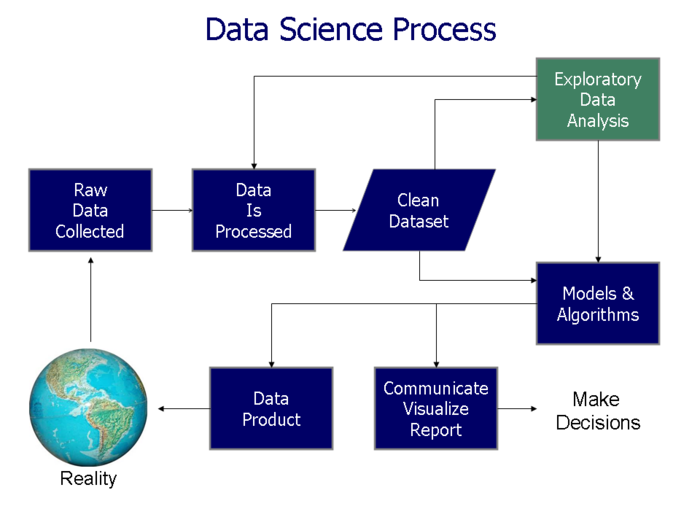
A seamless marketing research pipeline combines data collection, processing, analysis, and action, often requiring integration across tools like Google Analytics (GA), Python (for custom analysis), and CRM systems. Below is a step-by-step workflow, visualized as a text-based sequence:
Step 1: Data Collection
- Source Tools: Google Analytics (website behavior), Google Ads (ad performance), CRM (customer interactions), social media APIs (engagement metrics).
- Integration Method: Use Google Analytics Data API or BigQuery Export to pull raw data into a cloud warehouse (e.g., BigQuery, Snowflake).
Step 2: Data Processing and Transformation
- Tool: Python (Pandas, PySpark) or ETL platforms (Fivetran, Talend) clean and transform data.
- Example Workflow:
- Merge GA user behavior data with CRM purchase history.
- Apply Python scripts to calculate customer lifetime value (CLV) or churn risk scores.
- Store processed data in a data lake (e.g., Google Cloud Storage) or data warehouse.
Step 3: Analysis and Visualization
- Tool: Tableau/Power BI or custom Python dashboards (Plotly, Dash).
- Example:
- Use Tableau to create a customer segmentation dashboard (RFM analysis: Recency, Frequency, Monetary value).
- Integrate Salesforce API to overlay CRM data (e.g., sales stages
Data marketing research is not merely a tool but a paradigm shift in how organizations understand and influence consumer behavior. By systematically collecting, processing, and activating data, businesses can segment audiences with surgical precision, predict churn risks, and personalize interactions at scale. The integration of advanced analytics, CRM systems, and automation platforms transforms raw data into a competitive advantage, driving higher conversion rates, customer retention, and ROI. As technology evolves, the ability to harness real-time insights and ethical data practices will distinguish leaders from followers in an increasingly data-centric marketplace. The future of marketing lies in the seamless fusion of innovation and strategy, where data becomes the language of connection between brands and their audiences.
FAQ
What is a data marketing research agency and how can it help my business?
A data marketing research agency specializes in collecting, analyzing, and interpreting consumer data to inform marketing strategies. They use tools like surveys, AI, and big data analytics to identify trends, customer behavior, and market opportunities. Businesses hire them to optimize campaigns, improve ROI, and make data-driven decisions.
How do I choose the right data market research company for my needs?
Look for a company with expertise in your industry, strong analytical tools (e.g., CRM integration, predictive modeling), and a track record of delivering actionable insights. Check reviews, case studies, and certifications (like ISO or GDPR compliance) to ensure reliability. Pricing models (project-based, subscription, or retainer) should align with your budget and goals.
What skills and qualifications should a data market research analyst have?
A data market research analyst should have expertise in statistical analysis, data visualization (tools like Tableau or Power BI), and proficiency in software like SPSS, Python, or R. Strong communication skills and domain knowledge (e.g., digital marketing, consumer behavior) are also critical. Certifications like Google Analytics or HubSpot can be a plus.
What are the most common job titles and roles in marketing data research?
Common roles include Marketing Data Analyst (focused on campaign performance), Consumer Insights Analyst (studying customer behavior), Market Research Analyst (broader industry trends), and Data Scientist (advanced modeling/predictive analytics). Entry-level titles often include "Junior Analyst" or "Marketing Intelligence Coordinator."
What is direct marketing research, and how is it different from traditional market research?
Direct marketing research involves collecting data directly from target customers (e.g., surveys, focus groups, or CRM data) to measure immediate responses to campaigns or products. Unlike traditional research (which may use secondary data or broad samples), it’s often more personalized, actionable, and tied to specific marketing tactics like email or ad performance.
Where can I find a reliable direct marketing research paper for academic or business use?
Reliable sources include Google Scholar, JSTOR, or industry databases like Nielsen, Forrester, or Gartner. Academic papers often appear in journals like Journal of Marketing Research or Journal of Direct, Data, and Digital Marketing Practice. For business use, check reports from McKinsey, Harvard Business Review, or trade publications like Adweek. Always verify the source’s credibility and publication date.
|
|


Leave a Comment
Comments are moderated before appearing. The data you submit is processed according to the Privacy Policy of viralcontentbee.com.