How Apple’s App Store Connect Transforms App Development & Distribution
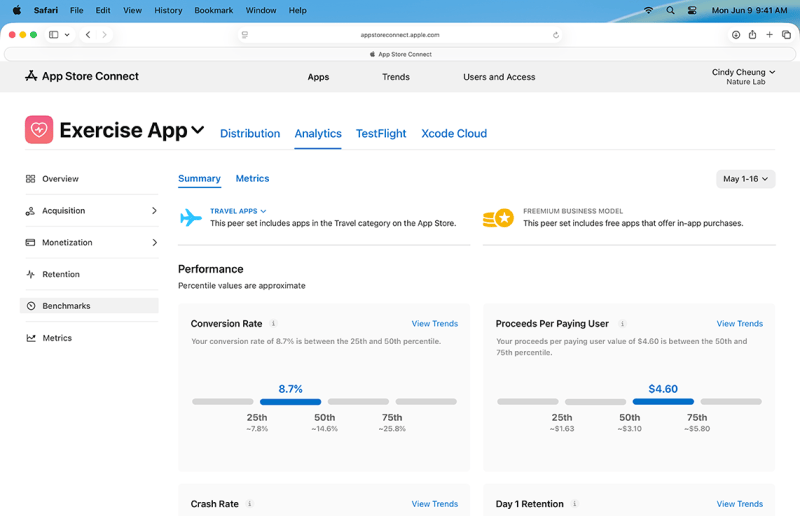
Apple’s App Store Connect is not just another tool in a developer’s arsenal—it’s the nerve center of iOS app lifecycle management. From initial submission to post-launch analytics, this platform orchestrates every critical step between creators and the world’s largest app marketplace. Without it, the seamless deployment of millions of apps daily would collapse into chaos. Developers who master App Store Connect gain an edge: faster iterations, precise audience targeting, and direct control over app visibility.
Yet, for many, the platform remains a black box—its full capabilities obscured by Apple’s minimalist documentation. The truth is, App Store Connect is evolving rapidly, integrating AI-driven insights, automated compliance checks, and granular revenue analytics. Ignoring these features means leaving money on the table or missing critical updates that could boost rankings. The platform’s true power lies in its ability to turn raw app ideas into data-driven, high-converting assets.
Behind every successful iOS app is a developer who understands the nuances of App Store Connect—whether it’s navigating App Review’s algorithmic quirks or optimizing metadata for App Store search. The difference between an app that flops and one that dominates the charts often comes down to how well its creators leverage this ecosystem. This guide cuts through the noise to reveal the platform’s inner workings, its untapped potential, and what’s coming next.

The Complete Overview of App Store Connect
At its core, App Store Connect is Apple’s proprietary dashboard designed to streamline the entire app development pipeline. It replaces older tools like iTunes Connect (now deprecated) with a unified interface for managing apps across iOS, macOS, tvOS, and watchOS. The platform handles everything from beta testing and app submission to sales tracking, customer reviews, and even in-app purchase management. What sets it apart is its deep integration with Apple’s ecosystem—meaning developers can push updates, monitor performance, and respond to reviews without ever leaving the interface.
The shift from iTunes Connect to App Store Connect marked a turning point in Apple’s developer tools. The new system introduced features like App Previews (video trailers directly in the App Store), automated compliance alerts, and real-time sales reports. For indie developers, these updates democratized access to professional-grade tools that were once reserved for large studios. Even today, as Apple continues to refine the platform, the focus remains on reducing friction—whether through faster review cycles or AI-assisted metadata suggestions.
Historical Background and Evolution
The origins of App Store Connect trace back to Apple’s 2008 launch of the App Store, which revolutionized mobile software distribution. Initially, developers relied on rudimentary tools like iTunes Producer to upload apps, a process that lacked transparency and analytics. By 2015, Apple introduced iTunes Connect 2.0, adding basic app performance metrics and sales reports. However, the platform still felt clunky, with separate workflows for different app types (iOS, macOS, etc.).
Table of Contents
- The Complete Overview of App Store Connect
- Historical Background and Evolution
- Core Mechanisms: How It Works
- Key Benefits and Crucial Impact
- Major Advantages
- Comparative Analysis
- Future Trends and Innovations
- Conclusion
- Comprehensive FAQs
- Q: Can I use App Store Connect for macOS or tvOS apps?
- Q: How long does it take to get an app approved via App Store Connect?
- Q: Does App Store Connect support in-app purchases for non-consumable items?
- Q: Can I automate App Store Connect tasks using third-party tools?
- Q: What happens if my app is rejected during submission?
- Q: Are there any hidden fees when using App Store Connect?
The transition to App Store Connect in 2018 was a strategic overhaul. Apple consolidated all app management functions into a single, cloud-based portal, eliminating legacy systems. Key milestones included the introduction of App Clips (2020), which required developers to manage new submission workflows, and the integration of App Store Connect API (2021), allowing third-party tools to automate tasks like price adjustments. Today, the platform is a testament to Apple’s commitment to developer efficiency, with features like automatic app updates and real-time revenue attribution becoming industry standards.
Core Mechanisms: How It Works
App Store Connect operates on a modular architecture, with each section tailored to a specific phase of the app lifecycle. The dashboard is divided into key areas: My Apps (for managing existing titles), App Store (for submission and metadata), Sales and Trends (for analytics), and Customers (for reviews and support). Behind the scenes, Apple’s servers handle everything from binary validation to App Review queues, ensuring compliance with guidelines before an app goes live. Developers upload their builds via Xcode or Application Loader, while App Store Connect handles the rest—from generating App Store pages to processing payments.
The platform’s strength lies in its automation. For example, when a developer submits an update, App Store Connect automatically checks for compliance issues (e.g., privacy policy mismatches) and flags them before review. Similarly, the Sales and Trends section aggregates data from multiple sources—App Store sales, in-app purchases, and even external attribution partners—to provide a holistic view of an app’s performance. This level of integration ensures that developers aren’t just publishing apps; they’re optimizing them in real time.
Key Benefits and Crucial Impact
For developers, App Store Connect is more than a submission tool—it’s a growth engine. The platform’s ability to surface actionable insights (such as top-performing keywords or user drop-off points) allows teams to refine their apps based on real-world data. Smaller studios, in particular, benefit from features like free beta testing via TestFlight, which reduces the cost of pre-launch validation. Meanwhile, enterprises leverage App Store Connect’s advanced analytics to track regional performance and adjust pricing dynamically.
Beyond individual apps, App Store Connect plays a pivotal role in Apple’s broader ecosystem. By centralizing app management, it reduces the cognitive load on developers, who no longer need to juggle multiple tools. The platform also supports Apple’s business goals—such as driving App Store revenue—by incentivizing developers to optimize their listings for visibility. For users, the result is a curated, high-quality marketplace where apps are consistently updated and secure.
— Tim Cook, Apple CEO (2022)
"The App Store isn’t just a marketplace; it’s a platform that empowers creators to reach billions. Tools like App Store Connect ensure that innovation thrives within our ecosystem."
Major Advantages
- End-to-End Workflow: From beta testing to post-launch analytics, App Store Connect consolidates every stage of app development under one roof, eliminating the need for third-party integrations.
- Real-Time Revenue Tracking: Developers access granular sales data, including net revenue after Apple’s commission, with drill-down capabilities for specific regions or payment methods.
- Automated Compliance: The platform proactively checks for guideline violations (e.g., missing privacy disclosures) before submission, reducing rejection rates.
- Global Scalability: With built-in localization tools and regional pricing controls, developers can manage apps across 175+ countries without manual intervention.
- API-Driven Automation: The App Store Connect API enables developers to automate tasks like price updates, metadata changes, and even customer support responses via third-party tools.

Comparative Analysis
| Feature | App Store Connect | Google Play Console |
|---|---|---|
| Primary Use Case | iOS/macOS/tvOS/watchOS app management, with deep Apple ecosystem integration. | Android app distribution, with emphasis on open-source flexibility. |
| Revenue Sharing | 15% for most apps (varies by region/country), with net payouts after fees. | 15–30% (varies by region), with gross payouts before fees. |
| Analytics Depth | Real-time sales trends, user acquisition paths, and App Store search rankings. | Basic sales data, with third-party tools required for advanced analytics. |
| Beta Testing | TestFlight with up to 10,000 external testers; integrates with App Store Connect for feedback. | Google Play Open Testing and Closed Testing; less seamless integration. |
Future Trends and Innovations
The next phase of App Store Connect will likely focus on AI and automation. Apple is already experimenting with machine learning to suggest metadata optimizations (e.g., keyword improvements) and predict app performance based on historical data. Additionally, the platform may expand its role in subscription management, offering more granular tools for handling churn and lifetime value analysis. For developers, this means less manual work and more data-driven decision-making.
Another area of growth is cross-platform integration. While App Store Connect currently serves Apple’s ecosystem, future iterations could bridge gaps with Google Play or third-party stores, allowing developers to manage all app listings from a single dashboard. Privacy-focused features—such as automated App Tracking Transparency (ATT) compliance checks—will also become more prominent, aligning with Apple’s broader push for user data protection.
Conclusion
App Store Connect is the backbone of modern iOS development, and its importance will only grow as Apple’s ecosystem expands. For developers, mastering the platform isn’t optional—it’s a necessity for staying competitive. The tools it provides today (from automated compliance to real-time analytics) are just the beginning; as AI and automation reshape app management, those who adapt will thrive. The key is treating App Store Connect not as a static tool, but as a dynamic partner in app success.
For Apple, the platform serves a dual purpose: it drives revenue for the App Store while ensuring developers have the resources to succeed. As the company continues to refine App Store Connect, the focus will remain on reducing friction—whether through faster review cycles, smarter analytics, or deeper integrations. One thing is certain: the apps that dominate the future will be built by developers who understand how to leverage this powerful ecosystem.
Comprehensive FAQs
Q: Can I use App Store Connect for macOS or tvOS apps?
A: Yes. App Store Connect supports all Apple platforms, including macOS, tvOS, and watchOS. The interface is unified, so you manage all your apps—regardless of platform—from a single dashboard.
Q: How long does it take to get an app approved via App Store Connect?
A: Apple’s App Review typically takes 1–3 days for most apps, though complex or high-risk submissions (e.g., fintech) may take longer. App Store Connect provides real-time status updates, including reasons for rejection if applicable.
Q: Does App Store Connect support in-app purchases for non-consumable items?
A: Yes. The platform handles all types of in-app purchases, including non-consumable items (e.g., premium features). You can manage entitlements, test transactions via Sandbox, and track revenue directly in the Sales and Trends section.
Q: Can I automate App Store Connect tasks using third-party tools?
A: Absolutely. Apple’s App Store Connect API allows developers to build custom integrations for tasks like price updates, metadata changes, and even customer support automation. Popular tools like Adjust or Branch often use this API to enhance workflows.
Q: What happens if my app is rejected during submission?
A: App Store Connect provides detailed rejection reasons, often with specific guidelines to fix. You can resubmit directly from the dashboard once corrections are made. Common issues include missing privacy policies, misleading screenshots, or functionality that violates Apple’s terms.
Q: Are there any hidden fees when using App Store Connect?
A: No. While Apple takes a 15% commission on most sales (or 17% for small businesses in some regions), App Store Connect itself is free to use. The only costs are the standard Apple Developer Program fee ($99/year) and transaction processing fees (if applicable).
Leave a Comment
Comments are moderated before appearing. The data you submit is processed according to the Privacy Policy of Viralcontentbee.