How Android Device Manager Secures, Locates, and Controls Your Smartphone
The moment your phone slips from your grip—whether in a crowded café or a back pocket—panic sets in. But for Android users, there’s a lifeline: a built-in system designed to reclaim control when physical access is lost. This isn’t just another app; it’s a seamless integration of Google’s infrastructure, quietly running in the background, ready to spring into action when needed. Unlike third-party solutions that require pre-installation or complex setups, the Android Device Manager (ADM) is baked into every Android device, offering a no-fuss way to locate, lock, or erase data remotely—all with minimal user intervention.
Yet for many, its full potential remains untapped. Most users only think of it as a last-resort tool for lost phones, unaware of its broader capabilities—like monitoring battery levels, forcing a ring on silent devices, or even tracking movement patterns. The system’s evolution mirrors Android’s own trajectory: from a basic find-my-phone feature to a multi-layered security and recovery tool. But how exactly does it work under the hood? And why does it often fail when users need it most? The answers lie in its architecture, Google’s backend systems, and the subtle trade-offs between convenience and privacy.
What if you could prevent data breaches before they happen? Or recover a stolen device without leaving a digital trail? The Android Device Manager isn’t just about retrieval—it’s about proactive protection. But to leverage it effectively, you need to understand its mechanics, limitations, and the alternatives that might suit specific needs better. This guide cuts through the noise to explore how ADM operates, its real-world impact, and what the future holds for remote device management in an era where smartphones are extensions of our identities.

The Complete Overview of Android Device Manager
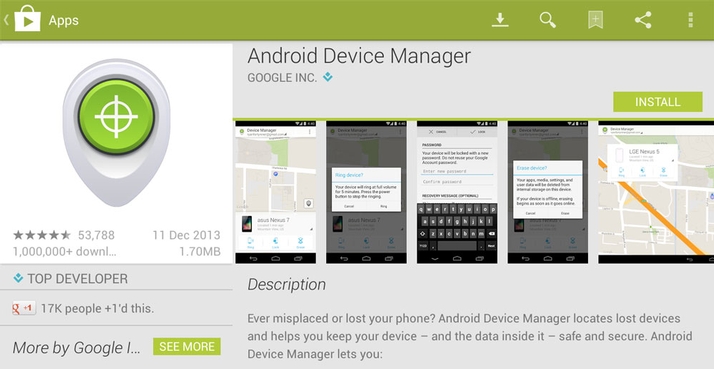
The Android Device Manager is Google’s native solution for remote device management, embedded within Android’s operating system since version 4.4 (KitKat). Unlike standalone apps, it doesn’t require additional storage or permissions—it’s activated automatically when a user signs in with a Google account. The system operates through a combination of Google Play Services, cloud synchronization, and device-specific APIs, allowing users to perform critical actions without physical access. Its primary functions—locating a device, locking it with a custom message, or wiping data—are triggered via a web interface or the Find My Device companion app, which serves as a more user-friendly frontend.
What sets ADM apart is its reliance on Google’s vast infrastructure. Every time an Android device connects to the internet, it pings Google’s servers with location data, battery status, and other telemetry—even when the screen is off. This constant communication ensures that the system can respond almost instantly to a user’s request, provided the device is online. However, this dependency also introduces a critical vulnerability: if the device is offline, ADM’s effectiveness diminishes. The system compensates by caching the last known location and status, but this isn’t foolproof, especially in areas with poor connectivity or when flight mode is enabled.
Historical Background and Evolution
The origins of ADM trace back to Google’s early efforts to streamline device recovery. Before its formal integration into Android, users relied on third-party tools like Lookout or Prey, which often required root access or manual setup. Google’s pivot came with Android 4.4, when it introduced the Android Device Manager API as part of its broader push to unify device management under a single, secure framework. The move was strategic: by embedding the feature directly into the OS, Google eliminated the need for users to download additional software, reducing friction and increasing adoption.
Table of Contents
- The Complete Overview of Android Device Manager
- Historical Background and Evolution
- Core Mechanisms: How It Works
- Key Benefits and Crucial Impact
- Major Advantages
- Comparative Analysis
- Future Trends and Innovations
- Conclusion
- Comprehensive FAQs
- Q: Can the Android Device Manager track an offline device?
- Q: What happens if I forget my Google account password?
- Q: Does ADM work on all Android devices?
- Q: Can I use ADM to track someone else’s Android device?
- Q: What should I do if ADM fails to locate my device?
- Q: Is there a way to use ADM without Google services?
The evolution didn’t stop there. With each major Android update, ADM gained new capabilities—such as the ability to force a ring on silent devices or display custom messages on the lock screen. The introduction of Find My Device in 2015 further refined the user experience, offering a dedicated app with real-time maps, detailed device stats, and even a "secure device" mode that encrypts sensitive data. These updates reflect a broader industry shift toward proactive security, where device recovery isn’t just about retrieval but also about minimizing exposure after a loss or theft.
Core Mechanisms: How It Works
At its core, the Android Device Manager functions as a remote control system, leveraging Google’s cloud infrastructure to execute commands. When a user initiates an action—such as locking their device—the request is sent to Google’s servers, which then relay it to the target device via Google Play Services. The device, upon receiving the command, executes it locally and sends a confirmation back to the server. This process is seamless for the user but relies heavily on the device’s ability to connect to the internet, either via Wi-Fi, mobile data, or even Bluetooth (in some cases).
The system’s accuracy depends on several factors, including the device’s last known location, GPS availability, and network conditions. For example, if a device is lost indoors with weak GPS signals, ADM may only provide an approximate location based on nearby cell towers. Additionally, the system requires the device to be powered on and signed into the same Google account used to initiate the command. If these conditions aren’t met—such as when a thief removes the SIM card or factory resets the device—ADM’s effectiveness is severely limited. This is why Google emphasizes enabling features like Find My Device and keeping the device’s Google account credentials secure.
Key Benefits and Crucial Impact
The Android Device Manager isn’t just a reactive tool—it’s a proactive layer of security that can prevent data breaches, reduce financial losses, and even aid law enforcement in recovering stolen devices. For businesses, it offers IT administrators a way to remotely manage fleet devices, enforce security policies, and track assets without physical intervention. For individuals, the peace of mind it provides is invaluable, especially in an era where smartphones contain sensitive personal and financial data.
Yet its impact extends beyond recovery. By encouraging users to think critically about device security—such as enabling automatic backups or setting up strong lock screen passwords—ADM indirectly fosters better digital hygiene. The system’s ability to display custom messages on a lost device’s screen also serves as a deterrent, signaling to potential thieves that the device is monitored. This dual role as both a recovery tool and a security deterrent makes it a cornerstone of Android’s broader approach to user protection.
"The Android Device Manager is more than a find-my-phone tool—it’s a testament to how integrated security can become invisible yet indispensable."
— Android Security Team, Google
Major Advantages
- Instant Location Tracking: Uses GPS, Wi-Fi, and cell tower data to pinpoint a device’s last known location, even if it’s offline.
- Remote Lock and Wipe: Allows users to lock the device with a custom PIN or erase all data to prevent unauthorized access.
- Force a Ring: Overrides silent mode to make the device ring loudly, helping locate it in noisy environments.
- Secure Device Mode: Encrypts sensitive data and locks the device remotely, reducing the risk of identity theft.
- No Additional Setup: Activated automatically upon Google account sign-in, requiring zero user configuration.

Comparative Analysis
| Feature | Android Device Manager | Third-Party Alternatives (e.g., Cerberus, Prey) |
|---|---|---|
| Setup Complexity | None (built-in) | Requires installation and configuration |
| Real-Time Tracking | Yes (with limitations) | More precise, often with stealth mode |
| Remote Wipe | Yes (full data erasure) | Yes, sometimes with selective wiping |
| Custom Alerts | Basic (lock screen messages) | Advanced (SMS, email, push notifications) |
Future Trends and Innovations
As Android continues to evolve, so too will the Android Device Manager. One likely development is deeper integration with AI-driven analytics, where the system can predict device loss patterns based on user behavior—such as frequent visits to high-theft areas—and automatically trigger preventive measures. Additionally, advancements in edge computing could enable ADM to function more effectively on offline devices by caching commands locally until connectivity is restored.
Privacy concerns will also shape the future of ADM. With regulations like GDPR tightening, Google may need to implement more transparent data usage policies, giving users granular control over location tracking and telemetry. Meanwhile, the rise of foldable and dual-screen devices could introduce new challenges, such as managing multiple displays or biometric locks remotely. The next iteration of ADM may very well blur the line between recovery tool and proactive security assistant, adapting in real-time to emerging threats.
Conclusion
The Android Device Manager is a testament to how embedded security can transform a mundane feature into a critical lifeline. While it may not be perfect—its reliance on internet connectivity and Google account linkage can be frustrating—its advantages far outweigh the limitations for most users. The key to maximizing its effectiveness lies in preparation: enabling the feature proactively, keeping software updated, and understanding its boundaries. For businesses and individuals alike, ADM represents a balance between convenience and security, a reminder that the best defense against device loss is a well-prepared offense.
As technology advances, the line between recovery and prevention will continue to blur. The Android Device Manager may soon evolve into something even more sophisticated—a silent guardian that not only helps you find your phone but also safeguards your digital life before it’s ever at risk. Until then, it remains an essential tool in every Android user’s arsenal.
Comprehensive FAQs
Q: Can the Android Device Manager track an offline device?
No, ADM requires an active internet connection to function. However, it will display the last known location and status before the device went offline. For continuous tracking, ensure the device is always connected to Wi-Fi or mobile data.
Q: What happens if I forget my Google account password?
You cannot use ADM to unlock or reset a device if you’ve forgotten your Google account credentials. In such cases, you’ll need to recover your account via Google’s password reset tool or contact support. This is why it’s crucial to keep recovery options up to date.
Q: Does ADM work on all Android devices?
Yes, but with some variations. Most modern Android devices (version 5.0 and above) support ADM fully. Older devices may have limited functionality, such as no GPS tracking. Always check your device’s compatibility in the Find My Device app.
Q: Can I use ADM to track someone else’s Android device?
No, ADM is tied to the Google account signed in on the device. You can only manage devices linked to your own account. Attempting to track another person’s device without permission violates privacy laws and Google’s terms of service.
Q: What should I do if ADM fails to locate my device?
First, check if the device is powered on and connected to the internet. If it’s offline, wait for it to reconnect. If the issue persists, ensure the device hasn’t been factory reset or had its Google account removed. In extreme cases, contact your carrier or local law enforcement for assistance.
Q: Is there a way to use ADM without Google services?
No, ADM is inherently tied to Google Play Services and a Google account. If you disable these services, the feature will no longer function. For users seeking alternatives, third-party apps like Cerberus or Prey offer more flexibility but require manual setup.
Leave a Comment
Comments are moderated before appearing. The data you submit is processed according to the Privacy Policy of Viralcontentbee.